

Participating Frequently
June 19, 2013

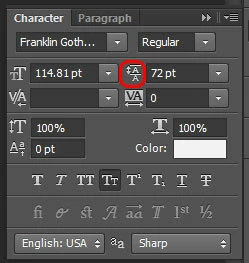
P: Scrub text leading jumps the value super high

  • June 19, 2013
  • 90 replies
  • 1995 views

When I use the scrub method of adjusting on my leading, PS(win) unexpectedly jumps the number way up, even if I'm scrubbing left, even if i'm holding the alt key.
This topic has been closed for replies.

90 replies

Participating Frequently
August 28, 2013
I appreciate your response, David; thank you.
David Mohr
Participating Frequently
August 28, 2013
Hi Carl,

We're aware of the problem and working on a fix. We are legally required, as employees of a publicly-traded company, NOT to promise a fix nor mention the date any such fix might be available to the public. That said, we have heard your complaint and are very much focused on a long-term solution.

Until this solution is officially available, a work-around for the bug is to simply not transform type. Or, if that is too inimical to your workflow, go ahead and make the transformations that you want, note the new point size of the font, and Undo. Afterwards, you can simply change the point size of the font WITHOUT a transformation and the bug will not be triggered.

We know this is not ideal, but it is a solution until we can get a fix built, vetted, and available to the public.

Thanks,
David
Participating Frequently
August 28, 2013
This bug is killing me. I cannot edit the tracking on a text string to make it match a comp. The setting WILL NOT stay set. This is critical.
Inspiring
August 27, 2013
Again, Adobe is a publicly traded company, so we can't tell you much until a new version is officially announced.
Inspiring
August 27, 2013
No, this topic is only about one specific bug with the text palette values.
Participating Frequently
August 27, 2013
I thought we were all talking about bugs in the "edit text layer" function of Photoshop CC. I will post a new topic so people won't be confused.
Inspiring
August 27, 2013
Also having this issue. Cannot type in values or use the scrubbers, as they will revert to a different amount once I press enter or release the mouseclick.

Really messing up my productivity.
Inspiring
August 27, 2013
Where are we at with this guys? It shows that it's been 2 months since this thread went up, at which point you guys acknowledged you were already aware of the problem (so it could be well OVER two months you have known about this). This is becoming VERY frustrating in trying to be efficient in Photoshop. I see updates rolling out nearly every week to Adobe Programs on my Creative Cloud notification panel and Photoshop is noticeably vacant from that list the majority of the time. Is this not considered a pretty big bug in what is probably considered Adobe's flagship program? Cause for those of us that work in the program everyday and work FAST, this is a real bottleneck when it comes to quickly changing text and making adjustments. I feel like I have to tiptoe around text handling in Photoshop to make sure I don't tick it off and screw up my future editing capabilities in it. Or do you guys not recognize how much your program is used for things other than photo editing?

So yeah....an update on the progress would be nice. Gracias.
Inspiring
August 27, 2013
Please post a new topic about that issue instead of confusing the discussion about this issue.
Participating Frequently
August 27, 2013
Please see http://d.pr/v/ly1M for an example of the behavior
