

Participating Frequently
June 19, 2013

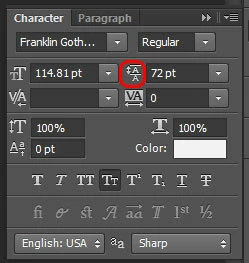
P: Scrub text leading jumps the value super high

When I use the scrub method of adjusting on my leading, PS(win) unexpectedly jumps the number way up, even if I'm scrubbing left, even if i'm holding the alt key.
このトピックへの返信は締め切られました。

返信数 90

Participating Frequently
August 27, 2013
I am finding bugs with text editing in PSCC Mac just trying to use the color picker (in the menu bar) -- sometimes the color picker won't pick up the color; sometimes it picks up the color, but then deletes the text string I've got selected (as if I hit the delete key). Sometimes I cannot position the cursor in the string and use the arrow keys to re-position the cursor. Happens to text also when attempting to use a layer style color overlay.
Inspiring
August 11, 2013
Please keep the PDF discussion on the topic about that issue, instead of confusing the discussion in this issue.
Inspiring
August 10, 2013
I just emailed the CEO of Adobe to hopefully escalate this issue since it's existed since CS6 and should have never carried over into CC.

I experience a version of this bug simply when trying to move multiple type layers using the Transform tool.

Very frustrating...
Inspiring
August 5, 2013
Hi David,
I believe this has been acknowledged by Adobe over in the Adobe Forums. It is pretty easy to reproduce.

Photoshop CS6 13.0.5

•With clean preferences File>New default new document

•Select Type Tool and click to insert type cursor for point type (using default Myriad Pro 12 pt font)

•Type one line of text, hit return/enter. Repeat until you have seven lines of text in one text layer. Commit Type.

•go File>Save> Photoshop PSD

•go File>Save As> choose Photoshop PDF file type (default “High Quality Print” PDF settings)

• Close Document

•Open the PDF document in any viewer (not Photoshop).

Opening the document in Reader, Acrobat, Preview, any browser, etc shows unexpected text corruption. As a result any PSD document being sent to publisher (or any output) as a PDF file can not contain more than 6 lines of text in any one text layer.
see results:


Edit:
Actually I see there is a thread in this forum (6 months old) describing the PSD to PDF text problem:
http://feedback.photoshop.com/photosh...

Edit II:
Yep, this was acknowledged by "Brett N" over in Adobe Photoshop forums five months ago. "A fix is in the works"...

and, again it is just weird that Adobe has (at least) two official Photoshop forums. It seems like information gets diluted rather than concentrated. Adds more work for the Adobe staff, and makes it more difficult for users to find solutions to their problems.
David Mohr
Participating Frequently
August 5, 2013
Hiya Charles,

I've been trying to reproduce the problem you're having with creating PDFs based on more than six lines of text. Are you transforming those layers? What font? Point size? I cannot seem to reproduce this problem. If you have details, could you share them so I can get the issue fixed?

Thanks,
David
David Mohr
Participating Frequently
July 24, 2013
Hi Greg,

We're aware of the bug and working on a fix. It is caused by transforming text. If you work with untransformed text, there won't be a problem.

Thanks,
David
Inspiring
July 24, 2013
So in CS6, the Character Panel gets broken after scaling text. And any more than 6 lines of text in Photoshop CS6 screws up saving as a PDF. If CS6 is the last perpetual version Adobe makes, and they say it will be supported for some time, it would be really nice if these CRITICAL bugs got fixed. It is just killing my production.
Inspiring
July 24, 2013


Whenever I change certain fields in the character panel such as font size, it will just randomly change to a different number. This happens when I try and scrub control the fields, use the drop down to select a specific amount, and even when I actually type in an amount. This is really annoying and forcing me to work on CS6 still. Hopefully this gets fixes soon.
Inspiring
July 19, 2013
I manually enter a leading value using the keyboard, but dont work too
Inspiring
July 18, 2013
Yeah, this bug is killing me ....
