

Participating Frequently
June 19, 2013

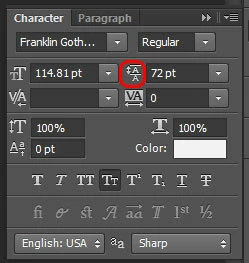
P: Scrub text leading jumps the value super high

When I use the scrub method of adjusting on my leading, PS(win) unexpectedly jumps the number way up, even if I'm scrubbing left, even if i'm holding the alt key.
このトピックへの返信は締め切られました。

返信数 90

Inspiring
July 4, 2013


When using the scrub slider to change the font size Photoshop changes the number drastically. This is definitely a bug. I was slide the scrubber from 10pt font to 20 point font and it popped in 1468pt font.
Inspiring
July 2, 2013


Typing in values like -700 in the tracking area of the character palette brings up a dialog box saying "An integer between -1000 and 10000 is required." even though it falls within those boundaries. When the dialog box pops up it changes the value in the field to -7124 on its own, then after clicking on the OK button on the dialog box, the value changes to -997, and it never successfully allows me to have the tracking I want.
Inspiring
June 27, 2013
David,

I just want to make sure the scope of the problem is properly understood. Not only some properties which should NOT be multiplied by the transform were multiplied but also vice versa, some properties which should be multiplied, are NOT multiplied (line spacing, paragraph spacing to name a couple).

Also, when you copy text from one text field and paste into another, the transforms of the source and target aren't taken into account, resulting in weird size pastes.

Photoshop CS5 would always produce the same size text when copied from one field and pasted into another, never mind the scale transforms of each text field.

Now, there are two strategies to implement this, I think 13.0.5 is trying a fundamentally different strategy than CS5 hence the plethora of side effects.

I have no access to the CS5 source code, but empirically (and judging from the scripting API) what it did was to "normalize" the transform, by adjusting the internal font-size, line-spacing and so on of the text during the transform, so at the end no values need to be constantly multiplied and divided to compensate in the UI.

Well you can go the UI multiplication/division way too, but you need to be really comprehensive, as the example of copy/pasting shows. You need to constantly adjust those values any place they're used.

I feel doing the normalization during the transform is a far simpler, more accurate strategy, but that's just my opinion.
David Mohr
Participating Frequently
June 27, 2013
Actually, Stan, what I was referring to as sounding new was the "I cannot get it to adjust at all" comment. I have already followed up with Brady and his problem is the same as the one you mentioned above. That bug was logged some time ago and is being investigated.

You are correct, several values which should not scale were incorrectly added to the list that are transformed. This mistake came in at the 11th hour, which is why we missed it. Using CS5 as a guideline, we've isolated those which need to be reverted.
Inspiring
June 27, 2013
Furthermore, some values need to scale with the text, while others are scale-agnostic.

Tracking is scale-agnostic. So code which multiplies tracking by scale is a pretty bad logic error in Photoshop's code that was added in 13.0.5. Please check very carefully which properties are scale-agnostic and which aren't. It's a bad mess in there right now.
Inspiring
June 27, 2013
David, come on, it's not new at all, here's my report from weeks ago and HOURS after the release of 13.0.5. *PLEASE* read carefully (especially bug C):

http://feedback.photoshop.com/photosh...
Participating Frequently
June 27, 2013
Thanks for mentioning this. I was having this bug the other day but didn't think to document it at the time.
Inspiring
June 27, 2013
This may or may not help anyone in the meantime, as I know some of the issues listed here weren't exactly like mine, but it will be a workaround for the problem I'm incurring until they get it fixed and maybe it will help someone else out. Big thanks to David with Adobe for responding directly to me and logging my particular issue.

So what seems to be happening (and David acknowledged this and that they're working on a fix) is that when you resize text with the transform tool, the values aren't updating. So if I sized up the text to like 200% with the transform tool and entered the value of 20 in my tracking field, it might auto change it to 10. Now this may not be exact, but it gives you a rough idea of what's happening. For now, make sure all sizing is done through the character palette after the initial creation of the text field and you're not tweaking any sizing through the transform tools. I like to manually tweak through the transform tool myself all the time, but at least it's a way to get by until they fix it, which David assures me they will, as it's a bug they know is a big priority.
David Mohr
Participating Frequently
June 27, 2013
Howdy Brady,

What you are describing sounds new; it is different than the other reported behavior. The field will automatically multiple whatever you enter by the multiplication factor that the transform represents. So, for instance, if you take some 12 pt Tahoma and scale it to 300%, the tracking will also be scaled 300%. That said, when you enter a manual value, you should get that new value (yes, there's some stuff going on under the hood, but what's reported is basically correct). It doesn't sound like you're seeing that. As a consequence, I'd like to follow up with you via a Connect session. I'll send an email.

Thanks,
David
Inspiring
June 27, 2013
Similar problems here, and wanted to make sure my particular issue was logged with the other character palette issues.

I'm on a PC using version 14.0. In the tracking field, I cannot get it to adjust at all. Regardless of entering the number or selecting from a pre-populated number, it just resets to some other random number. The only way I can remotely adjust the tracking on text is to select the text with the text tool and hit Alt+Right Arrow, and even that doesn't work too well because it doesn't let me fine tune the spacing.

Pretty bad bug here Adobe. Hope you guys get this fixed quick.
