

Participating Frequently
June 19, 2013

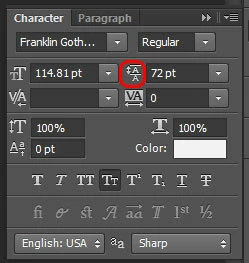
P: Scrub text leading jumps the value super high

When I use the scrub method of adjusting on my leading, PS(win) unexpectedly jumps the number way up, even if I'm scrubbing left, even if i'm holding the alt key.
このトピックへの返信は締め切られました。

返信数 90

Inspiring
June 26, 2013
I have a very real fear that instead of fixing the text+transform issues that are the cause of this behavior, now someone will go and break the sliders and make it all worse.

I mean, the mess we're in is due to someone trying to fix a font-size bug, instead introducing a bunch of worse text bugs. What's happening, did all people who know Photoshop's code get fired or quit or something?
Inspiring
June 26, 2013
"Meanwhile, if you manually enter a leading value using the keyboard, you can at least workaround the problem for now."

As Stan said that is not a work-around. All input gets broken. Only workaround it to not scale text in the first place.
Inspiring
June 26, 2013
The problem isn't just with the sliders. Entering values manually on transformed text is misbehaving pretty badly as well (see my linked reports up in the thread).
David Mohr
Participating Frequently
June 25, 2013
As Chris mentioned, we are aware of the problem and working on a fix. Meanwhile, if you manually enter a leading value using the keyboard, you can at least workaround the problem for now.

Thanks,
David
Inspiring
June 24, 2013
I don't know - that's up to the AI and ID teams.
el.gomez作成者
Participating Frequently
June 24, 2013
Thanks for your response Chris, on a side note when can we look forward to having the same scrubby sliders in Illustrator and InDesign?
Inspiring
June 24, 2013
We know about this issue, and related issues with scrubby sliders on the text palettes, and are working on a solution.
Inspiring
June 24, 2013
You're about to be disappointed.
Inspiring
June 24, 2013
Side note:

1) Create two text fields with some text.
2) Transform (scale) them up.
3) Select them both.
4) Change the font size from the text options.

It works, but every time you change the number and hit enter, you see some arbitrary number in the font size box get written, then reverts to what you wanted.

I can also notice Photoshop struggling to render the UI multiple times before it sets the text fields right. I wonder what kind of a lolgorithm is behind this.
Known Participant
June 23, 2013
Hopefully the move from CS to CC will allow Adobe to release app updates when they are ready instead of releasing all apps simultaneously on an inflexible date.
