

Participating Frequently
June 19, 2013

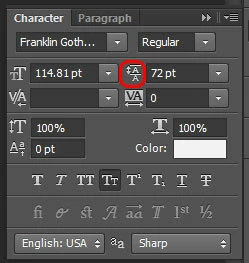
P: Scrub text leading jumps the value super high

When I use the scrub method of adjusting on my leading, PS(win) unexpectedly jumps the number way up, even if I'm scrubbing left, even if i'm holding the alt key.
このトピックへの返信は締め切られました。

返信数 90

Inspiring
June 23, 2013
Chris, same set of bugs here (read for details):

http://feedback.photoshop.com/photosh...

http://feedback.photoshop.com/photosh...

More reports exist as well. The bugs are on all platforms, and since 13.0.5, and is also in 14+.

I'm saying bugs because it's a whole new set of odd behavior around the text panel, and is related to the "font-size fix" which 13.0.5 was trying to fix (which I reported earlier as well).

The mess this time is bigger though, as you can see, and affects all PSD documents.
Inspiring
June 23, 2013
"Who beta tested this with you guys? I keep sending requests to beta for you, but sadly all these issues I find on day one of an actual release. I could have helped you see these issues months ago. "

I'm hearing the same from many users lately (and I can confirm), I wonder what is happening at Adobe internally. Must be quite interesting...

Also, same issues here (with font size, tracking, kerning, paragraph spacing, line spacing etc.) since last Photoshop update on OS X and Windows three weeks ago (13.0.5).
DaveChap
Known Participant
June 23, 2013
CS6 introduced a method of retaining a transform calculation before applying the font size. If text was 100pt and then transformed larger, the text would maintain the transform and apply that to any new values you typed in later. This was very problematic when changing many text layers to the same value (not realizing some layers had transformations applied).

Whether this is resolved or not in CC isn't clear, but CC (and probably the latest update to the perpetual CS6) now almost crash when opening any documents with text that has been transformed from the problematic CS6.

1. Changing the value of text by input or scrubbing will make the value higher than Photoshop can calculate leaving an alert loop that's almost impossible to dismiss.

example here: http://instagram.com/p/a6CzL6AwH1/

2. Changing the value for leading or tracking also increases the values beyond Photoshop's limits and produces an alert loop, but this time will bounce back and forth to the size and alert after alert continue.

example here: http://instagram.com/p/a6CNVKAwG7/

3. A new bug introduced in CC with tracking. Create a new text layer and set tracking to 100. Now transform the layer and see that the tracking readout has changed (it's higher or lower than the amount you had set). Attempting to change this value will give very odd results (whether you type it in or select a setting from the dropdown menu). If you scrub the amount, you can get a looping alert warning you the amount is too high (it jumps automatically into the thousands).

example here: http://vine.co/v/huuX0vD9pwE/embed
(it changed from -10 to -3)

I don't know what is going on, but someone forgot about all the scenarios for changing text after transformations. Clear the transformation calculation when documents are opened or before a new amount is applied! Who beta tested this with you guys? I keep sending requests to beta for you, but sadly all these issues I find on day one of an actual release. I could have helped you see these issues months ago.

😞

DaveChap
Known Participant
June 23, 2013
I just created a post about this scrub issue, but also a few other Character palette operations and have some video examples:
http://feedback.photoshop.com/photosh...

This needs to be fixed fast.
Inspiring
June 22, 2013
When scrubbing the text leading, number jumps to over 5000 and then a error message pops up; "A value between 0.01pt and 5000.00 pt is riquired...". Only happens when mouse is positioned over the text leading icon. Looks like the sensibility is too high. After the message pops up it continues to pop up at least three more times. This very annoying!

System Info:
Adobe Photoshop Version: 14.0 (14.0 20130423.r.221 2013/04/23:23:00:00) x64
Operating System: Windows 7 64-bit
Version: 6.1 Service Pack 1

el.gomez作成者
Participating Frequently
June 19, 2013
That's exactly it Charles, the bug only seems to happen when you transform a piece of text then try to manipulate the size, metrics, leading or kerning.
el.gomez作成者
Participating Frequently
June 19, 2013
I guess the same goes for the kerning as well.
Inspiring
June 19, 2013
Chris,
There are a number of separate threads on this bug here and at Adobe Forums. It got introduced in last update of CS6 perpetual (13.0.5 for me) And looks like it is in 14.0 as well. I think it had to do with fixing another "text transform" bug. But the fix made the a Character Panel behave even worse after scaling text.
el.gomez作成者
Participating Frequently
June 19, 2013
New CC
Inspiring
June 19, 2013
Which version of Photoshop are you using?
