


Inspiring
September 25, 2020

P: Select Subject = Blue Screen of Death 'uncorrectable error'

  • September 25, 2020
  • 23 replies
  • 2141 views

So after a clean install of Windows 10, all the latest updates and the latest updates for PS 2020, I was hoping this would be fixed, but it's still an issue.


In PS 2019, I open a high res TIFF, and go to: Select -> Select Subject. In about 2 seconds my subject is selected. Perfect.


In PS 2020, I open that same TIFF, Select -> Select Subject... and... waiting... BSOD. Every time. What's worse is it even crashes the BSOD and it just hangs on 0%.
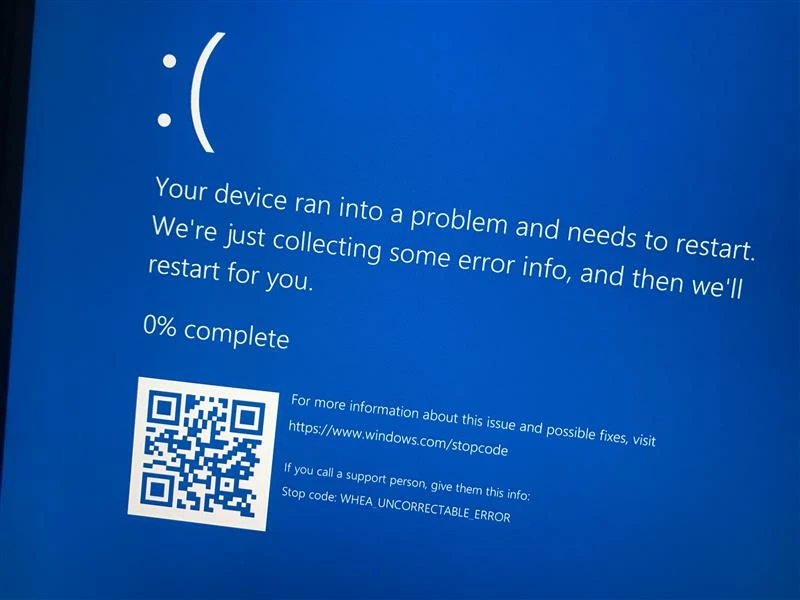
 

My Spec:

Win 10 Pro 64

i9-7940X

64GB Ram

1TB 970 Pro

GTX 1080 Ti


23 replies

Nick2049Author
Inspiring
September 25, 2020

icucnv64.dll   International Components for Unicode    Build gtlib_12.0.24171   
   icudt64.dll   International Components for Unicode    Build gtlib_12.0.24171   
   icuuc64.dll   International Components for Unicode    Build gtlib_12.0.24171   
   igestep30.dll   IGES Reader   9.3.0.113   
   JP2KLib.dll   JP2KLib 2020/04/28-11:43:26   79.274989   79.274989
   libifcoremd.dll   Intel(r) Visual Fortran Compiler   10.0 (Update A)   
   libiomp5md.dll   Intel(R) OpenMP* Runtime Library   5.0   
   libmmd.dll   Intel(R) C/C++/Fortran Compiler   19.0.0   
   LogSession.dll   LogSession   8.1.0.68.49183   
   mediacoreif.dll   photoshopdva   12.1.0   
   MPS.dll   MPS 2020/05/06-01:42:24   79.620254   79.620254
   pdfsettings.dll   Adobe PDFSettings   1.07   
   Photoshop.dll   Adobe Photoshop 2020   21.2   
   Plugin.dll   Adobe Photoshop 2020   21.2   
   PlugPlugExternalObject.dll   Adobe(R) CEP PlugPlugExternalObject Standard Dll (64 bit)   9.4.0   
   PlugPlugOwl.dll   Adobe(R) CSXS PlugPlugOwl Standard Dll (64 bit)   9.4.0.146   
   PSCloud.dll                                                   1.0.0.1   
   PSViews.dll   Adobe Photoshop 2020   21.2   
   ScCore.dll   ScCore 2019/07/29-10:07:31   82.2   82.2
   SVGRE.dll   SVGRE   79.620289   79.620289
   svml_dispmd.dll   Intel(R) C/C++/Fortran Compiler   19.0.0   
   tbb.dll   Intel(R) Threading Building Blocks for Windows   2019, 0, 2019, 0410   
   tbbmalloc.dll   Intel(R) Threading Building Blocks for Windows   2019, 0, 2019, 0410   
   TfFontMgr.dll   FontMgr   9.3.0.113   
   TfKernel.dll   Kernel   9.3.0.113   
   TFKGEOM.dll   Kernel Geom   9.3.0.113   
   TFUGEOM.dll   Adobe, UGeom©   9.3.0.113   
   VulcanControl.dll   Vulcan Application Control Library   6.0.0.14   
   VulcanMessage5.dll   Vulcan Message Library   6.0.0.14   
   WinRTSupport.dll   Adobe Photoshop Windows RT Support   21.0.0.0   
   WRServices.dll   WRServices    Build 15.3.0.24640   15.3.0.24640
   wu3d.dll   U3D Writer   9.3.0.113   
   Unified Extensibility Platform  uxp-3.8.0.45


Required plug-ins:

   Accented Edges 21.2 - from the file “Filter Gallery.8bf”
   Adaptive Wide Angle 21.2 - from the file “Adaptive Wide Angle.8bf”
   Angled Strokes 21.2 - from the file “Filter Gallery.8bf”
   Average 21.2 (20200902.r.308 2020/09/02: 4ea4dadce6) - from the file “Average.8bf”
   Bas Relief 21.2 - from the file “Filter Gallery.8bf”
   BMP 21.2 - from the file “Standard MultiPlugin.8bf”
   Camera Raw 12.4 - from the file “Camera Raw.8bi”
   Camera Raw Filter 12.4 - from the file “Camera Raw.8bi”
   Chalk && Charcoal 21.2 - from the file “Filter Gallery.8bf”
   Charcoal 21.2 - from the file “Filter Gallery.8bf”
   Chrome 21.2 - from the file “Filter Gallery.8bf”
   Cineon 21.2 (20200902.r.308 2020/09/02: 4ea4dadce6) - from the file “Cineon.8bi”
   Clouds 21.2 (20200902.r.308 2020/09/02: 4ea4dadce6) - from the file “Clouds.8bf”

Nick2049Author
Inspiring
September 25, 2020

@JeffreyTranberry Sure, here you go:


Adobe Photoshop Version: 21.2.3 20200902.r.308 2020/09/02: 4ea4dadce6  x64
Number of Launches: 439
Operating System: Windows 10 64-bit
Version: 10 or greater 10.0.19041.292
System architecture: Intel CPU Family:6, Model:5, Stepping:4 with MMX, SSE Integer, SSE FP, SSE2, SSE3, SSE4.1, SSE4.2, AVX, AVX2, HyperThreading
Physical processor count: 14
Logical processor count: 28
Processor speed: 3096 MHz
Built-in memory: 65212 MB
Free memory: 53773 MB
Memory available to Photoshop: 59748 MB
Memory used by Photoshop: 90 %
ACP.local Status:
 - SDK Version: 1.30.8.3
 - Core Sync Status: Reachable and compatible
 - Core Sync Running: 4.3.57.2
 - Min Core Sync Required: 4.3.4.2
ACPL Cache Config: Unavailable
Manta Canvas: Disabled.
Alias Layers: Disabled.
Modifier Palette: Enabled.
Highbeam: Enabled.
Image tile size: 1024K
Image cache levels: 4
Font Preview: Medium
TextComposer: Latin
Display: 1
Display Bounds: top=0, left=0, bottom=2160, right=3840
Display: 2
Display Bounds: top=735, left=3840, bottom=2175, right=6400
OpenGL Drawing: Enabled.
OpenGL Allow Old GPUs: Not Detected.
OpenGL Drawing Mode: Advanced
OpenGL Allow Normal Mode: True.
OpenGL Allow Advanced Mode: True.
AIFCoreInitialized=1
AIFOGLInitialized=1
OGLContextCreated=1
NumGLGPUs=1
NumCLGPUs=1
NumNativeGPUs=0
glgpu[0].GLVersion="2.1"
glgpu[0].IsIntegratedGLGPU=0
glgpu[0].GLMemoryMB=11264
glgpu[0].GLName="NVIDIA GeForce GTX 1080 Ti"
glgpu[0].GLVendor="NVIDIA Corporation"
glgpu[0].GLVendorID=4318
glgpu[0].GLDriverVersion="27.21.14.5638"
glgpu[0].GLRectTextureSize=32768
glgpu[0].GLRenderer="GeForce GTX 1080 Ti/PCIe/SSE2"
glgpu[0].GLRendererID=6918
glgpu[0].HasGLNPOTSupport=1
glgpu[0].GLDriver="C:\WINDOWS\System32\DriverStore\FileRepository\nv_dispsi.inf_amd64_98b8327e9bd736d9\nvldumdx.dll,C:\WINDOWS\System32\DriverStore\FileRepository\nv_dispsi.inf_amd64_98b8327e9bd736d9\nvldumdx.dll,C:\WINDOWS\System32\DriverStore\FileRepository\nv_dispsi.inf_amd64_98b8327e9bd736d9\nvldumdx.dll,C:\WINDOWS\System32\DriverStore\FileRepository\nv_dispsi.inf_amd64_98b8327e9bd736d9\nvldumdx.dll"
glgpu[0].GLDriverDate="20200914000000.000000-000"
glgpu[0].CanCompileProgramGLSL=1
glgpu[0].GLFrameBufferOK=1
glgpu[0].glGetString[GL_SHADING_LANGUAGE_VERSION]="1.20 NVIDIA via Cg compiler"
glgpu[0].glGetProgramivARB[GL_FRAGMENT_PROGRAM_ARB][GL_MAX_PROGRAM_INSTRUCTIONS_ARB]=[65536]
glgpu[0].glGetIntegerv[GL_MAX_TEXTURE_UNITS]=[4]
glgpu[0].glGetIntegerv[GL_MAX_COMBINED_TEXTURE_IMAGE_UNITS]=[192]
glgpu[0].glGetIntegerv[GL_MAX_VERTEX_TEXTURE_IMAGE_UNITS]=[32]
glgpu[0].glGetIntegerv[GL_MAX_TEXTURE_IMAGE_UNITS]=[32]
glgpu[0].glGetIntegerv[GL_MAX_DRAW_BUFFERS]=[8]
glgpu[0].glGetIntegerv[GL_MAX_VERTEX_UNIFORM_COMPONENTS]=[4096]
glgpu[0].glGetIntegerv[GL_MAX_FRAGMENT_UNIFORM_COMPONENTS]=[4096]
glgpu[0].glGetIntegerv[GL_MAX_VARYING_FLOATS]=[124]
glgpu[0].glGetIntegerv[GL_MAX_VERTEX_ATTRIBS]=[16]
glgpu[0].extension[AIF::OGL::GL_ARB_VERTEX_PROGRAM]=1
glgpu[0].extension[AIF::OGL::GL_ARB_FRAGMENT_PROGRAM]=1
glgpu[0].extension[AIF::OGL::GL_ARB_VERTEX_SHADER]=1
glgpu[0].extension[AIF::OGL::GL_ARB_FRAGMENT_SHADER]=1
glgpu[0].extension[AIF::OGL::GL_EXT_FRAMEBUFFER_OBJECT]=1
glgpu[0].extension[AIF::OGL::GL_ARB_TEXTURE_RECTANGLE]=1
glgpu[0].extension[AIF::OGL::GL_ARB_TEXTURE_FLOAT]=1
glgpu[0].extension[AIF::OGL::GL_ARB_OCCLUSION_QUERY]=1
glgpu[0].extension[AIF::OGL::GL_ARB_VERTEX_BUFFER_OBJECT]=1
glgpu[0].extension[AIF::OGL::GL_ARB_SHADER_TEXTURE_LOD]=1
clgpu[0].CLPlatformVersion="1.2 CUDA"
clgpu[0].CLDeviceVersion="1.2 CUDA"
clgpu[0].IsIntegratedCLGPU=0
clgpu[0].CLMemoryMB=11264
clgpu[0].CLName="GeForce GTX 1080 Ti"
clgpu[0].CLVendor="NVIDIA Corporation"
clgpu[0].CLVendorID=4318
clgpu[0].CLDriverVersion="456.38"
clgpu[0].CLBandwidth=3.413e+11
clgpu[0].CLCompute=4426.35
License Type: Subscription
Serial number: 94070529092322171275
GUIDBucket:
Application folder: C:\Program Files\Adobe\Adobe Photoshop 2020\
Temporary file path: C:\Users\render\AppData\Local\Temp\
Photoshop scratch has async I/O enabled
Scratch volume(s):
  S:\, 953.3G, 649.0G free
Required Plug-ins folder: C:\Program Files\Adobe\Adobe Photoshop 2020\Required\Plug-ins\
Primary Plug-ins folder: C:\Program Files\Adobe\Adobe Photoshop 2020\Plug-ins\

Installed components:
   A3DLIBS.dll   A3DLIB Dynamic Link Library   9.2.0.112   
   ACE.dll   ACE 2020/05/06-01:42:24   79.620289   79.620289
   AdbePM.dll   PatchMatch 2020/05/26:23:18:05   1.620877   1.620877
   AdobeLinguistic.dll   Adobe Linguisitc Library   14.0.0.0   
   AdobeOwl.dll   Adobe Owl   5.5.0   
   AdobePDFL.dll   PDFL 2020/05/07-01:07:42   79.382206   79.382206
   AdobePIP.dll   Adobe Product Improvement Program   8.1.0.68.49183   
   AdobeSVGAGM.dll   AdobeSVGAGM   79.620289   79.620289
   AdobeXMP.dll   Adobe XMP Core 2020/05/12-16:04:17   79.164460   79.164460
   AdobeXMPFiles.dll   Adobe XMP Files 2020/05/12-16:04:17   79.164460   79.164460
   AdobeXMPScript.dll   Adobe XMP Script 2020/05/12-16:04:17   79.164460   79.164460
   adobe_caps.dll   Adobe CAPS   10,0,0,6   
   AGM.dll   AGM 2020/05/06-01:42:24   79.620289   79.620289
   ahclient.dll    AdobeHelp Dynamic Link Library   4.1.0.0   
   AID.dll   AID DLL   1.0.0.7   
   AIDE.dll   AIDE 2020/05/13-01:07:45   79.620495   79.620495
   ARE.dll   ARE 2020/05/06-01:42:24   79.620289   79.620289
   AXE8SharedExpat.dll   AXE8SharedExpat 2020/04/29-19:51:01   79.620005   79.620005
   AXEDOMCore.dll   AXEDOMCore 2020/04/29-19:51:01   79.620005   79.620005
   Bib.dll   BIB 2020/05/06-01:42:24   79.620289   79.620289
   BIBUtils.dll   BIBUtils 2020/05/06-01:42:24   79.620289   79.620289
   boost_date_time.dll   photoshopdva   12.1.0   
   boost_filesystem.dll   photoshopdva   12.1.0   
   boost_system.dll   photoshopdva   12.1.0   
   boost_threads.dll   photoshopdva   12.1.0   
   CoolType.dll   CoolType 2020/05/06-01:42:24   79.620289   79.620289
   CRClient.dll   Adobe Crash Reporter Client DLL   3.0.2.0   
   dnssd.dll   Bonjour   3,0,0,2   
   dvaaccelerate.dll   photoshopdva   12.1.0   
   dvaappsupport.dll   photoshopdva   12.1.0   
   dvaaudiodevice.dll   photoshopdva   12.1.0   
   dvacore.dll   photoshopdva   12.1.0   
   dvacrashhandler.dll   Adobe Audition CC 2017   10.0.0   
   dvamarshal.dll   photoshopdva   12.1.0   
   dvamediatypes.dll   photoshopdva   12.1.0   
   dvametadata.dll   photoshopdva   12.1.0   
   dvametadataapi.dll   photoshopdva   12.1.0   
   dvametadataui.dll   photoshopdva   12.1.0   
   dvaplayer.dll   photoshopdva   12.1.0   
   dvascripting.dll   photoshopdva   12.1.0   
   dvatransport.dll   photoshopdva   12.1.0   
   dvaui.dll   photoshopdva   12.1.0   
   dvaunittesting.dll   photoshopdva   12.1.0   
   dynamic-torqnative.dll   Universal Extensibility Platform   uxp-3.8.0.45   
   dynamiclink.dll   photoshopdva   12.1.0   
   ExtendScript.dll   ExtendScript 2019/07/29-10:07:31   82.2   82.2
 

Legend
September 25, 2020

It may help if we could see your Photoshop System Info. Launch Photoshop, and select Help >System Info...and copy/paste the text in a reply.