
February 13, 2019

P: Selecting key frames for duplicated layer selects keyframes for previous layer in Timeline

  • February 13, 2019
  • 30 replies
  • 695 views

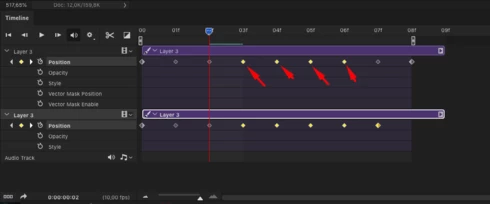
When I select the keys in the timeline in one layer, the keys in the layer with which I worked before are highlighted to.
I have to cancel selection, select keys again and the keys on another layer do not selected this time - this EXTREMELY slows down the work because i must to do this all the time! - (select- cancel selection - select again

Sometimes accidentally deleting or moving the keys where i didn't want it and having to go back many steps to correct the error
i think - this is not a feature - this is bug!
This topic has been closed for replies.

30 replies

February 11, 2020
OMG.... 21.0.3 Problem is still here.
ONE YEAR ! Let`s Celebrate!!!
Inspiring
December 21, 2019
 I have same problem with timeline
December 16, 2019
21.0.2 Problem is still here
10 monts.... omg... 10 monts to resolve the bug
Legend
June 18, 2019
Still on the docket for an upcoming update.
June 17, 2019
The problem is still not fixed. Any news?
March 24, 2019
Thank you, Jeffrey
Legend
March 24, 2019
Thanks. Looks like the same behavior since the feature was implemented. I've asked engineering to take a look, 
March 24, 2019
Here is the video of problem


March 24, 2019
Problem is still not solved
February 26, 2019
Problem is still not solved