


Immerwährend
Participating Frequently
May 20, 2020

P: Selections and panning snap to wrong location

  • May 20, 2020
  • 38 replies
  • 1517 views

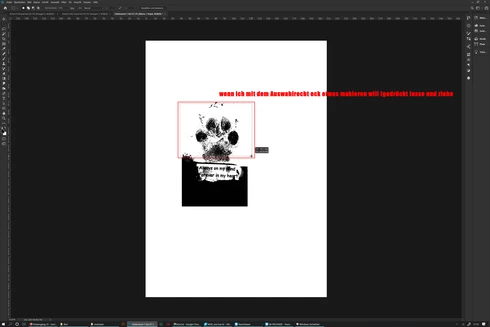
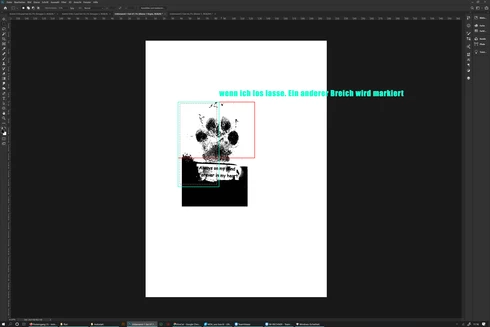
The selection rectangle tool does not mark the desired area but jumps to another place on the desktop after dragging and release, since 2020 version (Surface Studio)
 sorry for bad english

Das Auswahlrechteck Werkzeug markiert nicht den gewünschten Bereich sondern springt an eine andere Stelle auf dem Desktop nach dem loslassen. seit der 2020 version, benutze ein Surface Studio

This topic has been closed for replies.

38 replies

chad.rolfs
Participating Frequently
April 14, 2021

Is anyone still seeing this with the latest update 22.3.1. 

We haven't been able to reproduce this in recent builds/versions and haven't heard any reports recently.

Inspiring
October 7, 2020

Hi, Using Windows 10 with all updates done. Latest Photoshop CC, Nvidia drivers up to date, Wacom drivers also up to date. Using Wacom Intuos Pro. Can't recall wintab

Legend
October 7, 2020

Hi Karosa, are you on Windows or Mac? Using a tablet? If so, do you have WinTab enabled? 

Inspiring
October 7, 2020

I have been trying to fix this for ages and have at least discovered that it happens only after I have used liquify tool. Only way to fix it so far is to restart PS

Inspiring
August 17, 2020
I am having the same issue and have been for 2-3 months. I use 2 monitors and a wacom cintiq pro 24.

My eyedropper tool also jumps to the grayscale version of any colour I pick after a random amount of time (happens every day) of working in photoshop and is unusable without a save and restart, also working in RBG, tried CMYK, tried to use the tool itself instead of alt-click, played around with layers being sampled, asked others I know to no avail.
Inspiring
August 13, 2020
Resetting prefs and updating Nvidia driver did not work, it's back. GRRRR
Inspiring
August 12, 2020
@chad@zewg.com I am #2 No PSUserConfig, 21.2.1 still seeing the issue

I have 2 Cintiqs in addition to my main monitor
Windows Version 10.0.19041 Build 19041
yes pan snap + selection bugs, also seeing erratic brush and lasso tool behavior when I use them directly after trying to pan or drag a marquee
English

Inspiring
August 12, 2020
Hey @chad@zewg.com I just found this discussion. I'm having the same issue. Will review your reco's and report back if the results. Thanks.
Immerwährend
Participating Frequently
August 11, 2020
1. no others monitors
2. Win 10 Pro  Version 10.0.18362 Build 18362 (its up to date) the issue already existed before the update
3. yes
4. German qwertz


chad.rolfs
Participating Frequently
August 10, 2020

Thanks @Immerwährend Tattoo 

If you could provide me with some additional info, that would be helpful.  

For your Surface Studio 2;
1. Do you have an additional monitor connected? 
2. What version of Win10 are you running (is it up to date)? 
3. Are you seeing both Panning snapping back AND incorrect selection locations?
4. Is your OS/keyboard set to English or are you running in a different language?

Thank you!