


Immerwährend
Participating Frequently
May 20, 2020

P: Selections and panning snap to wrong location

  • May 20, 2020
  • 38 replies
  • 1517 views

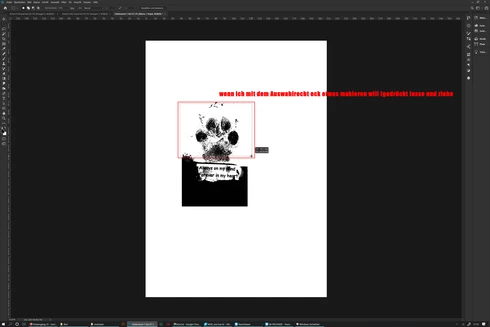
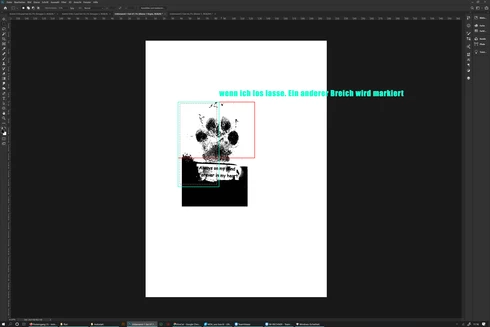
The selection rectangle tool does not mark the desired area but jumps to another place on the desktop after dragging and release, since 2020 version (Surface Studio)
 sorry for bad english

Das Auswahlrechteck Werkzeug markiert nicht den gewünschten Bereich sondern springt an eine andere Stelle auf dem Desktop nach dem loslassen. seit der 2020 version, benutze ein Surface Studio

This topic has been closed for replies.

38 replies

Immerwährend
Participating Frequently
August 10, 2020
Okay.
no i dont have a PSUserConfig.txt file in that location

#2 STILL seeing the issue with 21.2.1 and DON'T have PSUserConfig.txt in Prefs folder (UseSystemStylus 0)
dzigakaiser
Known Participant
August 7, 2020
Heyhey,

Chad is referring to this folder:

C:\Users\USER\AppData\Roaming\Adobe\Adobe Photoshop 2020\Adobe Photoshop 2020 Settings

..and is asking if you have a PSUserConfig.txt file in that location (by default you don't).

In case you do have this file, open it and see if it contains "UseSystemStylus 0".

🙂
Creating worlds for screen and paper - also offering photo resources and HDRIs on www.dziga.com
Immerwährend
Participating Frequently
August 7, 2020
#2.... i think ???

I don't even find the folder "Prefs" and i dont know what (UseSystemStylus 0) means


chad.rolfs
Participating Frequently
August 3, 2020
If you are still running into this issue with the 21.2.1 update, can you please clarify if you are using PSUserConfig.txt in Prefs folder (UseSystemStylus 0)?  Please reply 1, 2 or 3:

#1 NOT seeing the issue with 21.2.1 and DON'T have PSUserConfig.txt in Prefs folder (UseSystemStylus 0)

#2 STILL seeing the issue with 21.2.1 and DON'T have PSUserConfig.txt in Prefs folder (UseSystemStylus 0)

#3 STILL seeing the issue with 21.2.1 and DO have PSUserConfig.txt in Prefs folder (UseSystemStylus 0)
chad.rolfs
Participating Frequently
July 30, 2020
Thank you Immerwährend Tattoo - this info is very helpful.
Immerwährend
Participating Frequently
July 30, 2020
PS And sometimes even the brush make random storkes across the entire display if I only press briefly with the Mous

Immerwährend
Participating Frequently
July 30, 2020
If you mean the settings under display, 
scale and Layout
150% (i have try other)
Display resolution
4500x3000

only one display on which I can also use a pen (Surface Studio 2)
https://www.microsoft.com/de-de/surface/devices/surface-studio-2/tech-specs

I have found that the problem only occurs with the mouse
After I have used the pen, the display remembers the last pressure point
(only sometimes and always somewhere on the right of the display)
and the selection then jumps to this point
Then when I use the pen it works normally again

and like I said
Only in Photoshop and only sometimes
No other program like Illustrator or anything else has a problem with the pen


chad.rolfs
Participating Frequently
July 29, 2020
Thanks for the reply Marty Gottlieb.  Can you tell me what your hardware setup is; how many monitors and what is the arrangement and OS Scaling of each and also which Wacom you're using (if any)?  Thank you!
Participating Frequently
July 28, 2020
Thanks for asking, but this is still a problem. This occurs with the Rectangular and Elliptical Marquee tools. 

As a workaround I can use Polygonal Lasso Tool with Shift Key for rectangles but for ellipses I'm still screwed. 
chad.rolfs
Participating Frequently
July 27, 2020
Hi all.  Can you verify this issue does or does not occur in the latest update (21.2.1)?  We shipped a fix for this bug in 21.2.1 but due to limited hardware of everyone working from home, we weren't able to verify the fix on all the different hardware configurations.  Let us know if the fix worked for you or not.  Thanks!