


Immerwährend
Participating Frequently
May 20, 2020

P: Selections and panning snap to wrong location

  • May 20, 2020
  • 38 replies
  • 1516 views

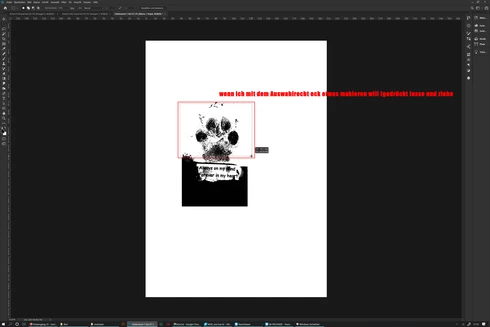
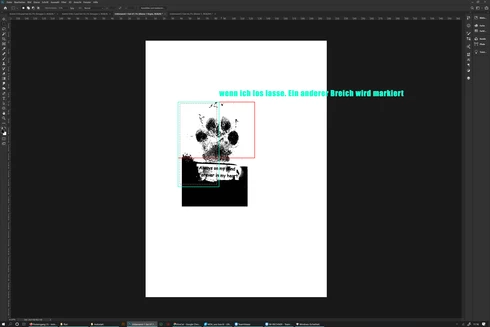
The selection rectangle tool does not mark the desired area but jumps to another place on the desktop after dragging and release, since 2020 version (Surface Studio)
 sorry for bad english

Das Auswahlrechteck Werkzeug markiert nicht den gewünschten Bereich sondern springt an eine andere Stelle auf dem Desktop nach dem loslassen. seit der 2020 version, benutze ein Surface Studio

This topic has been closed for replies.

38 replies

Participant
July 14, 2020


When I select the object with all of maquee tools and all lasso tools (lasso tool, polygonal lasso tool and Magnetic Lasso tool) in Photoshop 21.2 (rectangular maquee tool in the video) it doesn't work correctly. The selection is out of the place. Incorrect selection placement when I drag along with the mouse cursor.

I updated to the latest version of the NVIDIA 1050ti's graphic card driver.

spec: Windows 10, 16 GB ram, Intel i5-7500 CPU
Participating Frequently
June 26, 2020
I have the same problems. Panning snaps to the wrong location - ok, I can live with that.

I also have the Marquee tool problem with both the Wacom Tablet AND the mouse. I select "area A" and "area Z" is selected. I select "area B" and same "area Z" is selected. Same with "area C, D, E, F..." Nothing short of rebooting helps. And sometimes that does not help. This is a real time-waster for me so it is very frustrating. 
Inspiring
June 26, 2020


Hi Adobe

Another bug in the latest version. Very annoying. You have to quit the software to reset it. Marquee tool after some use starts to snap to the end of the document from wherever you click. Nothing you can do to select a simple rectangular selection other than save and restart. Please fix.

This along with, the brush previews that don't show transfer, broken split Window view, and resetting of keyboard shortcuts is starting to make this version a deal breaker.

Andrew
Participant
June 22, 2020

Hi,

I have had the same issue randomly for about 2 months. The latest Photoshop update didn’t fix it.

As I said in another thread, there is a workaround that works for me: immediately after the issue occurs, I touch my graphic tablet (Wacom) with my stylus, and then it is OK. If I don’t do this at once, the window gets frozen after a while and I can’t work in my document anymore.

Try to do so if you have a tablet.

Otherwise, the only solution is to save and close your document (not Photoshop) and open it again.


Inspiring
June 22, 2020


Recently I've came across a really stressful bug to do with the hand tool. Randomly when I let go after moving around the canvas, the canvas will instantly snap to a location and freeze there. All visuals within the window then don't appear to update after it happens and requires a restart to fix. It seems to be completely random as to when it decides to break and only effects the window of the document you have open.

Has anyone else had this problem? Are there any quick fixes I could do in the meantime? 
YunikoYokai
Participant
June 22, 2020


I'm having an issue with my Photoshop 2020. From time to time, my Pan Tool with start snapping hard to the left, and refuse to go in any other direction. Eventually, I will no longer be able to zoom into or out of my image, despite the navigator moving. The only way to fix this is to close Photoshop and restart the program.

Is this a known issue? Is there a resolution to it?
Inspiring
June 22, 2020


ズームイン、アウトがバグる。表示中のPSDファイルをウィンドウ内で動かせなくなる。異常に動作が重くなる。
仕事にならない。

Google translated:
Zooming in and out is buggy. The displayed PSD file cannot be moved in the window. The motion becomes abnormally heavy.I can't work.
Legend
June 9, 2020
Thanks
Immerwährend
Participating Frequently
June 9, 2020
as soon as the problem appears again I try it and report again

Legend
June 8, 2020
If you set scaling to 150%, does it work correctly for you?