


Immerwährend
Participating Frequently
May 20, 2020

P: Selections and panning snap to wrong location

  • May 20, 2020
  • 38 replies
  • 1517 views

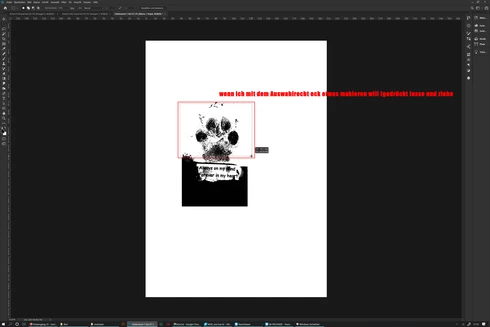
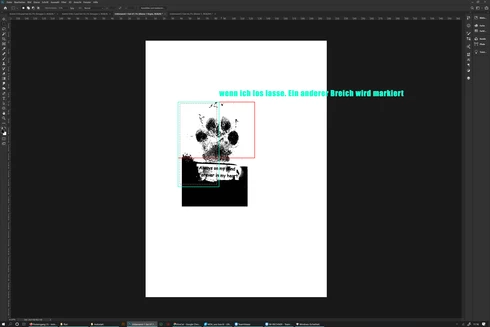
The selection rectangle tool does not mark the desired area but jumps to another place on the desktop after dragging and release, since 2020 version (Surface Studio)
 sorry for bad english

Das Auswahlrechteck Werkzeug markiert nicht den gewünschten Bereich sondern springt an eine andere Stelle auf dem Desktop nach dem loslassen. seit der 2020 version, benutze ein Surface Studio

This topic has been closed for replies.

38 replies

Legend
June 8, 2020
Thanks. QE were able to repro.
Immerwährend
Participating Frequently
June 8, 2020
Just one
  • Bildschirm: PixelSenseTM-Display (28 Zoll)
  • Auflösung: 4500 x 3000 Pixel (192 PPI)
  • Farbeinstellungen: sRGB, DCI-P3 und „lebendig“
  • Individuell farbkalibriertes Display
  • Seitenverhältnis: 3:2
  • Toucheingabe: 10-Punkt-Multi-Touch
  • Unterstützt Surface Pen mit Aktivierung durch Neigen, Surface Dial*-Interaktion auf dem Bildschirm und Zero Gravity-Gelenk
  • 16 GB oder 32 GB (DDR4)
  • NVIDIA® GeForce® GTX 1060 mit 6 GB GDDR5-Speicher (mit i7/16/1 TB-Konfiguration)
  • NVIDIA® GeForce® GTX 1070 mit 8 GB GDDR5-Speicher (mit i7/32/1 TB- und i7/32/2 TB-Konfiguration)
The problem started with the 2020 version
Since this is a touch screen, I have the feeling that I have pressed a fixed point in the right corner and the mouse then jumps there automatically. But only in Photoshop and, as I said, only sometimes  so it can't be because that


Legend
June 5, 2020
Do you have more than one monitor attached when this happens? Or use two monitors at any time? Also, what is the scaling set to on your monitor or each of your monitors?
Immerwährend
Participating Frequently
June 3, 2020
So... The problem still exists.
I would say only with the Mouse not with the Pen (but not 100% sure about that) it Still happened just then and now and not everytime, mostly after a longer time and when i restart PS its gone
chad.rolfs
Participating Frequently
May 26, 2020
Thank you.  Let us know if this problem still exists in the most current version of PS as well as Win 10 OS. 
Immerwährend
Participating Frequently
May 22, 2020
With mouse definitely. I'm not sure with a pen because the problem only occurs now and then, so I can't test it right now

Not with a Wacom, I have a surface and can paint directly on the display

Yesterday's update is not yet installed, I will install that now


Mit maus auf jedenfall, mit Stift bin ich mir nicht sicher da das Problem nur abunzu auftrit deshalb kann ich es grade nicht testen

Kein wabco, ich habe ein surface und kann direkt auf dem Display malen

Das Update von gestern werde ich jetzt erst instalieren war also noch nicht drauf


chad.rolfs
Participating Frequently
May 20, 2020
Does this happen with mouse or pen only, or both?  

Also, are all the latest OS updates applied?
Legend
May 20, 2020
Are you using a Wacom tablet or mouse?

Did you install the 21.1.3 update that came out yesterday?

Verwenden Sie ein Wacom-Tablet oder eine Wacom-Maus?

Haben Sie das gestern veröffentlichte 21.1.3-Update installiert?