Participant
May 11, 2015

P: Shoelace shaped brush stroke with Wacom and smoothing on macOS

  • May 11, 2015
  • 22 replies
  • 16928 views

I'm getting fed up with you Adobe

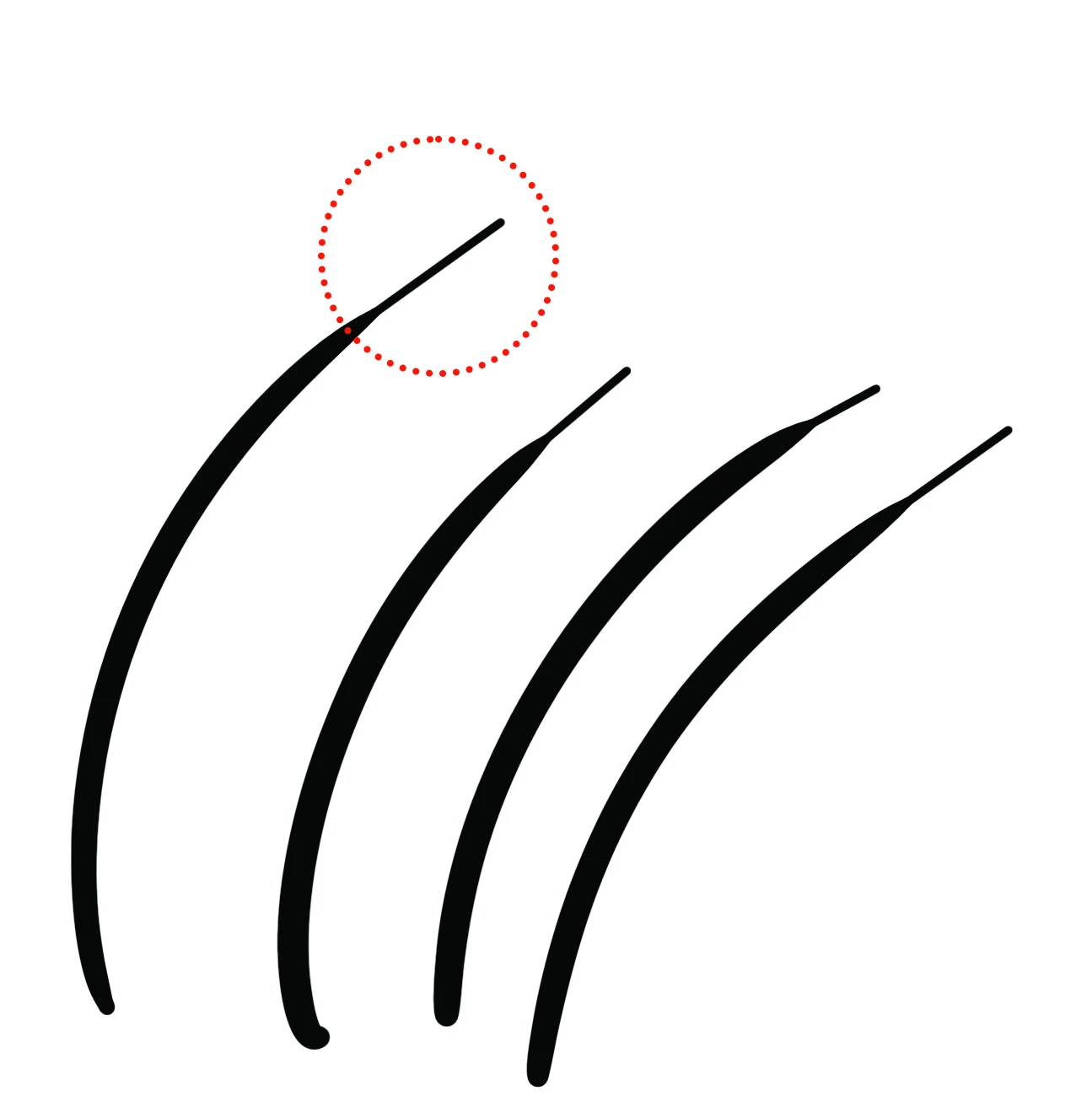
This is a recurring issue with smoothing creating a "shoelace" effect. I'm on a brand new mac, and a brand new Cintiq. I've tried reinstalling drivers, installing older versions of photoshop, and toying with smoothing settings. As far as I can tell, if I want to use smoothing, it generates these artifacts at the end of my strokes. 


I've used photoshop for a couple of decades professionally, but I'm at a crossroads with whether I will bite the bullet, cancel my Adobe subscribtions and switch to Pro Create or another product. Fix this.


22 replies

Participant
September 2, 2018

Hi, I use Photoshop CS6 and a tablet Wacom intuos pro medium and whenever I do a normal line using the pen pressure the lines pressure at the end of said line ends up extrimely small and isn't smooth at all like this:

Can anyone help me?

Community Expert
September 2, 2018

Try another brush or Customize your pen functions

Participant
September 2, 2018

I've already tried both of those but the settings don't change anything and another brush if texture is less noticeable but it's there anyway.

Participant
May 11, 2015

The shoe-lace effect refers to a bug where a pressure sensitive line does not smoothly taper off at the strokes end to a minimum and instead awkwardly retains a noticeable none tapering size for a distance towards the end of the pressure sensitive stroke.

Shoe-lace Bug (brush-strokes do not taper) in PS CC-2014 on Mac Yosemite | Yoel Judowitz Illustration

I would sincerely appreciate some enlightenment on the issue of the shoe-lace bug and other bugs with Yosemite/Cintiq24hd/Photoshop

These are the current options for Yosemite + Photoshop in terms of brush line quality on a Cintiq 24hd:


1) Photoshop CS5= Good:good line quality. Bugs: flickering cursor on corners of palettes, search engine windows also have flickering when window is above in PS, PS crashes when color of frame is (accidentally) selected in full screen. (this is with all updates)
2) Photoshop CS6 without White window workaround= Good: good line quality. Bugs: delay when using zoom tool with Cintiq. Delays by other keys as well.
3) Photoshop CS6 with White window= Good: No more delay. Bugs: pressure sensitive lines end with shoelace effect where line does not taper off to minimum and instead awkwardly retains size for a distance.
4) Photoshop CC: same as Photoshop CS6
5) Photoshop CC2014 Smoothing on: White-window has been integrated into program resulting in shoe-lace bug but zoom is smooth
6) Photoshop CC2014 Smoothing off: jagged curves which are horrible and rapid taper which is better than shoelace, but not great.

As you can see on Yosemite there is currently not a SINGLE bug free option for using Photoshop with a pressure sensitive Cintiq 24hd and creating smooth tapered lines aside from PS CS5 which has other issues. According to friends things were not this way on Mavericks.

Is there ANY combination of any version of PS that will give a smooth line quality bug free experience on Yosemite? The only solution I know to this issue is the Lazi Nezumi plugin and that does not work for Mac.

(Please note that these issues are not solved with changing Wacom drivers and apply with all PS updates and Yosemite 10.10.3 and earlier versions)

Trevor.Dennis
Community Expert
Community Expert
May 11, 2015

Bugger.  Just put up an answer advising Lazy Nezumi Pro, but there is no Mac version.  Sorry.

Participant
May 11, 2015

Yup. Unfortunately there is no mac version of Lazi Nezumi. I have contacted the creator recently asking if he plans on making a mac version and it does not seem to be imminent.

I think it is time for Adobe to provide some basic line smoothing options in Photoshop above the crude smoothing option currently provided. The smoothing settings on the Wacom do not accomplish the same thing as auto smoothing in Nezumi and do not solve the shoe-lace problem in Yosemite. Every other program has an option like this and apparently it's not that difficult to figure out if Mr Lazy Nezumi could do it. I think a company as big as Adobe is capable at this point of providing such a basic feature.