


Inspiring
December 10, 2018

P: Single path points aren't displayed properly with 'Use GPU' turned on

  • December 10, 2018
  • 11 replies
  • 534 views

Deselected single path points are supposed to be displayed as crosses. In my case the cross is drawn in the top-left of a document, the actual points stay invisible until I select them. If I disable GPU, path points are displayed properly, but I use GPU features a lot.
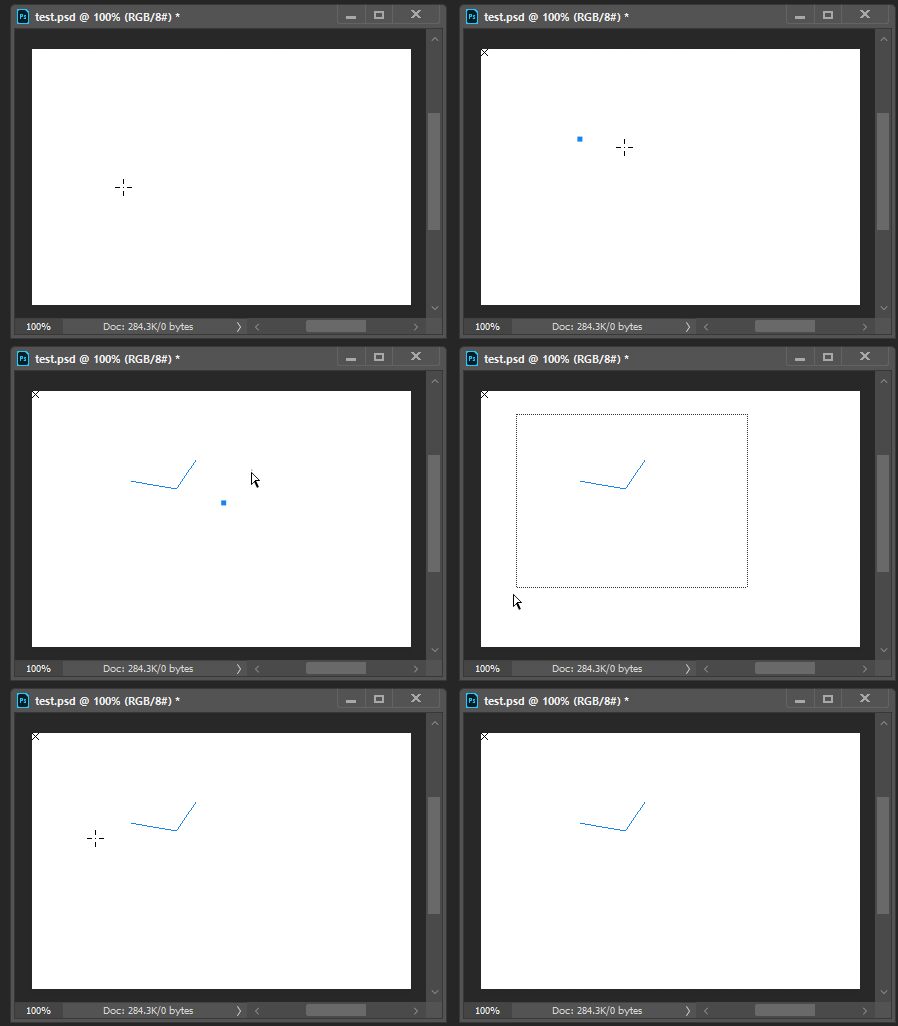


CC2018 and previous versions don't have this issue. Using different GPU options, compositing engine doesn't seem to give any result.

Some PS and system Info:

Adobe Photoshop Version: 20.0.1 20181029.r.41 2018/010/29: 1197484  x64
Operating System: Windows 10 64-bit

glgpu[0].GLVersion="4.1"
glgpu[0].IsIntegratedGLGPU=0
glgpu[0].GLMemoryMB=6144
glgpu[0].GLName="NVIDIA GeForce GTX 1060 6GB"
glgpu[0].GLVendor="NVIDIA Corporation"
glgpu[0].GLVendorID=4318
glgpu[0].GLDriverVersion="25.21.14.1722"
glgpu[0].GLRectTextureSize=32768
glgpu[0].GLRenderer="GeForce GTX 1060 6GB/PCIe/SSE2"
glgpu[0].GLRendererID=7171

full system info: https://pastebin.com/Y7imjL70

This topic has been closed for replies.

11 replies

Legend
November 20, 2019

Fixed in 21.1 or later.

Inspiring
November 20, 2019
Ah ok, os it only works if path thickness is more than 1 (I'm using 0.5 because everything that's more obscures artwork for me). I wouldn't say that the issue is fixed 😕😕
Legend
November 20, 2019
If you go to the gear on the path select tool options bar and put in 1.1px for path width, the path points will be visible. They are working on making them visible at lower values. Sorry for the confusion.
Inspiring
November 15, 2019
I'm on 21.0.1 and it's still here. Waiting for the next update.
Legend
November 15, 2019
This issue should be fixed in the current version, Photoshop 2020 v21.x or later. Let us know if you're still having trouble.
Legend
January 15, 2019
Sorry. This one didn't make this update. Hoping we can find a fix for the next update.
Inspiring
January 15, 2019
This, unfortunately, wasn't fixed in 20.0.2 and still drives me crazy 😞
Legend
December 10, 2018
Thanks Sergey, I can reproduce. The engineers will take a look.
Participating Frequently
December 10, 2018
My apologies Sergey.  We'll have our engineering team look into this.
Inspiring
December 10, 2018
Hi Andrew. Yes, as I mentioned, I tried to use Legacy Compositing engine, there was no difference unfortunately.