
David Badke
Known Participant
February 22, 2020

P: Slider Lag

  • February 22, 2020
  • 38 replies
  • 2771 views

In Photoshop 2020.1, when dragging sliders (e.g. in Levels, but in other slider-containing dialogs as well) there is a significant lag before the screen redraws (Preview enabled). The screen doesn't start to redraw until I stop dragging the slider; there is about a 0.5 second or more delay before I can see the effect of the change. Photoshop 2019 does not do this, on the same computer; the slider change effect is shown continuously and smoothly in the preview as the slider moves. This is happening even with very small images (1000 x 600).

This makes fine adjustments very difficult to do, since I can't see the effect as it happens.

System information:

Adobe Photoshop Version: 21.1.0 20200212.r.106 2020/02/12: 4dd027efb58  x64
Operating System: Windows 10 64-bit
Version: 10 or greater 10.0.18362.329
System architecture: Intel CPU Family:6, Model:14, Stepping:13 with MMX, SSE Integer, SSE FP, SSE2, SSE3, SSE4.1, SSE4.2, AVX, AVX2
Physical processor count: 8
Processor speed: 3000 MHz
Built-in memory: 16318 MB
Free memory: 11196 MB
Memory available to Photoshop: 14929 MB
Memory used by Photoshop: 75 %

I have tried many suggested "performance enhancing" preference settings, but they don't help. Current settings:
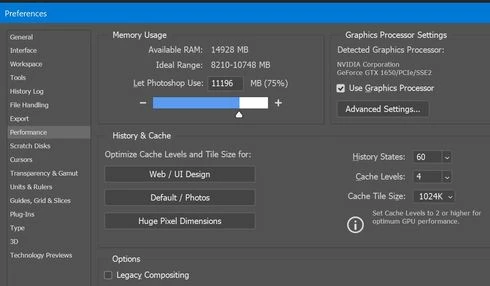


I have two scratch disks set up, with the main one on an SSD.

My computer is certainly fast enough that there should be no lag, and there is no lag in PS 2019. Am I missing some setting or tweak that would eliminate the lag? Or is this a known problem in PS 2020.1?

David

This topic has been closed for replies.

38 replies

Inspiring
March 18, 2021

Tested 22.3, no change.

masktao
Known Participant
March 10, 2021

2020_21.2.6.482 & 2021_22.3.0.49 also still flag

nice work!

Inspiring
February 9, 2021

Also tested 21.2.5 - it's fractionally more responsive than 22.2 but still far worse than 21.0.3.

Inspiring
February 9, 2021

Tested 22.2 - same handle lag problem. 

Inspiring
January 27, 2021

Yeah... they're going to depreciate those at some point though - it's a concern that the 2020 versions are all essentially unusable on 90% of my workflow (anything larger than 20mp and more than a few layers).

Inspiring
January 27, 2021
masktao
Known Participant
November 15, 2020

@mh_tnm 

yes. go back to ps 2019

Inspiring
October 21, 2020

The new point release, 22.0.0 suffers the same slider handle-dragging lag as all the post 21.0.3 versions. Most noticeable on Curves but also pretty bad on Colour Balance. This is only when you get up to big canvas sizes and quite a few layers, please note.

 It also has some nasty render errors when transforming the new live shapes.

Inspiring
September 9, 2020
It feels a lot like they've tied the update of the slider's handle to the update of the canvas since then. Where you used to be able to make precise changes to the slider handles and then wait for a moment for the canvas to update, you now move the slider, it doesn't move with your movement until the canvas updates. By which point you've over or undershot because of the lack of visual feedback. And with complex images, that can take a moment even with the beefiest machine.

Now, arguably this wouldn't be a problem if PS leveraged the GPU more extensively (like the competition!) as even on complex documents, the vastly more parallel GPU architecture would be able to cope with live updating of the canvas, but PS is still mostly CPU driven, and largely single core at that for this sort of operation, so it'd be better to go back to the scenario where you could at least see where you were dragging your handle live...
Inspiring
September 9, 2020
Sorry - I meant it's the same as 21.2.2. Everything after 21.0.3 has been horribly laggy once you get up to a decent number of layers.