
David Badke
Known Participant
February 22, 2020

P: Slider Lag

  • February 22, 2020
  • 38 replies
  • 2771 views

In Photoshop 2020.1, when dragging sliders (e.g. in Levels, but in other slider-containing dialogs as well) there is a significant lag before the screen redraws (Preview enabled). The screen doesn't start to redraw until I stop dragging the slider; there is about a 0.5 second or more delay before I can see the effect of the change. Photoshop 2019 does not do this, on the same computer; the slider change effect is shown continuously and smoothly in the preview as the slider moves. This is happening even with very small images (1000 x 600).

This makes fine adjustments very difficult to do, since I can't see the effect as it happens.

System information:

Adobe Photoshop Version: 21.1.0 20200212.r.106 2020/02/12: 4dd027efb58  x64
Operating System: Windows 10 64-bit
Version: 10 or greater 10.0.18362.329
System architecture: Intel CPU Family:6, Model:14, Stepping:13 with MMX, SSE Integer, SSE FP, SSE2, SSE3, SSE4.1, SSE4.2, AVX, AVX2
Physical processor count: 8
Processor speed: 3000 MHz
Built-in memory: 16318 MB
Free memory: 11196 MB
Memory available to Photoshop: 14929 MB
Memory used by Photoshop: 75 %

I have tried many suggested "performance enhancing" preference settings, but they don't help. Current settings:
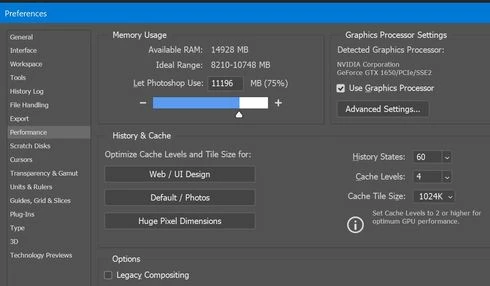


I have two scratch disks set up, with the main one on an SSD.

My computer is certainly fast enough that there should be no lag, and there is no lag in PS 2019. Am I missing some setting or tweak that would eliminate the lag? Or is this a known problem in PS 2020.1?

David

This topic has been closed for replies.

38 replies

Participating Frequently
September 9, 2020
I did not understand ... it is worth updating to 21.2.3?!? Is it like 21.0.3?


Inspiring
September 9, 2020
21.2.3 also performs the same.
Inspiring
August 18, 2020
21.2.2 seems to perform the same.
Inspiring
July 7, 2020
21.2.0 too. Have gone back to 21.0.3 - that at least let you drag the sliders/handles around smoothly. Albeit the canvas still takes a while to update to changes but at least you don't have the teeth-shatteringly frustrating experience of not being able to move the slider where you intend.
Participating Frequently
June 2, 2020
This was solved? I am on 21.1.3 and the brush setting sliders lag make the settings panel near unusable.
Participating Frequently
June 1, 2020
How did you solve it? What version do you have installed? Hi
ariedesaint
Participating Frequently
March 19, 2020
both bad...don't know of there is a difference..the delay is really annoying.
But the difference with PS 2019 is huge.In 21.1.10 i had problems with shadow highlight en delay in curves etc..In 21,1,1  the shadow highlight works again...but the delay still there.
Known Participant
March 19, 2020
It did? I'm holding on to 21.0 because curves in 21.1 were causing lag. Are they also fixed?
Legend
March 19, 2020
Are you saying sliders are slower in 21.1.1 than 21.1.0?
ariedesaint
Participating Frequently
March 19, 2020
Same here..after the update sliders are slow...And go back again to PS 2019:(