


Participating Frequently
November 19, 2019

P: Spherical panoramas 3D view low quality

  • November 19, 2019
  • 72 replies
  • 4316 views

i work with 360 panorama images taken with dedicated cameras
and sometimes i need to edit the pictures (remove tripod, fix other parts)

all worked fine with this workflow:
3D - spherical panorama from layer - making the needed changes on a new layer - merge down the new layer - export panorama.

but recently i noticed that when opening the panorama image in 3D view, the details become pixelated horribly.
and so if i make a change (healing brush), that part of the image will not be the same quality as the rest.

strange thing is that if i just export the image without changing anything, the quality is still perfect!

see the attached image, all i did was copying my head next to the original, using the workflow above, and exported the pano.
as you can see, the left is sharp (even though in 3D view it LOOKED pixelated!) and the copied one on the right IS pixelated.
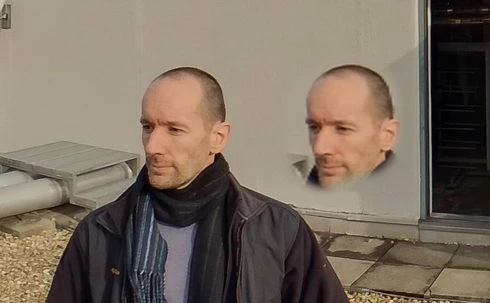
so it seems to me that the 3D view is the problem.

noticed after installing PS 2020.
but even when i try it in 2019 (which worked fine before) now it's the same issue there as well.

72 replies

CShubert
Community Manager
Community Manager
June 20, 2023

@Enkhbileg5FFB 


You’ve posted to a very old thread. It is highly unlikely that the issue described in this thread, though not impossible, is the same issue which you are currently experiencing. Rather than resurrect an old thread that is seemingly similar, you are better posting to a new thread with fresh, complete information including system information, a complete description of the problem and step-by-step instructions for reproduction.In the unlikely event the issue is the same, we will merge you back into the appropriate location.


Participant
June 16, 2023

Yeah same issue is still present in 24.2 on Windows.
Whenever image turnet into spherical panorama it lost so much detail and gets pixeleted.

As said problem is in 3d view. Exported panorama seems fine


Participant
October 15, 2021

Hi there!

Have you gone around this issue?

I have been using this workflow from the equirectangular projection :

1- rotate 180 degrees

2- FILTER/DISTORT "rectangular to polar"

3- (Edit)

4- FILTER/DISTORT "polar to rectangular"

5- rotate 180 degrees

6- (save edited version)


The case is that PS is not performing the action DISTORT POLAR TO RECTANGULAR so I cannot go beyond step 3...


Some people workflow consists in changing the equirectangular projection to a cubemap an editing the side needed in PS to finally going back to equirectangular but I don't know software to make such conversion in MacOS...

kerenyizAuthor
Participating Frequently
May 20, 2021

v22.4.1 still NOT FIXED.

kerenyizAuthor
Participating Frequently
April 15, 2021

v22.3.1 still NOT FIXED.

kerenyizAuthor
Participating Frequently
February 15, 2021

v22.2.0 still NOT FIXED.

Participating Frequently
December 6, 2020

Blatant attempt at co-opting this forum for soliciting for her own business.

Participating Frequently
November 17, 2020

Adobe should reimbursed the money as we use Affinity Photo solely because they failed to fix a feature advertised in Photoshop. So its false advertisement I would say. Let aside the frustration and hours of internet research for possible fixes. I spent 4 hours at night with Adobe support to no avail. On the other hand, we support Affinity Photo team that could provide some competitive environment for Adobe to recognize what customers want.

Inspiring
November 17, 2020

I agree. It's the best solution for now. I downloaded the Affinity trial and it edits the spherical pano's with ease. I just wish Photoshop could perform in the same way and that this bug could be fixed. It's taken way too long and Adobe don't seem concerned enough to even acknowledge there's a problem. I'm going to have to buy Affinity when the trial expires. I might send Adobe the invoice and request a refund 🙂 

Participating Frequently
November 17, 2020

FOUND THE FIX! it's called Affinity Photo. I bought it as 50% and does exactly what PS couldn't do since 3D feature was introduced. I stopped trying to fix this damn issue for Adobe and went with workaround which in a long run will only help me learn new stuff.

It's a workaround I know that but one that works and saves you a lot of gray hair and time.

Shame on you Adobe!

Not sure if my other post got posted, so just a recap here