


Participating Frequently
November 19, 2019

P: Spherical panoramas 3D view low quality

  • November 19, 2019
  • 72 replies
  • 4316 views

i work with 360 panorama images taken with dedicated cameras
and sometimes i need to edit the pictures (remove tripod, fix other parts)

all worked fine with this workflow:
3D - spherical panorama from layer - making the needed changes on a new layer - merge down the new layer - export panorama.

but recently i noticed that when opening the panorama image in 3D view, the details become pixelated horribly.
and so if i make a change (healing brush), that part of the image will not be the same quality as the rest.

strange thing is that if i just export the image without changing anything, the quality is still perfect!

see the attached image, all i did was copying my head next to the original, using the workflow above, and exported the pano.
as you can see, the left is sharp (even though in 3D view it LOOKED pixelated!) and the copied one on the right IS pixelated.
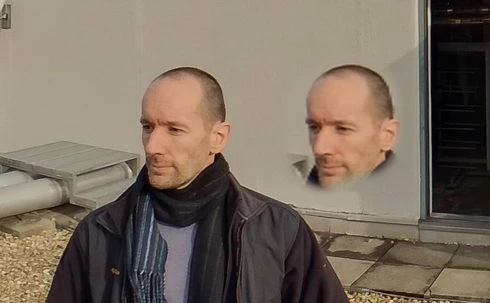
so it seems to me that the 3D view is the problem.

noticed after installing PS 2020.
but even when i try it in 2019 (which worked fine before) now it's the same issue there as well.

72 replies

Participating Frequently
November 17, 2020

I found a fix! It's called Affinity Photo. I got it for 50% off so it's like 2.5 months of Adobe subscription and it's yours for life. I don't do much other stuff in it yet but it handles 360 panos exactly the way I need it. So if Adobe isn't able to fix this damn issue since 3D editing was added to PS, this is for me the quickest and least painful and time wasting solution. Shame on you Adobe!

kerenyizAuthor
Participating Frequently
November 17, 2020

v 22.0.1

and the 3D canvas still NOT FIXED.

see the attached image for easy understanding: 

right click+open in new tab for full res:

kerenyizAuthor
Participating Frequently
November 17, 2020

exactly! thanks for confirming my claims.

kerenyizAuthor
Participating Frequently
November 17, 2020

using an other paid software to "fix" PS bugs is not a solution.
not to mention it's not even fixing the issue i posted here.

Lance021
Participating Frequently
November 17, 2020

Hi Andrew,

Would you please copy the red circles in the exact same place, right after the main part, so that we can compare the "healing" parts of the same image?

Inspiring
October 26, 2020

This is so very frustrating. I had hoped to avoid purchasing Affinity, but see no other option now that 22 hasn't fixed it. Such a let down, Adobe devs. 

Participating Frequently
October 23, 2020

Yep, useless as always

Participating Frequently
October 23, 2020

Can you not download the version you want (2018) and use both at the same time. I am quite annoyed by 3D space and spherical panorama. It's just crap and no support I can find. 

Participating Frequently
October 23, 2020

I have Ps 21.2.4 and I can see low res version of my panorama when displayed as 3D in photoshop 2020. So anything I use as tool will only work in the low res version. Exporting the panorama stays high res but parts edited (tripod removal, people removal) will be low res, pixelated. Which settings influence displaying panorama in full original resolution when working in 3D space (I have english version, just to think changing language affects 3D working space is just hilarious or really sad)

kerenyizAuthor
Participating Frequently
October 20, 2020

@andrew_sender 

v 22.0

and the 3D canvas still NOT FIXED.