


Participating Frequently
November 19, 2019

P: Spherical panoramas 3D view low quality

  • November 19, 2019
  • 72 replies
  • 4316 views

i work with 360 panorama images taken with dedicated cameras
and sometimes i need to edit the pictures (remove tripod, fix other parts)

all worked fine with this workflow:
3D - spherical panorama from layer - making the needed changes on a new layer - merge down the new layer - export panorama.

but recently i noticed that when opening the panorama image in 3D view, the details become pixelated horribly.
and so if i make a change (healing brush), that part of the image will not be the same quality as the rest.

strange thing is that if i just export the image without changing anything, the quality is still perfect!

see the attached image, all i did was copying my head next to the original, using the workflow above, and exported the pano.
as you can see, the left is sharp (even though in 3D view it LOOKED pixelated!) and the copied one on the right IS pixelated.
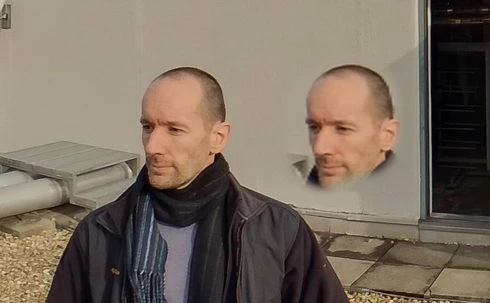
so it seems to me that the 3D view is the problem.

noticed after installing PS 2020.
but even when i try it in 2019 (which worked fine before) now it's the same issue there as well.

72 replies

kerenyizAuthor
Participating Frequently
October 20, 2020

v 22.0

and the 3D canvas still NOT FIXED.

Inspiring
October 3, 2020

@zoltan_kerenyi Okay, I've found a not exactly perfect but an easy and workable solution to this but it does cost $100. However, I would say it's worth the investment. You can basically do your editing as per usual via photoshop and export the file. I experimented with a 10MB jpeg image shot on the Insta360 Pro2. After going through the standard Photoshop procedure the final exported file was 1.2MB. I put it into Topaz Gigapixel and even on the default settings it was amazing. I increased the file size x 4 and exported the finished image which was now 248MB!!!! I then repeated the Photoshop process and exported what is now a 4th gen version of the image. The final result was 12MB. But, and here's the crazy part, it was substantially better than the original image... and I mean SUBSTANTIALLY even after PS had reduced the quality from 248MB to 12MB. This is, in my opinion, far easier than any other workaround offered so far. I know it means buying a new piece of software for $100 but think how much time you've spent trying to get an answer from PS and work out what your hourly rate is and how many commercial jobs you could have done in that time and I think $100 is worth it. I'd seen it on Ben Claremont's YouTube channel and was sceptical at first but it really did work for me. It's not perfect but it's better than the original PS result. See the attached image which is an extreme zoom. The image on the left is the original file and the one on the right the 4th Gen PS file!

And here is another example where I've used the stamp tool to remove a woman from the background of a shot and used the warp tools and text to rebuild a logo on a wall:


kerenyizAuthor
Participating Frequently
September 13, 2020

v 21.2.3 update:

3D canvas still NOT FIXED.
kerenyizAuthor
Participating Frequently
August 27, 2020

v 21.2.2 update:

3D canvas still NOT FIXED.

what a surprise.
Inspiring
August 14, 2020

Image is not available

Inspiring
August 14, 2020
I have the same issue with the shity 3D view quality
https://youtu.be/nnduG0eWvzw

I chatted to Adobe Support. Sample files were sent to them and they saw the issue. I hope they will fix it soon.
Inspiring
August 13, 2020
When I export from Lightroom (edit in -> edit as smart object in Photoshop) I cannot really comprehend the issue that Zoltan described. However, any attempt for editing (e.g. stamp / healing tool) does not work afterwards. So PS is completely useless to remove the tripod in my 360 images. I contacted Adobe support but they just wanted me to - as so often  - reinstall the whole thing. PS v21.2.1 - How can we emphasize the issue towards Adobe? The bug seems already present for quite some time now.
Inspiring
August 13, 2020
I agree with your answer but when it comes to retouching like removing the tripod then there is no way around that you load your image in a spherical editor.
Participant
July 23, 2020
The old version is a lot better but I've done a few tests with it today, it's still not perfect. Still blurs the edits slightly. But you will only really see this when you are working with higher resolution panos, like 8000x4000 and upward. But it is still at least 5 times better than the newer versions.
kerenyizAuthor
Participating Frequently
July 22, 2020

v 21.2.1 update just arrived.

had high hopes as it stated: "This update addresses several critical bugs, crashes, canvas drawing errors, and painting issues."


well, the canvas loses resoluation after the making the layer 3D -> Spherical Panorama -> New Panorama Layer From Selected Layer(s). Once that happens, the healing brush tool picks up this low resolution.


issue NOT FIXED.

Andrew, his engineering team, Adobe support - all totally useless.

my only solution is still to go back to an older version of PS,

for example: 2018.v19.1.2