


P: Spherical panoramas 3D view low quality
i work with 360 panorama images taken with dedicated cameras
and sometimes i need to edit the pictures (remove tripod, fix other parts)
all worked fine with this workflow:
3D - spherical panorama from layer - making the needed changes on a new layer - merge down the new layer - export panorama.
but recently i noticed that when opening the panorama image in 3D view, the details become pixelated horribly.
and so if i make a change (healing brush), that part of the image will not be the same quality as the rest.
strange thing is that if i just export the image without changing anything, the quality is still perfect!
see the attached image, all i did was copying my head next to the original, using the workflow above, and exported the pano.
as you can see, the left is sharp (even though in 3D view it LOOKED pixelated!) and the copied one on the right IS pixelated.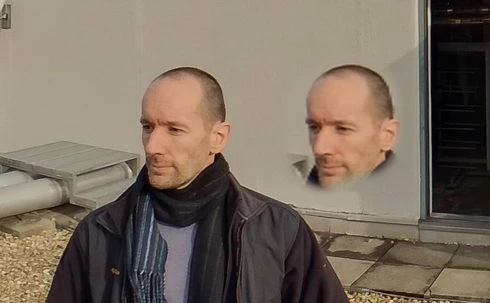
so it seems to me that the 3D view is the problem.
noticed after installing PS 2020.
but even when i try it in 2019 (which worked fine before) now it's the same issue there as well.
 AdChoices