


Participant
December 11, 2019

P: Starting in v 23.1.1 - keeps nagging me to save to Creative Cloud

  • December 11, 2019
  • 81 replies
  • 34525 views

I've been paying for / using Photoshop for many years (since way back to version 3 in 1996).


I don't use the Creative Cloud for saving files, and don't want to.


However, starting with version 23.1.1 whenever I create new file from an image I've copied to the PC's clipboard and then paste it into the blank PSD and Save, it now prompts me to save the file to the Creative Cloud.


The first time it popped-up (today) I made sure to put a check mark in the "Dont Show Again" box and chose "Save to your computer".


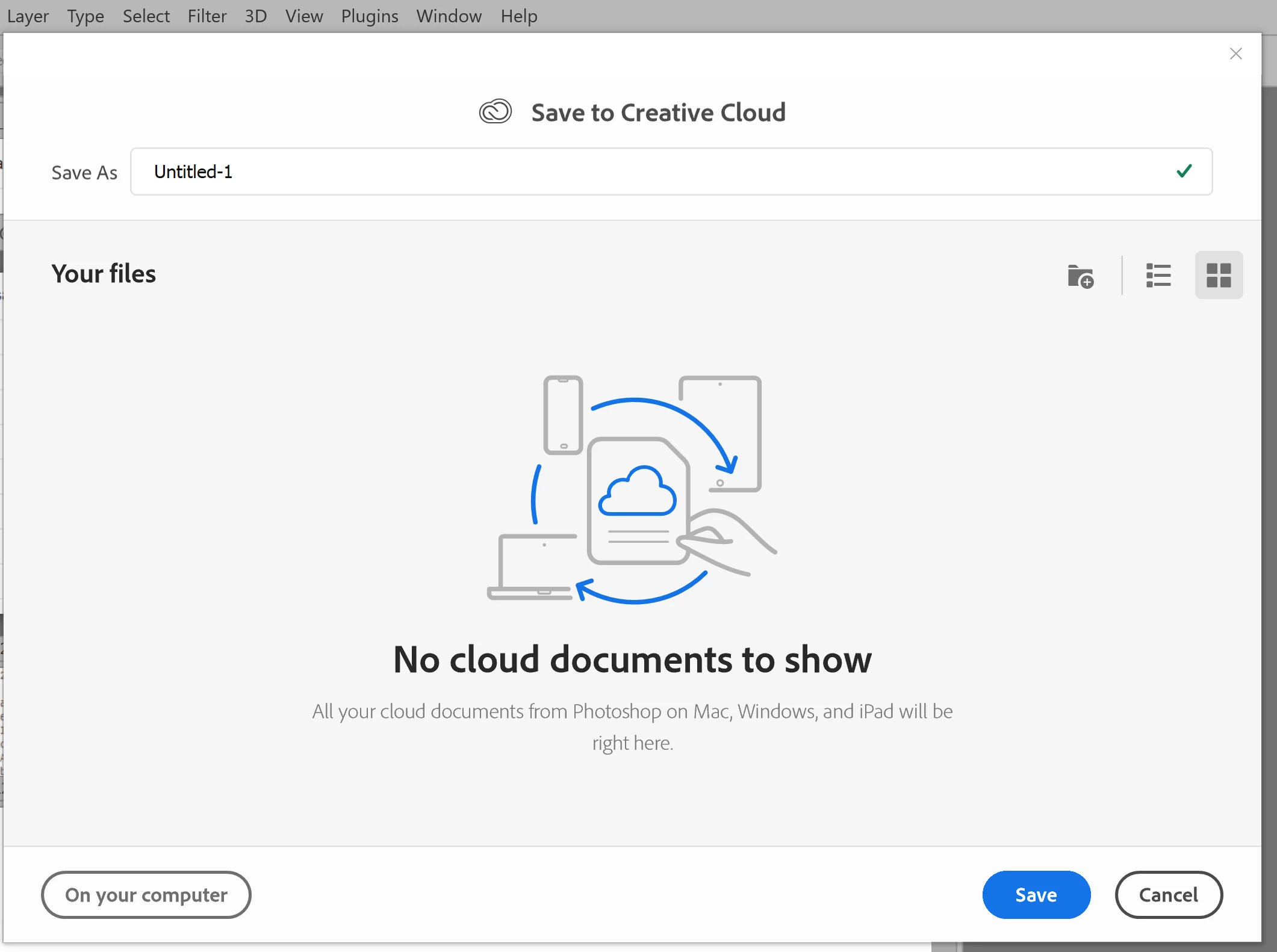
Yet it's still popping-up the "Save to Creative Cloud" prompt every time and still forcing me to make the extra step of choosing "On your computer" , every time. (Screenshot attached).


This is insanely annoying.


At first I thought hmmm... OK maybe just a glitch, so I shut down PhotoShop and restarted my PC. Problem still happens. I can't seem to find any way to change it in the settings.


Has anyone else encountering this bug? Know of a solution?

Many thanks for any input!


81 replies

Audrey Sousa
Adobe Employee
Adobe Employee
April 19, 2022

Hi everyone -- thanks for your feedback.  We've updated the preference to more accurately reflect your expectations so that if you want to default to save locally, it will always only do that and no longer "upsell" with the dialog explaining the advantages of saving to the cloud.  

Please see the updated preference under Preferences > File Handling > Default File Location and you can choose "On your computer" for the local dialog to always appear when saving a new document.  This updated experience is now in version 23.3.


Participant
May 25, 2022

An update on photoshop now means save to creative cloud comes up as the first option EVERYTIME I want to save a new design file adding an extra process when all I want to do is save to my works online system. Many of my colleagues agree that this feature is irritating and often causes the dreaded rainbow wheel to pop up. 


Any help with how to get rid of this option would be greatly appreciated. I work in the creative industry where we are constantly having to save mutliple files and myslef and my team all really dislike this feature.


Thanks,

Frustrated designer.

Sameer K
Community Manager
Community Manager
May 25, 2022

Hi Janet,


Thanks for reaching out. We are sorry for the trouble with Photoshop. We are here to help.

This updated experience is now in version 23.3 & above.

Try this and let us know if it helps. 

Go to Photoshop > Preferences > File Handling > Default File Location > Set to 'On your computer' and restart Photoshop.
 
 
Thanks!
Sameer K
Participant
March 17, 2022

Open your photoshop, Create new , Save it ctrl+shift + s (2 dialogs will show) save it locally and tick the "Dont show again"


Close it and open the photoshop, now double click it VOILA! hope it helps!

Participant
March 4, 2022

Well, no it doesn't.

*Every* *single* *new* file I get the "save to cloud" box. And I have *unckecked* the "Save to cloud" option in Preferences/File Handling. So... What is it that doesn't work?

(MacOS, latest version, PS version 23.2.1)

more than happy
Participating Frequently
February 24, 2022

I have saved an offline copy of Ps 2019 version and installed that instead. I don't see any benefit of using new versions (at least for my job), but my workflow has been a lot better without updating a perfectly working app from 2019.
Also, changing simple conventions as simple as saving files to computer in an app that updates every year makes it counterintuitive.
Don't update. Adobe just wants you to avail their cloud services as if everyone has unlimited and consistent internet connection.

Inspiring
February 22, 2022

Ah, thank you, @Audrey Sousa , I had completely missed that option in the preferences.


That worked!

Audrey Sousa
Adobe Employee
Adobe Employee
February 21, 2022

Hi @BriGuyOSC , try the following 2 steps:

1. As noted from Jeff above, uncheck the "Default save to Creative Cloud" under Preferences > File Handling
2. Next, open a local file

After that point, when you create a new document and then save, the local dialog should show up for you.  When you uncheck the preference, the behavior then goes back to the previous where the dialog that shows up is based on the storage location you last opened or saved.  Hope that helps.

Inspiring
February 18, 2022

There seems to be a bug in the latest Photoshop update. The following locked topic -- Solved: I don't want to save PS files to the cloud! - Adobe Support Community - 10921312 -- has been having some new comments added, with people experiencing the same thing I've just started noticing:


When I do a Save As, it defaults to Save To Cloud, which I don't want. I'm trying to save to a local drive. I've already reset my preferences and I've checked the "Do not show this again" checkbox. The problem is that the checkbox is on the 2nd splash screen (the one w/ the comparison table between saving locally and saving to the Cloud) and not the very first splash screen. So while I don't get the 2nd splash screen anymore (presumably because I've checked that box), I still get the first one every time I try to save a file, which means I still have to click the "On my computer" button on the left.... Every. Single. Time.


Please fix.


Thank you.

Inspiring
April 26, 2022

Someone tell me how to stop this incredibly annoying "save to cloud ???" interface that pops up when all I want to do is save a file?  What is this nonsense?

Stephen Marsh
Community Expert
Community Expert
April 26, 2022

You may need to go into prefs and press the "Reset All Warning Dialogs" to get to the following window:


Participant
February 17, 2022

This just started happening to me with update 23.2 and I do have "default save to creative cloud" unchecked and the box still pops up. I have tried a few times checking and unchecking the box and restarting to no avail.

Participant
February 7, 2022

Thank you Jeffery! I feel really dumb for not spotting that while perusing the settings. That did the trick!

Legend
February 7, 2022

Try unchecking "Default save to Creative Cloud" under Preferences > File Handling...