


leds2097726
Inspiring
February 22, 2020

P: Swatches name glitch (macOS)

  • February 22, 2020
  • 14 replies
  • 1171 views

Latest Photoshop, Mac. Clicking on the name of a colour swatch does this:
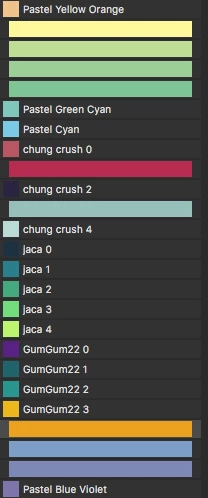


I can't figure out a way of reinstating the name of the swatch once this has happened.

I assume that's not intentional behaviour?

14 replies

Participant
July 10, 2024

Any update on this?  I use specific swatches for my design work and I can't get the names back.

TrishMvhl
Participant
May 25, 2023

Has there been a fix for this? I've got a shiny new Mac, brand new Photoshop... and this glitch is happening. I use my swatch list all day, this is maddening!

ClaudiaR99
Community Manager
Community Manager
December 7, 2022

Hello @yuske05 could you record a video of what is happening and send it to me?.

Please also send me a copy of your System Info. This can be found in Ps > Help > System Info.

My email is clrodrig@adobe.com

Thanks! 

ClaudiaR99
Community Manager
Community Manager
December 7, 2022

Hello @defaultqen7v3nzr211 , @leds2097726 could you please email me sample swatches that are showing this issue? I'd like to reproduce it. My email is clrodrig@adobe.com

Swatches can be exported using the Swatches Preset Panel.

  1. Window > Swatches
  2. Once Swatches Preset panel select the folder or group of swatches that show the issue.
  3. Go to the hamburger menu (top right) and select 'Export selected swatches' and select the location.

This will create a file with .aco, please send that attachement. 

Also please copy System info and save it to a text file. This can be found in Help > System Info


Thanks 


Participant
December 7, 2022

Still not fixed in PS 2023


Participant
December 7, 2022

Hi, same problem here, on the latest version of Photoshop 2023. Very annoying !

Inspiring
October 6, 2022

Hi, I have the latest version of Photoshop this date and I lose swatch names of custom swatch groups whenever I move them for desired order. Not only do I lose the name of any moved swatch, I lose all the names of all swatches within the group. Is this a glitch as well? Thank you.

leds2097726
Inspiring
April 9, 2020
Small list.

No, I can't think of anything that would have caused this. No new extensions, filters etc.

I've gone back to a previous version now anyway,  2020 is a massive car crash.
leds2097726
Inspiring
April 9, 2020
They are .aco files downloaded from Dribbble.
óscar
Participant
April 9, 2020


The swatches color panel loses names in list mode: 


Cheers 🙂