


Sean H [Seattle branch]
Known Participant
January 16, 2019

P: Switching tabs doesn't show the correct image

  • January 16, 2019
  • 64 replies
  • 3439 views

I keep running into render issues in the new PS 2020. Here's the most recent example. I loaded a large pano into the first tab then opened a PSD file into the second tab. This second tab should show me a couch and kitchen as indicated by the view in the layers, yet it's showing me the pano from the first tab. This has happened to me dozens of times in past few days.
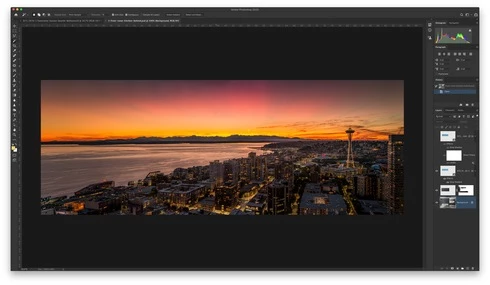

When I pull the tab out, it then renders the PSD correctly:
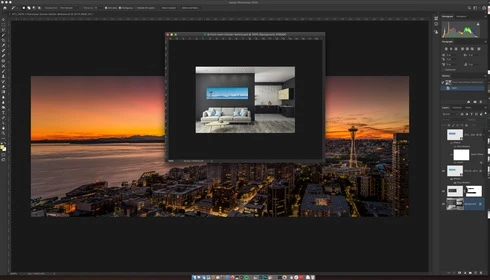

Another issue was when I went to restart the computer and had a dozen files open in PS that weren't saved. PS 2020 just closed it all out and skipped the "Do you want to save?" dialog. Just trashed the file progress.

This topic has been closed for replies.

64 replies

Legend
November 25, 2021

Fixed 21.2 or later

Participating Frequently
June 29, 2020
Sorry; to clarify: I'm not referring to the Artboards issue. I'm referring to the switching tabs issue. The issue you linked here (Artboards) doesn't sound like anything I've dealt with (thankfully).
Inspiring
June 29, 2020
Oh right. There is nothing in the first post or the title to say this is a Mac OS issue. I just think most people in this thread are using Macs. I was just pointing out the same behaviour is happening in windows so it would appear to be non OS specific.
Legend
June 29, 2020
The issue on this thread was a macOS issue. Your issue sounds more like a GPU problem on Windows.
Legend
June 29, 2020
Yes, That's sounds like a different issue that being worked on with Artboards: https://feedback.photoshop.com/photoshop_family/topics/a-problem-on-the-latest-photoshop-21-2-blank-...
Participating Frequently
June 27, 2020
Oh ... maybe I responded to the wrong thread? I am referring to the main issue in this thread (the switching tabs issue). If that's what you mean, then I'll just say that it usually works like this: I have a doc open in a tab; I then open a new doc; the new tab shows the exact same image I had up in the previous tab (same when I switch between tabs). When I start to close all tabs, yes, subsequent tabs after the first will show up as a gray (ie, no canvas showing). Is that what you were asking?
Inspiring
June 26, 2020
Im on 21.2 Windows 10 and this is happening to me. A few images open and I cant switch back to my primary image. Please can you guys get a fix for this. Im going to try and install the earliest version CC lets me.
Legend
June 26, 2020
Sean H [Seattle branch]
Known Participant
June 26, 2020
I'm seeing worse behavior now. I'm experiencing persistent images within layers. If I edit text, all of a sudden it looks like I have a duplicate layer of identical text below that I'm overtyping. I also see ghost images when I move layers. 
[ ◉"]
Legend
June 26, 2020
Is the canvas turning black or grey for you?