


Sean H [Seattle branch]
Known Participant
January 16, 2019

P: Switching tabs doesn't show the correct image

  • January 16, 2019
  • 64 replies
  • 3471 views

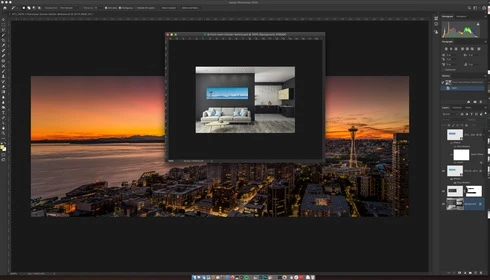
I keep running into render issues in the new PS 2020. Here's the most recent example. I loaded a large pano into the first tab then opened a PSD file into the second tab. This second tab should show me a couch and kitchen as indicated by the view in the layers, yet it's showing me the pano from the first tab. This has happened to me dozens of times in past few days.
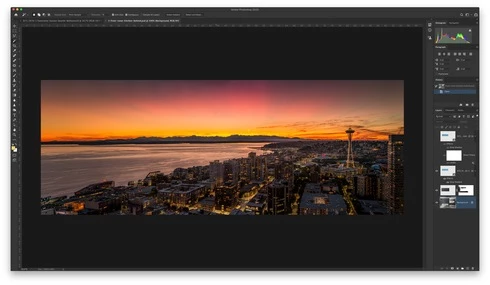

When I pull the tab out, it then renders the PSD correctly:

Another issue was when I went to restart the computer and had a dozen files open in PS that weren't saved. PS 2020 just closed it all out and skipped the "Do you want to save?" dialog. Just trashed the file progress.

This topic has been closed for replies.

64 replies

mollyt61703068
Participant
March 5, 2020
I'm back on Mojave and have yet to have any of the viewing problems like I did in Photoshop with Catalina.
Participating Frequently
March 5, 2020
I also like to point out that since my initial post (2 weeks ago) I got a brand new macbook pro (16") and a brand new Photoshop installation, and I still experience some issues w the view management.
Participating Frequently
March 5, 2020
I haven't experienced the tab switch problems with the new version(21.1.0) yet (however not used too much) but I just experienced an error when opening a document (I was working with it before, but closed, the reopened with Recent documents).

Layers displayed but no view.

Clicking the layer and hitting Cmd+T to select the object does change the toolbar, but the view is missing.

It looks it is somehow related to the tab management since when the problem kicks in the tab and view management is completely broken. Only a restart helps.


Legend
February 26, 2020
For folks seeing an issue with the document tab not updating when changing tabs, did 21.1 fix that issue for you?

Inspiring
February 25, 2020
I am having the exact same problem right. It happens every single time...
Participating Frequently
February 20, 2020


Hi,


there is an issue with the latest Photoshop (21.0.3), the problem occurred to me several times already.

Description:
I have couple of documents open and hit Cmd+N to create a new document. The new document tab is opened but the view is not refreshed. It still shows the previously active document I was working on. If I close the previous documents, so that I only have the newly created tab opened, I only see an empty view (no document layer).
A full close/open of Photoshop fixes the issue.


Cheers
Janos
mollyt61703068
Participant
February 20, 2020


I'm having problems with my photoshop screen freezing. I can still click through the different project tabs within the window, but the screen will be frozen on last project open. I then have to force quit and reopen everything. I have the latest update and still have issues.
Inspiring
February 16, 2020
Hi! Same is happening to me in Photoshop 2020.
Fresh install of Creative Cloud. Mac Catalina updated as of 2020-Fev.

Hannah Nicollet
Community Manager
Community Manager
January 31, 2020
Hi Briana,

Sorry for the frustration! It's interesting that the issue has escalated for you to an almost 100% reproducible situation. I'm emailing you to see if we can set up a screen share to get some diagnostics from your system.

Regards,
Hannah
Inspiring
January 23, 2020
Hi, I had same issue on PS 2020. Happened only when I opened several smart objects. However I may have found a way to get photoshop to display the correct images. Click save as (either via the shortcut keys or the menu option) for the smart object, in the new window you'll find several .psb files, select the one with the same file name .psb as the active tab, Photoshop will ask if you want to replace the file, click yes, your smart object image would be restored on that tab whether or not you choose to continue with the process.