


Sean H [Seattle branch]
Known Participant
January 16, 2019

P: Switching tabs doesn't show the correct image

  • January 16, 2019
  • 64 replies
  • 3471 views

I keep running into render issues in the new PS 2020. Here's the most recent example. I loaded a large pano into the first tab then opened a PSD file into the second tab. This second tab should show me a couch and kitchen as indicated by the view in the layers, yet it's showing me the pano from the first tab. This has happened to me dozens of times in past few days.
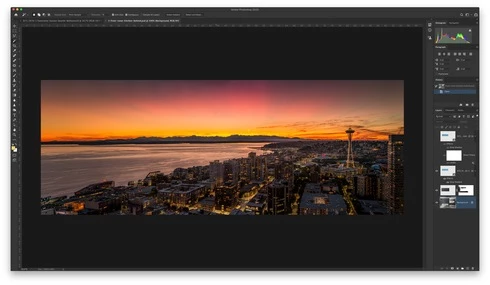

When I pull the tab out, it then renders the PSD correctly:
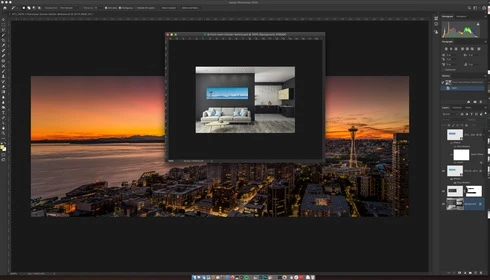

Another issue was when I went to restart the computer and had a dozen files open in PS that weren't saved. PS 2020 just closed it all out and skipped the "Do you want to save?" dialog. Just trashed the file progress.

This topic has been closed for replies.

64 replies

Participant
January 7, 2020
I'm having this issue as well. Contacted adobe customer support and they told me to trash the preferences file and that didn't do anything to solve it. I'm on Mac Catalina and 2020, never had this issue with 2019 so I'm pretty sure 2020 is the problem. Anyone seen a fix? It's escalated now to happening almost every single time that I have two images open and I can't get anything done.
russg22417893
Inspiring
December 30, 2019
Hi Jeff, I have this issue fairly often as well. Normally I overlook, but when working with large files and multiple smart ojects and tight timelines, it gets rather frustrating. Any word on this one yet? Would ideally love to find a solution that doesn't trashing preferences, if possible (spent many years fine-tuning those). Thank you!

- Russ
jacobg66926630
Participant
December 23, 2019
I'm also having this same issue for both Adobe Illustrator 2020, and Photoshop 2020 running macOS Catalina on my 2017 MacBook Pro.  Sometimes I can go hrs without it happening though, so its not always an issue for me, but it really kills the workflow when it does.  Basically all tabs, no matter if they hold a document pain or a tool panel, can suddenly stop switching to whatever tab you switch to.  I can resize the program or window and have that update it for some reason, but that is no way to work.  Only option is to close the program and open it again. 
Inspiring
December 19, 2019
One thing I forgot to mention: this started happening to me since upgrading to CC2020. The reason I originally mentioned it happening when upgrading to Catalina was that I upgraded both around the same time so I'm not entirely sure which is to blame. Maybe a combination of the two? I'm not sure.
Participant
December 19, 2019


Viewing more than one image at a time is a current issue for me since the upgrade, amongst others.  When I have two images opened at one time and click to the 2nd image, the 1st image remains on the screen along with all actions.  I try going to "arrange" to have them side by side and both images disappear, except for the actions from image 1.  I'm using Photoshop CC.  there are other issues, but I will try to conquer this one first.  I'm on a Mac with Catalina.
Participant
December 19, 2019


When switching from different tabs in the panels group the information display doesn't change to the selected tab. 

For example going from colour to libraries then to swatches the panel still shows the colour options. The same happens for all tabs open. This then causes parts of the window to disappear showing the windows behind. 
Inspiring
December 19, 2019


The panels in the user interface for both Illustrator and Photoshop have started not rendering properly (aka disappearing) both for the document panel and for workspace panels ever since upgrading to Catalina on Mac. This most commonly happens when pressing "F" to switch between document views. Other times when switching from another application to the Illustrator or Photoshop window, the entire document disappears despite the Window dropdown menu saying it is open.  

I have contacted Adobe Customer Support and they have continually told me to delete my preference files (Illustrator) or turn on/off Legacy compositing (Photoshop). Despite doing these, neither has fixed the problem. How can this be solved for good? It's highly disruptive to my workflow.
Legend
December 3, 2019
Sean, one other thing to try would be to resize the whole Photoshop frame/window to see if that forces it to update. Let me know if that makes it work/update.
Sean H [Seattle branch]
Known Participant
November 16, 2019
Not sure you'll find one with Radeon 7.... I'll try disabling GPU next time this issue arises. I'm also moving up to Catalina soon.
[ ◉"]
Sean H [Seattle branch]
Known Participant
November 16, 2019
Will do. I'll monitor. Thanks!
[ ◉"]