


Participant
January 29, 2019

P: Text tool Problem: A bunch of small text is all over my screen

  • January 29, 2019
  • 38 replies
  • 9223 views

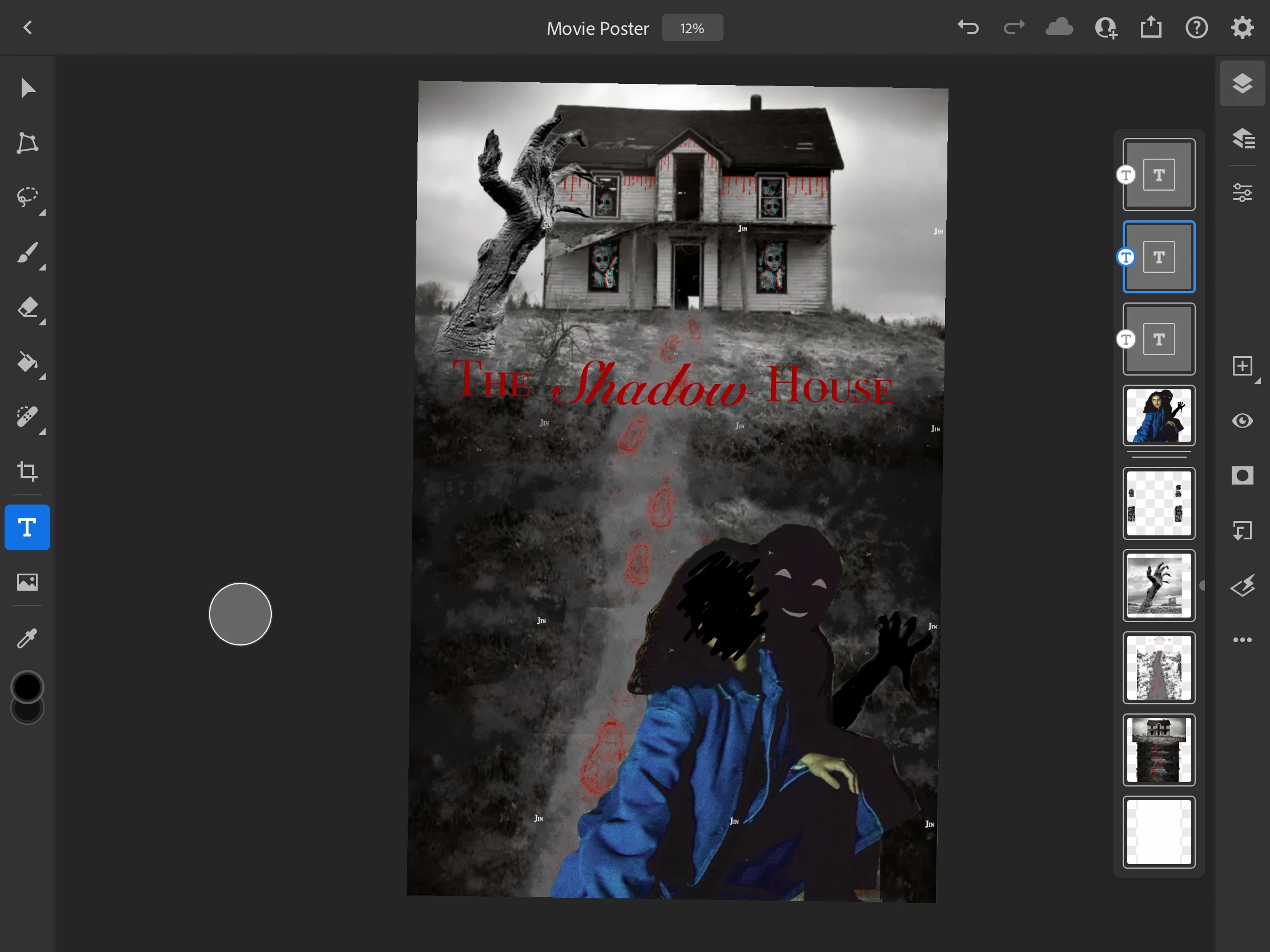
So like usual, I made a text box to start typing but I don't know what happened because now there is the same word in various small fonts all over my work. I have no idea where it came from. If you look at the photo, there is the word "Jin" in white everywhere and I can't seem to remove it.
38 replies

Participant
August 13, 2025

FIX
Click text layer
(font and font format should show up blank) > Reselect font > it should disappear


Participant
August 13, 2025

See my latest reply.

Participant
August 13, 2025

I MAY HAVE FOUND A SOLUTION
Click on your text layer (dont double click to edit the text, just click the layer > go into the font selection drop down > reselect your font that you had selected. (The two drop down bars were blank when I first clicked on the layer and didnt show a font selected)

I think it's a glitch with a downloaded font. When I clicked the layer, reselected my font from the drop down menu, all the patterning text disappeared from my project and it fixed the issue. 

Let me know if this works for yall! It was giving me a headache


ralphc37960410
Participating Frequently
July 14, 2025

Just wondering, was anyone else with this issue using VARIABLE FONTS? I loaded some fonts through Adobe right before this and some were variable. I deleted some fonts and it seems like the issue went away, once I reset all type. I'll see if it comes back. 

ralphc37960410
Participating Frequently
July 14, 2025

Can someone please chime in on this? I'm running the latest PS 2025 and having this repeated text issue. It's ruined multiple files and I have deadlines. And the issue which started in one file is now transferred to another, text that was never there on the second file. What do I do?????

Participant
April 19, 2025


 Here in 2025, running into the same issue... It seems to have sprung up out of nowhere. I've been using PS all year without this issue. Today, it is plaguing all of my projects. I've tried manually erasing the excess type but it seems to create even MORE fragments when I do that. Nothing in preferences has helped. Using the paragraph text frame as mentioned by the Adobe Employee didn't help. It's ANY text I create that causes this issue. I will try reinstalling but I've tried everything else I can think of so far.

Participant
April 19, 2025

infuriating that this has not been fixed by now
--
Beau Comeaux


[weblink removed]


Participant
November 27, 2024

For me also the same problem. After wasting a lot of time and energy figuring out what is going on, I came to this thread. Seems the problem exists already for a while and not being fixed. Clear for me now. Not going to waste more money on this

Participant
November 14, 2024

same problem.... none of the workarounds work for me. i'm loathe to lose the progress and revert back to pre-text problem state. ADOBE, pls fix this!!!

Participating Frequently
November 2, 2024

Well, if it makes you feel any better, I first complained about this problem in early 2021 and it's still happening. So clearly, Adobe is working diligently to find a solution. Just keep paying those monthly fees. They promise, a solution is coming soon. 👍

Participant
November 2, 2024

I have this same issue every single time I use photoshop. It is infuriating. I will get SO close to finishing, then the last word or even letter I have to type flies all over my image. I have to delete ALL the text and start over. This time, its gotten worse and worse and I am unable to finish my photo. I have had to revert to finishing my photo and applying text on a separate application. It is insane this problem has been happening for so long and they have yet to fix it.