
jakubp66048398
Participating Frequently
August 30, 2013

P: Type tool - When I hit space bar cursor go to beginning of line

  • August 30, 2013
  • 16 replies
  • 6623 views

When I'm on line end and hit space bar cursor go to beginning of line but hen if I start type some letters it goes back to end. This is in paragraph text.

In point text when text is align to left (screen)
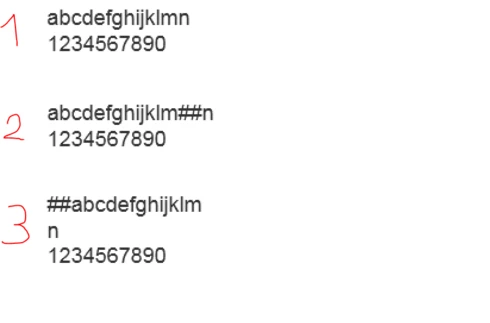
1. Point text with two lines of text
2. With text tool I clicked between "m" and "n" and wrote "##"
3. This happened after I hit enter
This topic has been closed for replies.

16 replies

Participating Frequently
July 10, 2020
Photoshop spacebar suddenly works in reverse in windows 10.  How do I fix this?
Inspiring
June 25, 2017
U r a life saver thanks david
Inspiring
January 25, 2016
Character settings reset works, thnx
David Mohr
Participating Frequently
March 5, 2015
Hi Lai,

Have you checked your language/composer settings?  This is NOT something that we hear about almost ever and is directly tied to which composer you're using.  If you want to get rid of the issue entirely, all you probably need to do is follow the steps outlined...

Thanks,
David
Inspiring
March 5, 2015
on Character tab....try to reset your Character settings....that should do the trick! I only use point text, never used a textbox ever! I always have this trouble in Photoshop, at first I just create another text layer as I'm always in a rush...but with the recent issue, I had more time to find a way to fix it....and resetting the Characters helped!!!!
Inspiring
March 5, 2015
Thankyou so much its so helpfull ................................. 🙂 🙂 🙂 🙂 🙂 🙂 🙂 🙂 🙂 🙂 🙂 🙂 🙂 🙂 🙂 🙂 🙂 🙂 🙂 🙂 🙂 🙂 🙂 🙂 🙂 🙂 🙂 🙂 🙂 🙂 🙂 🙂 🙂 🙂 🙂 🙂 🙂 🙂 🙂 🙂 🙂 🙂 🙂 🙂 🙂 🙂 🙂 🙂 🙂 🙂 🙂 🙂 🙂 🙂 🙂
David Mohr
Participating Frequently
January 20, 2014
Howdy Rich,

Changing the flow of text can only be done when in the Middle Eastern and Southasian text engine, as that is the only time this UI is displayed. If you're seeing this control, then you are using that text engine.

Thanks,
David
Inspiring
January 18, 2014
Open the paragraph panel, and down in the lower left corner you''ll see the paragraph directional buttons just above the "Hyphenate" check box... mouse over the buttons, and the tool tip will tell you which is which - or just notice the arrow beside each icon.


Image is not available


Mine was somehow set at "Right to Left". I switched it back and that was that 🙂
David Mohr
Participating Frequently
January 13, 2014
Hi Gemma,

The association between type engine and a type layer is permanent. That means if you are using a file that you already created with the other engine, it will continue to use that engine in the future.

Go ahead, change type engines, and start a new document and you will be fine.

Thanks,
David
Inspiring
December 23, 2013
I tried following this, but like others even when it is set to left-to-right, with multiple restarts (and deleting settings file) the cursor goes to the front and any punctuation will be placed there. Really strange... It must be a broken file :(. The only thing that works for me now is to start again choosing the 'East Asian' text engine which was set by default.
I use Windows 8.1, not sure if that effects anything.