


Participating Frequently
October 29, 2014

P: Typing font name into font search is losing first letter (CC 2014)

  • October 29, 2014
  • 22 replies
  • 1290 views

When typing a font name into the font dropdown to quickly change fonts in Photoshop (CC 2014), the first letter is automatically highlighted, causing it to get erased when attempting to type a whole font name. Hard to explain, harder to title, excruciating to try to search for (especially since this site seems to be having some problems today). If there's another topic for this, please do point me there.

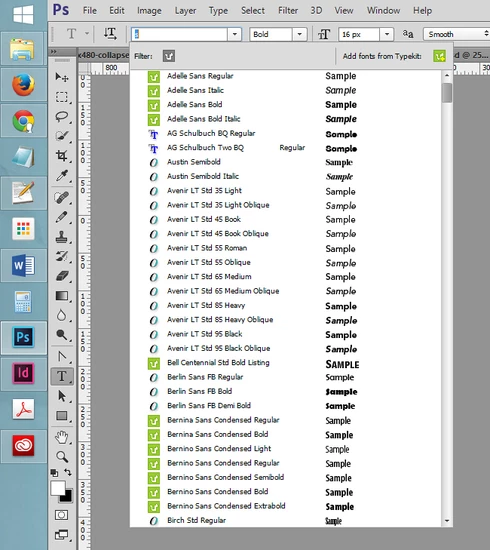
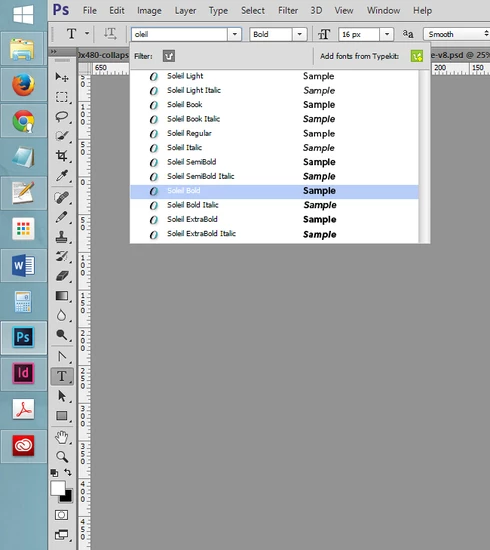
I've attached a couple screenshots that probably explain this better than that paragraph, and may help any Adobe personnel recreate the problem.

Step 1: Click on the font list, then start typing. First letter gets highlighted after being typed.

Step 2: Continuing to type a font name causes the highlighted first letter to be replaced, erasing it.

This only seems to be an issue in Photoshop - Illustrator and InDesign have not presented this problem yet from my experience.

This topic has been closed for replies.

22 replies

Inspiring
January 6, 2015
This was acknowledged a month ago. I'm updated to the latest, but still having this issue.
Participating Frequently
December 24, 2014


CC 2014: When In Type Tool: When I click the drop down for the fonts and type it always drops the first letter. Please fix it before i slit my throat.

Example: Click font drop down to highlight. Type tim for times. Only im will be in the selector. Fix it Immediately.
David Mohr
Participating Frequently
December 3, 2014
Howdy Fadi,

We're aware of the problem and looking into a solution.  Hopefully, we'll have it available soon.

Thanks for the feedback,
David
Fadi Habib
Participant
December 3, 2014
Yes! Exact same problem. Clearly shows what's happening. Thanks for making that.
Fadi Habib
Participant
December 3, 2014
Also having this bug! So frustrating! Please fix this Adobe, you're our only hope.

And while you're at it, PLEASE, give us the option to change the default save folder for save for web. I'd like my Save for Web to save in the original folder of the PSD. Right now it saves in whatever folder you saved in last. Very annoying and time consuming to navigate my folder tree for a quick save.
Participating Frequently
November 12, 2014
Awesome, thanks for the quick response! I look forward to the fix.
David Mohr
Participating Frequently
November 12, 2014
Wow, this was NOT happening before.  You have a perfectly valid bug there.  I've gone ahead and logged it -- it should be resolved soon.

Sorry for the inconvenience,
Thanks,
David
Participating Frequently
November 11, 2014
I can get a video, but duncan's is a good one. It's really simple to recreate - just start typing and it'll happen.
Participating Frequently
November 11, 2014
I can get a video, but this is a good one. It's really simple to recreate - just start typing and it'll happen.
Inspiring
November 10, 2014
The same thing happens here; when for example I want to use the font "Open Sans", it automatically searches for "Pen Sans", the O I typed get selected and disappears when I type the rest of the font name.

I've created a video screen grab to demonstrate: Youtube-link

I'm running the latest 64bit Photoshop CC 2014 on Windows 8.1