


P: Typing font name into font search is losing first letter (CC 2014)
When typing a font name into the font dropdown to quickly change fonts in Photoshop (CC 2014), the first letter is automatically highlighted, causing it to get erased when attempting to type a whole font name. Hard to explain, harder to title, excruciating to try to search for (especially since this site seems to be having some problems today). If there's another topic for this, please do point me there.
I've attached a couple screenshots that probably explain this better than that paragraph, and may help any Adobe personnel recreate the problem.
Step 1: Click on the font list, then start typing. First letter gets highlighted after being typed. 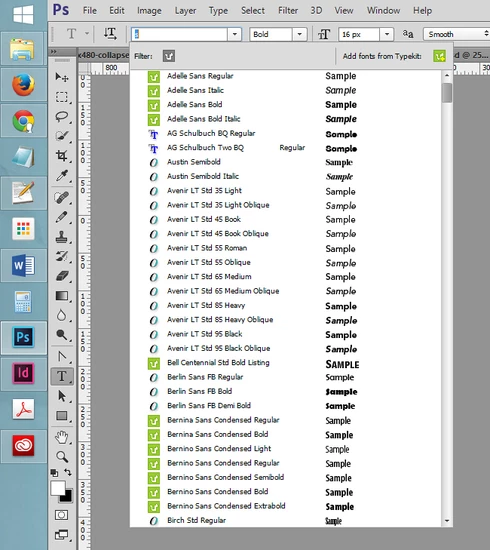
Step 2: Continuing to type a font name causes the highlighted first letter to be replaced, erasing it. 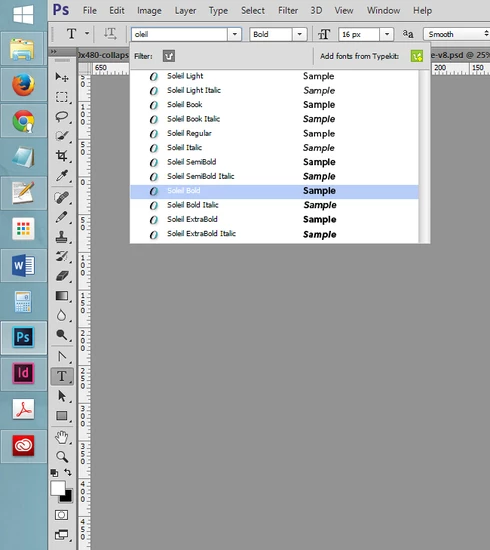
This only seems to be an issue in Photoshop - Illustrator and InDesign have not presented this problem yet from my experience.
 AdChoices