


Inspiring
October 22, 2018

P: Undocked panels show on top of the Home screen

  • October 22, 2018
  • 15 replies
  • 766 views

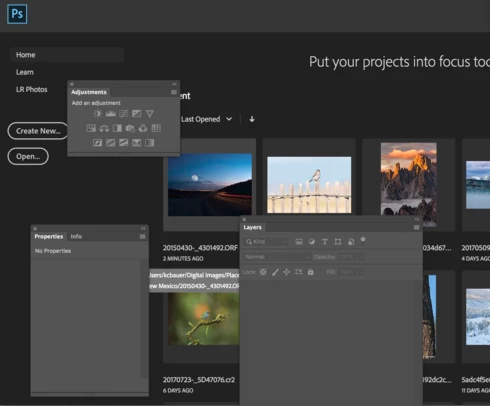
If you have any undocked panels in Photoshop, when you close all of the open documents and return to the Home screen, the panels are on top of the Home screen. It appears that if the panels are docked then don't behave like this.  Here's a screen shot.


I

15 replies

Participant
January 17, 2024

It's just a bug, not like that in old versions.

C.Cella
Legend
March 14, 2022

The info Panel is always displayed even when selecting recent files.

IMO the Info panel should say hidden until we choose a file and open it.


I attach a screen capture to illustrate.


Inspiring
January 15, 2019


The workspace in Ps CC 2019 is still bugged even after most recent update. Panels and menus dont close at home screen (where you select recent files) when they've been moved from their default location. It's been this way since it came out. Also happens on my friends account/computer. So only the menus that have been moved do this.

Inspiring
October 26, 2018
So a nice optimization for working with floating documents.  Try working with it when you consolidate documents to tabs, then click the Home button to go open another document and the Open button is covered up.  You say press the tab key to hide the floating panels.  Yep, hides them.  Then I open the document and guess what.  I have to hit Tab again to get tools, etc. back.   Do you seriously consider that a good UI design?  Maybe an option should be set up that allows the user to choose whether or not to hide the panels.  
Legend
October 26, 2018
I'm simply pointing out a workflow that would be impossible if we hid floating panels when the home screen was is showing. What do we do with floating documents? Hide those? What if the customer wanted to see the name of a floating document while perusing recent files in the home screen that might relate the open file they're working on?
Inspiring
October 26, 2018
OK.  I'm done trying to make a point that Adobe doesn't want to listen to.  I'm a 34 year software veteran and I know one thing for sure.  Ask your customers before you implement something that you seem to think is a great idea and they don't.  If this is such a great idea, do a survey of your customers and see how many like the "new improved" behavior.  
Legend
October 26, 2018
It's to support editing floating documents with floating panels with the Home Screen active. There are many different layouts that customers use, and this designed behavior support those. 

If you don't want floating panels over your home screen you can hit Tab to hide them and bring them back when you're done.
Inspiring
October 26, 2018
Guess I'm missing something from your example.  On your Home Screen you don't have any of the floating panels in the way of the images or options available on the home screen.  It also looks like you might be using dual monitors so you can see the document you have on the right visible at the same time as the home screen.  I just can't imagine why this new behavior would be intentional .

Legend
October 26, 2018
What about this scenario where a customer wants to edit their document and have a window with the Home Screen visible active:


This might be a desired workflow which wouldn't work if the panels were hidden.
joosniz
Participant
October 26, 2018
If it's intended then the design does not seem very well thought out. What's the point of having the Home button while you have floating windows if you can't properly see the home screen when you press it?

Right now you have to minimize or dock all documents and hide the panels (which normally is done with TAB but if the home screen has focus it switches focus between "Home", "Create New", "Open" etc.) to be able to see anything based on what your layout looks like.

Why not do it like "Select and Mask" is done in PS CC 20.0, by temporarily switching layout. Maybe taking the extra step to hide or minimize the documents temporarily for you as well?