

Participating Frequently
April 26, 2020

P: Use brush as an eraser (german)

  • April 26, 2020
  • 40 replies
  • 5220 views

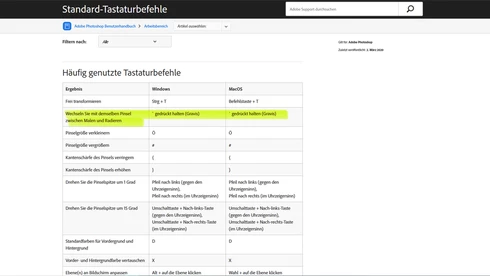
The function to use the chosen brush as an eraser doesn't work in the german Version, even though it is mentioned in the official list of shortcuts.



This topic has been closed for replies.

40 replies

Participant
October 15, 2024

wanted to add an Information. German Keyboard. MacOS. I can use the "Brush Toggle Erase"-shortcut. But only when asigning it to any other key than "<". The "<"-key, is assigned to "first brush". When I unassign the "first brush" in the KBSC, it is still assigned. Even when i assign any other key for "first brush", it is still assigned to the "<"-key. 

When assigning the "Brush Toggle Erase" to the "<"-key, u can erase with your brush, but when letting go of the "<"-key, it goes to first brush. Always. 

A pitty, because the "<"-key is right, where you have your left hand when painting in PS. But this key is hardcoded to "first brush". But still a big upgrade to be able to erase with your brush

geoffreyn49540042
Community Expert
Community Expert
October 16, 2023

Hello,

I made a plugin that targets this very issue, @PECourtejoie mentioned it in a comment earlier, except the name has been changed to KeyFlow. The Windows version has been released in the creative cloud marketplace and a version for MacOS is 70% complete.

I'm giving it out for free this week to 10 people from this community. Just send me a DM

Cheers


patriks83324899
Participant
May 25, 2023

Good news is this works, bad news is when you release the hotkey to go back to normal paint mode, the brush changes to another brush (possibly the "first" or "last" brush). Super annoying.

Participating Frequently
May 11, 2023

@chad.rolfs 
Ok... I have to correct myself.
There is an effect, when I use a brush... since I often use the pen, there was no effect, so...
It is only working with the brush 😞

Participating Frequently
May 11, 2023

@chad.rolfs 
This would be indeed great news, if this would work.
unfortunately, at my machine I only can apply a shortcut ... however, when I press the key, nothing happens. 😞
I have Windows 10 and just updated PS to 24.4.1 ...
Absolutely not effect when pressing the assigned key.

PECourtejoie
Community Expert
Community Expert
May 1, 2023

Wonderful, thank you for championing this, @chad.rolfs !

c.pfaffenbichler
Community Expert
Community Expert
April 27, 2023
quote

Great NEWS!  With the latest release, 24.4, we have exposed this feature to apply a custom KBSC so you can use it with a non-Engish keyboard/OS. 

Good news indeed! 


How about allowing the setting of keyboard shortcuts to select Whites, Neutrals and Blacks in the Selective Colors Adjustment? (Since the default shortcuts have been removed a while back.) 

Participant
April 20, 2023

This is some great news indeed, thanks for looking into this.

But I just realized this nice little feature only works with the brush tool and not with the pencil tool.

Pleaaase add this keyboard toggle for the pencil tool, too.

It was the actual reason I was looking forward to this update and I think it makes a lot of sense to expose it for the pencil.

chad.rolfs
Participating Frequently
April 17, 2023

Great NEWS!  With the latest release, 24.4, we have exposed this feature to apply a custom KBSC so you can use it with a non-English keyboard/OS. 

PECourtejoie
Community Expert
Community Expert
March 31, 2023

Hi, for Windows users, there is a promising Plugin, Master Keys that targets this very issue (incredible that someone has to write a plugin to work around the lack of an entry for a given funtion in the keyboard shortcut editor...)

https://edgidesign.com/portfolio/master-keys-for-photoshop/