

Participating Frequently
April 26, 2020

P: Use brush as an eraser (german)

  • April 26, 2020
  • 40 replies
  • 5220 views

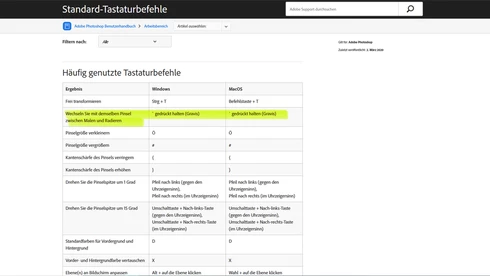
The function to use the chosen brush as an eraser doesn't work in the german Version, even though it is mentioned in the official list of shortcuts.



This topic has been closed for replies.

40 replies

Participating Frequently
March 31, 2023

On windows, i've just discover a quite easy fix. Using Microsoft Keyboard Layout Creator you can remap any key you want with any character, may it be another language symbol. So just remap one key to the US tilde key `~ which output is ` (unicode U+0060)

more explanation here : https://community.adobe.com/t5/photoshop-ecosystem-discussions/workarounds-for-the-non-working-tilde-shortcut-on-non-us-keyboard-win/m-p/13694303#M719654

Participating Frequently
March 30, 2023

For windows user :

Workaround 1 : change your keyboard location (language) per application in advanced keyboard parameter. After that you have to change language once whenever you use an app then it will remember it.

Workaround 2 : remap your key using Microsoft Keyboard Layout Creator on official microsoft website. I have a french keyboard and remaped the ² key to ` key (accent grave, which unicode is U+0060). Validate layout and name it, test it, build package, open created folder, intall.exe, then log out windows, log in, change to your new keyboard layout (win+space) et voilà!!! works great and my layout still azerty ! (works with win 11 even if not mentionned on website)

And you can remap any (more or less) key you want with symbol and other not available in your language, you can use charmap.exe (included in windows) to find them and their unicode. ((!be careful, works also with windows login password)


(but sadly workaround 2 does not work with tourbox, so still waiting for a proper fix...)

Chad Rolfs
Adobe Employee
Adobe Employee
February 10, 2023

This has NOT been fixed or addressed.  It has been logged as a bug and a larger feature to better support keyboard shortcuts for international keyboards.  This particular keyboard shortcut is not exposed in the Customize Keyboard Shortcuts dialog so it can't be re-assigned unfortunately.  I will keep pushing on this.  Thanks for your patience. 

Inspiring
February 10, 2023

@CShubert I was about to answer the same thing as @PECourtejoie : how was this issue resolved ? It is still showing "~" key for french version 

I'm on PS 23.3.2 and the keyboard shortcut for "Toggle between painting and erasing with the same brush " is not editable in Photoshop.

PECourtejoie
Community Expert
Community Expert
February 10, 2023

Hi, @CShubert in this case, could you be kind enough to share which key should German or users of other locales use to get that feature to work when the key is not available in their keyboard?


The French ang German helpx page still lists Tilde, not available on the AZERTY or QWERTZ keyboard: https://helpx.adobe.com/be_fr/photoshop/using/default-keyboard-shortcuts.html

and https://helpx.adobe.com/de/photoshop/using/default-keyboard-shortcuts.html

Participant
February 9, 2023

@CShubert what does it mean for the german qwertz keyboard (and other non-US layouts)?

I'd like to use the discussed shortcut to temporarily toggle the current brush to its erase mode while holding that key, like what the tilde (~) does on the american keyboard in Photoshop.

Using an Apple keyboard on macOS I tried many keys and combos, but none of them seems to have the desired effect. In the shortcut preferences, I couldn't find any entry corresponding to that toggle neither.

Could you give me any hint on how to use it?

That shortcut would be really useful. I'd preferably use it with the key below the ESC key (a ^ on German keyboard).


CShubert
Community Manager
Community Manager
February 9, 2023

This issue was resolved in Ps 22.5.


Thank you,

Cory

Inspiring
February 8, 2023

It seems it doesn't work on a french keyboard neither. But I have a mac keyboard on a Windows machine, so it is even more complicated because the shortcut should be "~" and it is not a key...


Anyway, there is a workaround, because there is a shortcut to change the "blend" mode of the brush which is "SHIFT" + "+" or "SHIFT" + "-" 
On top of that, there is a shortcut for each of the blend mode, and for "clear" mode, it is "ALT"+"SHIFT"+"R".
For the "normal" mode, it is "ALT"+"SHIFT"+"N".
Hope this works for you, even if I guess you've found a workaround since these ancient times

khellstr
Known Participant
April 24, 2021

I found partial solution, at least for Scandinavian keyboard. 

It is possible to use different input language for different programs in Windows. So I just use UK keyboard with Photoshop. I rarely type anything in PS and most of the keys are in same place in UK and Scandinavian keyboards. 

https://answers.microsoft.com/en-us/windows/forum/all/how-to-set-a-keyboard-input-language-for-a/1f5ce55c-26ef-485d-b40c-43e19d35d1de

Fabiantech
Inspiring
January 1, 2021

So "Unfortunately, it would appear that this is an issue in Italian too." is the only hellp/answer to this programming desaster by an official Adobe Rep?

- After months.