

Participating Frequently
April 26, 2020

P: Use brush as an eraser (german)

  • April 26, 2020
  • 40 replies
  • 5220 views

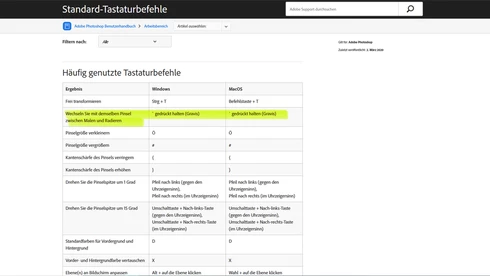
The function to use the chosen brush as an eraser doesn't work in the german Version, even though it is mentioned in the official list of shortcuts.



This topic has been closed for replies.

40 replies

Fabiantech
Inspiring
January 1, 2021

@dmohr 

Is there anybody at Adobe who _does_ have access to a non-US-system?

Is there anybody at Adobe who _is_ familiar with new features?

Is there anybody at Adobe who is familiar with quality control?

Is there anybody at Adobe who cares about the future of PS like I do?

Fabiantech
Inspiring
January 1, 2021

Is there a solution yet?

How do you use the erease feature on non-US-Systems?

(By the way, programming it to be ~ for american keyboards only without any flexibility in key binding seems a total lack of basic programming skills in the first place to me...)

Participating Frequently
November 9, 2020

I would say, even if this would work, it can't be the answer to use the "wrong" keybordlayout to become capeable of an officialy documented KBSC....

PECourtejoie
Community Expert
Community Expert
September 18, 2020

I have to check on my mac, on a French Ps, MacOS and AZERTY keyboard, but I believe there's also a similar issue that the listed KBSC does not work.

PECourtejoie
Community Expert
Community Expert
September 18, 2020

@dmohr I believe there might be a possible shortcut conflict, as < > are used to switch to the first and last brushes, if I'm not mistaken, while the german documentation lists the English placement of those keys (shift+, and shift+.), and on the german keyboard, this key combo is wrong. There are many problems like that in the french doc for KBSCs.


Can a german user tell me what are the keys they really have to use to select the first and last brush?


Keyboard mapping issues like these abound for localized users, and most of the times, the desired function is not even listed in the kbsc editor.

Noremac
Participating Frequently
September 18, 2020

Not sure if this will help but it does for me on Windows 10 you need to use "US keyboard" in your preferred language not "United States-International" keyboard I hope this helps

khellstr
Known Participant
July 16, 2020
This is an issue with Scandinavian keyboard too! 
David Mohr
Participating Frequently
June 1, 2020
Unfortunately, it would appear that this is an issue in Italian too.
Inspiring
June 1, 2020


I am following many tutorials regarding the latest version of Photoshop 2020. In this version there is the possibility of using the brush and erasing alternately with the tilde key. However, Tilde does not exist on the Italian keyboard, nor does that of the grave accent that you have indicated as an alternative exist. I therefore ask technical support to indicate a valid key for the Italian keyboard or to find an appropriate solution.