

Participating Frequently
April 26, 2020

P: Use brush as an eraser (german)

  • April 26, 2020
  • 40 replies
  • 5220 views

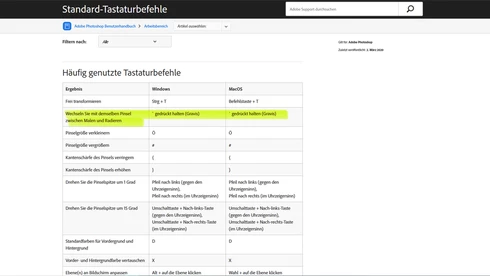
The function to use the chosen brush as an eraser doesn't work in the german Version, even though it is mentioned in the official list of shortcuts.



This topic has been closed for replies.

40 replies

Participating Frequently
May 24, 2020
is there an update to the logged bug so far? Is it possible to review the status of the logged bug?
David Mohr
Participating Frequently
May 5, 2020
The shortcut is actually a new one, added recently in 21.0, that's why I wasn't familiar with it.
Thanks to the current situation, I don't have a physical machine or keyboard I can connect with.  At least on Windows.  Using VPN, however, I don't see a problem when I set my keyboard to German.  Similarly, I'm not seeing a problem on my Macbook Pro set to German either.  I've logged a bug to have this investigated and it appears to be an issue in Czech as well.  Strange.

The new functionality is SUPPOSED TO allow users to erase with the same brush they were painting with.
Thanks for letting us know and hopefully we'll get this resolved soon.  Meanwhile, if this is happening in your language too, please add a comment so I can have those languages checked as well (all my equipment is locked down).
Thanks,David
Inspiring
May 5, 2020
hmm, then it is a bug or not full supported with every brush. I just did a test with the standard brush and not a custom one. maybe some Adobe Member can answer the tool function better.
Participating Frequently
May 4, 2020
It jumps to erase, but dont hold the used brush this way. It uses a round soft brush then, unfortunatly.
Inspiring
May 3, 2020
hi, try to use the ">" key on your German keyboard. I think it should be working. Maybe the documentation needs an update. 
Participating Frequently
May 3, 2020
Hey David, 

I'm working on Windows 10, V.1909.

The Keyboard is German Layout, German physical device. 

I've tried both, the key below esc, left of the number 1 (on german Layout, this is not the gravis, it is the Accent circonflexe (^)) and the Accent Grave (on german Layout on the left of the backspace, together with shift. (`)

I'm available for a screenshare, just need to make out the Time.

Thanks
Sascha
David Mohr
Participating Frequently
April 29, 2020
Hey Sascha,
That's very strange, because I tried it this morning.  Are you on Windows or Mac?  Which OS version?  You're using a German keyboard layout as well as a physical German keyboard?  And the ` that you're pressing is below ESC and to the left of the number 1?

Would you be available for a web-hosted screenshare?  There's something more here, I think.
Thanks,
David
Participating Frequently
April 29, 2020
Hello David, please log a bug again, I am working with 21.1.2, German Version. This functionality won't work with the Gravis - Key (`), tested it again on another Layer with different Brushes.

Thanks
Sascha
David Mohr
Participating Frequently
April 28, 2020
Hello Sacha,

My mistake.  This functionality was added for 21.0 and does appear to be working in English and German on both platforms.  You need to make sure you're not working on the background layer, as erasing there leads to non-transparent results.
Thanks,
David
David Mohr
Participating Frequently
April 27, 2020
Hallo!
Okay, this appears to be a problem in English too.  I've gone ahead and logged a bug. 

Thanks for letting us know,David