Inspiring
June 22, 2014

P: Various issues (Focus Area Selection)

  • June 22, 2014
  • 66 replies
  • 1148 views

Since downloading Photoshop 2014 yesterday, I've noticed a variety of issues that make the program almost unable to use.

1) Selection issues. All selection tools *seem* to work normally until I attempt to use the new focus-range selection tool. After doing so, any selection tool I use (lasso, rectangular marquee, etc) result in me getting selections such as these:
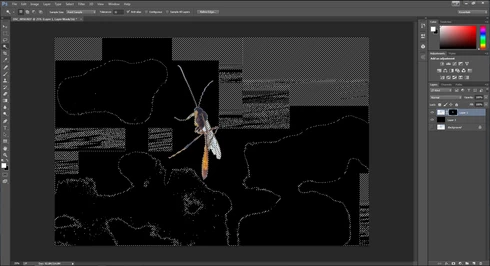


They consistently show up as selected rectangles of various sizes, spread out throughout the canvas. Any additional selections made from this point only amplify the errors.

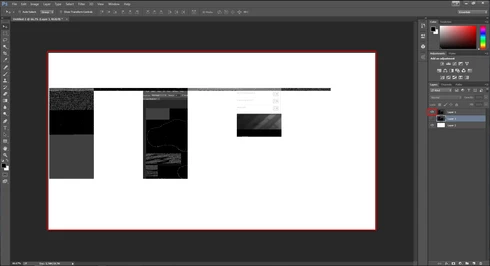
2) Also possibly caused by the same tool, I started to develop other issues like layers disappearing from the canvas, despite being visible in the layer panel and visible glitches/artifacts on the screen when opening separate windows (such as the save window).

(Artifacts and visibility issues after taking a screenshot, pasting into a new window, and cropping)

I'm currently using Windows 7 on an NVIDIA gtx 670. I have all of the latest drivers, and have no problems with the regular CC version of photoshop.

I have also tried re-installing twice, along with disabling the GPU. No luck.

Rather humorously and ironically, I've had to use the previous Photoshop CC just to make these screenshots at all.

If I notice any other issues, I'll be sure to post them here, unless directed otherwise.

This topic has been closed for replies.

66 replies

Legend
April 29, 2016
What specifically are you seeing? Can you provide the exact steps and results you're seeing?
Inspiring
April 29, 2016
I'm using CC 2015 and have the same problem.
Inspiring
January 4, 2016
my Nvidia is up to date. I have a pc with windows 10==Photoshop Ele 13 on new computer in Nov. and the quick select is not working at all..
Legend
February 4, 2015
Fixed in Photoshop CC (2014.2) or later
Inspiring
August 6, 2014
That should include the fix.
Participating Frequently
August 6, 2014
I just downloaded an update for CC 2014 did it also include the fix for this problem?
Participating Frequently
July 31, 2014
I did indeed update ACR and each of the Photoshop Apps also seemed to update that's why I asked.
Inspiring
July 31, 2014
Photoshop hasn't been updated yet. I think you just downloaded the ACR update.
Participating Frequently
July 31, 2014
Adam,
The latest update 7-31-2014 of CC 2014 didn't seem to fix it. Is that true?
Tom
Participating Frequently
July 15, 2014
I deleted the .psp file, and for the first time didn't get the "blocking" that others have described. I did have some strange things happen such as selected areas getting moved when I was trying to add to them, and then suddenly I got a "Photoshop has stopped working" message, so I went back to the pre-2014 version of PS CC, again. Looking forward to a fix and having this valuable tool in a bug-free implementation.