Inspiring
June 22, 2014

P: Various issues (Focus Area Selection)

  • June 22, 2014
  • 66 replies
  • 1151 views

Since downloading Photoshop 2014 yesterday, I've noticed a variety of issues that make the program almost unable to use.

1) Selection issues. All selection tools *seem* to work normally until I attempt to use the new focus-range selection tool. After doing so, any selection tool I use (lasso, rectangular marquee, etc) result in me getting selections such as these:
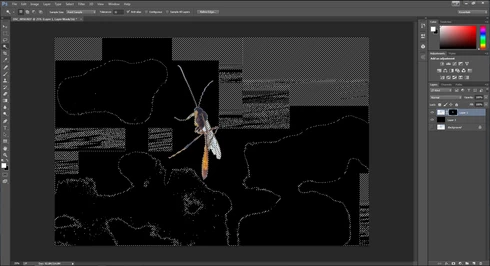


They consistently show up as selected rectangles of various sizes, spread out throughout the canvas. Any additional selections made from this point only amplify the errors.

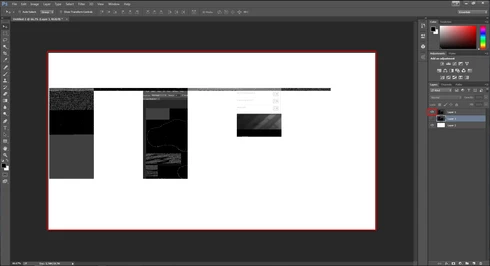
2) Also possibly caused by the same tool, I started to develop other issues like layers disappearing from the canvas, despite being visible in the layer panel and visible glitches/artifacts on the screen when opening separate windows (such as the save window).

(Artifacts and visibility issues after taking a screenshot, pasting into a new window, and cropping)

I'm currently using Windows 7 on an NVIDIA gtx 670. I have all of the latest drivers, and have no problems with the regular CC version of photoshop.

I have also tried re-installing twice, along with disabling the GPU. No luck.

Rather humorously and ironically, I've had to use the previous Photoshop CC just to make these screenshots at all.

If I notice any other issues, I'll be sure to post them here, unless directed otherwise.

This topic is closed to new replies. Start a new post to keep the conversation going.

66 replies

Inspiring
July 10, 2014
Tried this on the Windows version....so far, no success.
July 10, 2014
There was a fix provided in a different thread.
As far as I remember to hit CMD-ALT-SHIFT (on Mac) when you start Photoshop.
This will prompt to delete the options.
Apparently this is because we all migrated the setting from the previous version

I fixed my issue.
Participating Frequently
July 10, 2014
Same issue as described above.
Participating Frequently
July 5, 2014
Same issue here. Windows 7 64x, i5, 8GB ram, latest drivers installed.
Natureimmortal
Participating Frequently
July 5, 2014
Have just tried opening a RAW file and using Focus Area selection without going through Lightroom (had to find CC 2014 icon, whats with the double install thing?) Problem persists with random masking problem, happens 100% of the time.
Participant
July 5, 2014
Same problem here, happening with quick masking and focus selecting. Bumped the graphics from "advanced" down to "normal" and the quick masking problem went away, but focus selection is still problematic. Tried "basic" and turning off graphics altogether, but the focus selection problem persists. I am moving photos into Ps via Lr. I tried opening a file directly with Ps and focus selection worked fine (only tried it once so hardly a confirmation)

Running macbook retina 2012
Natureimmortal
Participating Frequently
July 5, 2014
Same problem for me, initially it happened only when trying to "refine mask edges" but now also when I use the Focus area tool. Have disabled GPU support in preferences, made sure RAM is correctly assigned... shame it is a nice tool when it works.

Running 32GB RAM, Win8, 64 bit.

Further to this I cannot paint the mask in the areas which are affected dueto the pain tool becoming huge blocks. I I try to edit another file while this one is open that file goes into a screen full of artifacts.
CR Henderson
Participating Frequently
July 4, 2014
Chris...how about an update on this problem? As it stands I don't even know if Adobe have downloaded the file.
Known Participant
July 3, 2014
Having this problem too. I saved the selection as a channel, then saved to a PSD, closed photoshop and re-opened. The channel is full of bizarre artifacts but could then be cleaned up and used.

Cool feature once the bugs get fixed! Made a tricky selection much easier today...
Participating Frequently
June 28, 2014
Using a NVIDIA GeForce GTS-250 Video card. Intel I5 Processor. The artifacting happens in both 8 and 16 bits on my computer. Starts with the focus area selection tool. IF I try to use Quick select or the Quick mask tool after using the focus area they artifact also. I am processing 27 to 35 MB Raw files from my Canon EOS 5D Mark III to TIFF files and using the selection on my TIFF Files. My TIFF Files average 110 MB.
Hope this helps.