Inspiring
June 22, 2014

P: Various issues (Focus Area Selection)

  • June 22, 2014
  • 66 replies
  • 1108 views

Since downloading Photoshop 2014 yesterday, I've noticed a variety of issues that make the program almost unable to use.

1) Selection issues. All selection tools *seem* to work normally until I attempt to use the new focus-range selection tool. After doing so, any selection tool I use (lasso, rectangular marquee, etc) result in me getting selections such as these:
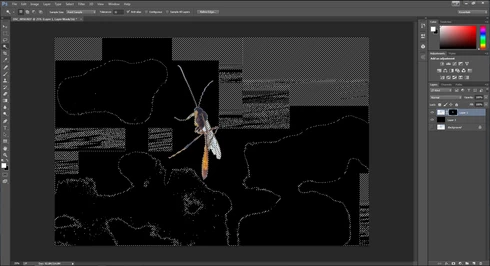


They consistently show up as selected rectangles of various sizes, spread out throughout the canvas. Any additional selections made from this point only amplify the errors.

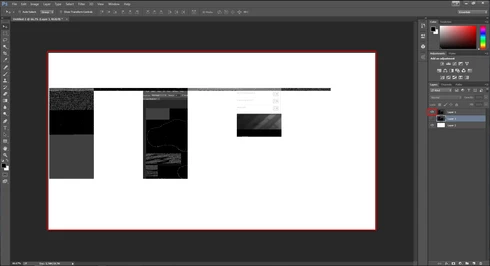
2) Also possibly caused by the same tool, I started to develop other issues like layers disappearing from the canvas, despite being visible in the layer panel and visible glitches/artifacts on the screen when opening separate windows (such as the save window).

(Artifacts and visibility issues after taking a screenshot, pasting into a new window, and cropping)

I'm currently using Windows 7 on an NVIDIA gtx 670. I have all of the latest drivers, and have no problems with the regular CC version of photoshop.

I have also tried re-installing twice, along with disabling the GPU. No luck.

Rather humorously and ironically, I've had to use the previous Photoshop CC just to make these screenshots at all.

If I notice any other issues, I'll be sure to post them here, unless directed otherwise.

This topic has been closed for replies.

66 replies

Participating Frequently
June 28, 2014
OK thanks for the info
Participating Frequently
June 28, 2014
Thanks Chris
Participant
June 28, 2014
Same problem. Win 8.1 Nvidia GT650ti . Latest Nvidia drivers from Nvidia.
Get artifacts in selections using focus area and quick selection tool..

CR Henderson
Participating Frequently
June 28, 2014
You should have the info.
Inspiring
June 28, 2014
ccox at adobe dot com, and I'll forward it to the appropriate engineers and QE.
CR Henderson
Participating Frequently
June 28, 2014
Yes it is repeatable and I can send you a copy of that image. Where should I send it?
Inspiring
June 28, 2014
Is it really repeatable with a specific image? If so, can you send us a copy of that image?
Inspiring
June 28, 2014
Same problem, D800 .nef files. Both my 2013 Mac Pro and late 2012 27" iMac have the issue.
Inspiring
June 27, 2014
We need you to TRY the suggestions to help identify exactly what you are seeing and what is affected. We haven't been able to reproduce this problem ourselves. But we suspect that some driver versions may have problems that lead to this problem. So we are trying to learn what factors are involved.
CR Henderson
Participating Frequently
June 27, 2014
Same problem here on a late-2012 i7 iMac with 32GB DRAM and 3TB Fusion. It doesn't happen on all images, just on some, but I haven't determined what triggers it.

It happens on both 8bit and 16bit images. It doesn't make any difference whether the Use Graphics Processor is checked or unchecked when I open Photoshop CC 2014. The 'bad' images still cause the problem and the 'good' images do not with the processor checked or unchecked.

The only 'fix' I've found is to restart PS 2014 and not use Focus Select on a problem image again.