

davescm
Community Expert
Community Expert
June 5, 2022

P: Version 23 has introduced file compression on large files which slows down saves

  • June 5, 2022
  • 53 replies
  • 9693 views

Version 23 has introduced file compression on large files - even when file compression is disabled in preferences. This is slowing down save times compared to previous versions.


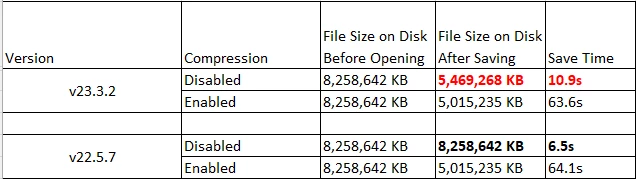
As an example, on my current PC a psb file on disk at 8.2GB now saves at 5.4GB but with a lengthened save time. The PC is Windows 10, i9-10920X, save to NVMe drives
 

The same file on an older PC shows the same issue.i7-3930K, save to SSD drive
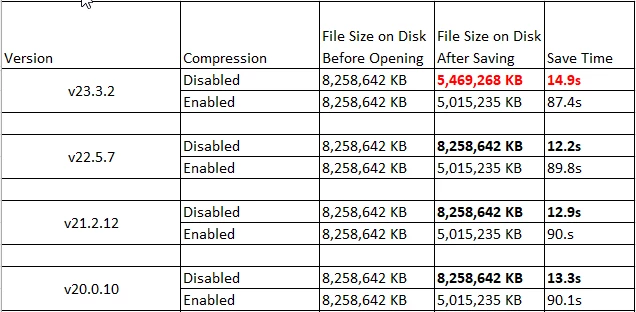
 

In all other versions, disabling file compression resulted in a larger file but a much faster save. The new version is not as slow as enabling compression, but clearly some undocumented partial compression has been introduced. There are many of us who invest in large high speed solid state drives for the fastest save and load times, and purposely disable compression in favour of speed. This change negates some of that speed gain.


Dave


Note : This bug report came out of a discussion on speed in this thread : https://community.adobe.com/t5/photoshop-ecosystem-discussions/slow-saving-16bit-images-m1-max/td-p/12975588  but as it has not yet been proven on Mac I've raised this bug report separately.

This topic has been closed for replies.

53 replies

Participating Frequently
August 25, 2022

Does anyone know what the last photoshop version it was where the RLE compression was still be used?


I've reverted back to 23.3.2 to get the compression back, but now I have horrible lag when you are zoomed in to 66.7 or 100% on high res images. It's almost unworkable unless you work at 50%.

Until adobe add the tick box mentioned below (which I need) I'm stuck on older versions. Does anyone know when this compression was removed? Maybe there is a version where the lag was improved but the RLE compression was still implemented present?

Participating Frequently
August 23, 2022

Sorry I mean RLE file sizes were only a touch bigger than the official compressed ones....but SOOO much faster to save.

Participating Frequently
August 23, 2022

Thank you Cory.


I know some on here feel the RLE compression is much slower to save than saving with no compression, but on the types of files we work on and the tests I have done, I found the RLE compression to be very fast relative to the file size saving. The file sizes were only a touch smaller but the save times infinitely quicker than with compression on. So you're onto something good there!

As mentioned, just a tick box option in preferences would be ideal so users can choose.

Thank you!

davescm
Community Expert
davescmCommunity ExpertAuthor
Community Expert
August 23, 2022

Perhaps a Preference choice between:

Full Compression - equivalent to today's enable compression option giving the smallest files but slowest saves.

No Compression - equivalent to today's compression disabled (as just fixed in 23.5) giving largest files and fastest saves.

A new Balanced Compression - as per the RLE save in early v23. Giving medium files and medium saves.


Most users should be able to pick an option that suits their workflow, images and hardware from one of those three.


Dave

Participating Frequently
August 22, 2022

Hello Adobe Dev Team,


After installing Adobe Photoshop version 23.5, I noticed the size of my uncompressed 16bit PSB\PSD files were almost 100% bigger than version 23.4.2.  Could you please look into this and fix.


Create uncompressed 16bit PSD\PSB in both versions (v23.5 and v23.4.2) and observe file size difference.


Preferences > Files Handling,  Disable Compression of PSD and PSB files is flagged (active)

Version of the App – Adobe Photoshop 23.5

Platform and OS version – Windows 11 64bit Pro 22000.856 - CPU - i9-12900K - 64GB Memory

CShubert
Community Manager
Community Manager
August 22, 2022

Hi @vcx thank you for the post, will be happy to have the team investigate this.


It may help if we could see your Photoshop System Info. Launch Photoshop, and select Help >System Info...and copy/paste the text in a reply.  


Thank you,

CShubert
Community Manager
Community Manager
August 23, 2022

Thanks everyone for the info and sharing on this thread. The team is looking into other options for compression for these type of workflows. Stay tuned for future releases and a possible addition of options.


Thank you,

D Fosse
Community Expert
Community Expert
August 23, 2022

I'd vote for that. As compromises go, this looks like a sensible one.


My own preference will always be no compression (and disk space be damned), but for those who want some kind of compression, the present algorithm is almost unbelievably slow with maybe 20 x open/save times.

Participating Frequently
August 23, 2022

Could this mystery compression that was trailed be brought back as a tick box in preferences?

davescm
Community Expert
davescmCommunity ExpertAuthor
Community Expert
August 23, 2022

V23 used RLE compression and slowed save times. It was not a sweet spot or a good compromise for those of us who work on local disks with large files. The example I gave above was not a particularly large file, just an example that could demonstrate the issue and was a practical size to share with the Adobe developers so that they could investigate.

For many, file size on disk does not matter - disk space is cheap, but speed does matter. Reintroducing no compression (the same as in all versions up to and including v22) resolved the issue and brought back the previous save and re-open speeds. Remember compression and decompression occurs on both saving and re-opening.


That said, I would have no objection at all to the RLE compression being an option in preferences, between the current compressed and uncompressed, but uncompressed must remain as that.


Dave


Participating Frequently
August 23, 2022

I came across this issue too yesterday after updating from 23.3.2 to 23.5. I always work with compress files turned off too, to increase save time. However, we have seen a huge performance hit by making this update. Our files have gone from 3gb to 50gb with the update (both with compression off). As we are working on a server, which has a max write speed of about 700mb, this has meant our save times have gone from 1m to 3mins due to the file sizes being so much larger. So what you save in time by there being no compression, is lost in the epic file size increase. From my testing, it was still slower to write the file out to the M.2 in 23.5 over 23.3.2. Not by much but it was faster in the older version for us.


Whatever this mystery compression Adobe were trailing 23.3.2 (even with compression turned off) hit a magic sweet spot for people like us who work on huge A0+ file sizes but have no option but to save to a server. The files weren't as small as having compression on but SO much faster to save.

Adobe....what was this mystery compression you were trailing? Could this be implemented as a tick box in future additions? For people like us, it has increased productivity by so much as the save times were close to working with compression off but the file sizes were only a small bit bigger than with compression on - a sweet spot I'd say. Yes, over saving to an M.2 it had slightly decreased saved times for some maybe, but on huge files and saving to a server, finally there was an answer to the old VERY slow compression method.


Can anyone at Adobe or else shed any light?

davescm
Community Expert
davescmCommunity ExpertAuthor
Community Expert
August 22, 2022

The result was slightly faster than my original test, although I do see a second or so difference anyway depending on what else the PC is doing. I am happy that it is back to faster saving with no compresssion.


Dave