

davescm
Community Expert
Community Expert
June 5, 2022

P: Version 23 has introduced file compression on large files which slows down saves

  • June 5, 2022
  • 53 replies
  • 9693 views

Version 23 has introduced file compression on large files - even when file compression is disabled in preferences. This is slowing down save times compared to previous versions.


As an example, on my current PC a psb file on disk at 8.2GB now saves at 5.4GB but with a lengthened save time. The PC is Windows 10, i9-10920X, save to NVMe drives
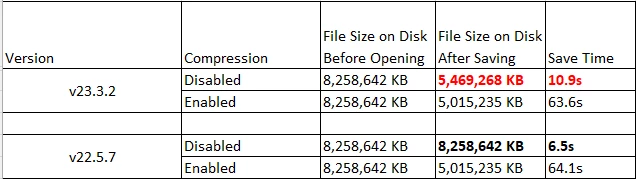
 

The same file on an older PC shows the same issue.i7-3930K, save to SSD drive
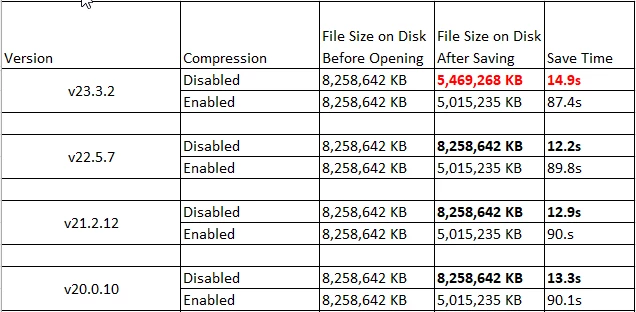
 

In all other versions, disabling file compression resulted in a larger file but a much faster save. The new version is not as slow as enabling compression, but clearly some undocumented partial compression has been introduced. There are many of us who invest in large high speed solid state drives for the fastest save and load times, and purposely disable compression in favour of speed. This change negates some of that speed gain.


Dave


Note : This bug report came out of a discussion on speed in this thread : https://community.adobe.com/t5/photoshop-ecosystem-discussions/slow-saving-16bit-images-m1-max/td-p/12975588  but as it has not yet been proven on Mac I've raised this bug report separately.

This topic has been closed for replies.

53 replies

PECourtejoie
Community Expert
Community Expert
August 22, 2022

Thank you @CShubert for the followup on this issue, and @davescm for the detective work!

And 23.5 is even faster than prior versions, according to your data!

CShubert
Community Manager
Community Manager
August 17, 2022

Thanks @davescm for the update and sharing your results.

davescm
Community Expert
davescmCommunity ExpertAuthor
Community Expert
August 17, 2022

This morning, I downloaded v23.5. I can't yet see a published list of fixed issues contained in the release, but I have just tried the file save using the original document from the first post and with compression disabled as per the original conditions.


This time the document saved in 5.5s at the full size of 8,258.642 KB so it looks as if the issue raised in this thread has been addressed in this release.


Thank you Adobe 🙂 .


Dave

davescm
Community Expert
davescmCommunity ExpertAuthor
Community Expert
July 18, 2022

I just checked the newly released 23.4.2 the same issue remains


Dave

D Fosse
Community Expert
Community Expert
June 7, 2022

Until I get this file on its way, one more data point:


I did some more tests, and this is apparently specific to layer compression. I tried a different file, big pixel size, but flat, so it just came under the 2GB limit and I could save it as both PSD and PSB. Both PS versions were identical, to the last bit.


Then I added some layers, pushing it over the 2GB limit - but this time, there was the now familiar difference between version 22 and version 23:

davescm
Community Expert
davescmCommunity ExpertAuthor
Community Expert
June 7, 2022

I'm not sure how long it took. I don't have a fast upload speed at home. It was late last night and when syncing it did not show progress - just a syncing message. So I just left it to finish and sent the link this morning. 

Dave

D Fosse
Community Expert
Community Expert
June 7, 2022

OK. If this is going to take all night and a half, it'll have to wait a while.


(I'm usually able to max the wetransfer quota and send in 5 minutes or so, so 9 GB should travel on the internet in 20 minutes max. If the CC is this slow, I'm even less keen on it...)

davescm
Community Expert
davescmCommunity ExpertAuthor
Community Expert
June 7, 2022

@CoryShubert   Link sent by email


@D Fosse  All I did was use Windows File Explorer to manually copy a file to the Creative Cloud folder on my PC. It took a long time to sync (I went to bed and looked again this morning) and it doesn't show a preview but it appears to be there on the web (under Your Files -Synced Files)  and I was able to right click and get a share link.


Dave

D Fosse
Community Expert
Community Expert
June 7, 2022

...but it should be easy enough to recreate. Here's the recipe:

  • Base document 26756 x 17962 pixels, flat, 16 bit.
  • Duplicate background and do some pixel tweaks.
  • Add 5 adjustment layers, three of them with random masks.
  • Add another pixel element with a clipped adjustment layer.


Here's the Layers panel:


All adjustment layers are active with "normal" adjustments (nothing extreme).

D Fosse
Community Expert
Community Expert
June 7, 2022

PSB not supported, it says.

How on earth am I going to send 9.5 GB? Wetransfer has a 2 GB limit...