

davescm
Community Expert
Community Expert
June 5, 2022

P: Version 23 has introduced file compression on large files which slows down saves

  • June 5, 2022
  • 53 replies
  • 9740 views

Version 23 has introduced file compression on large files - even when file compression is disabled in preferences. This is slowing down save times compared to previous versions.


As an example, on my current PC a psb file on disk at 8.2GB now saves at 5.4GB but with a lengthened save time. The PC is Windows 10, i9-10920X, save to NVMe drives
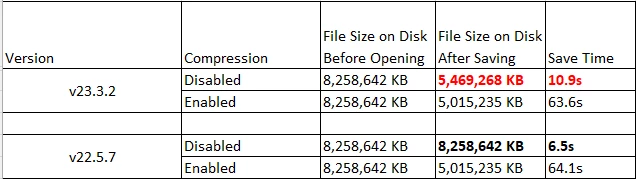
 

The same file on an older PC shows the same issue.i7-3930K, save to SSD drive
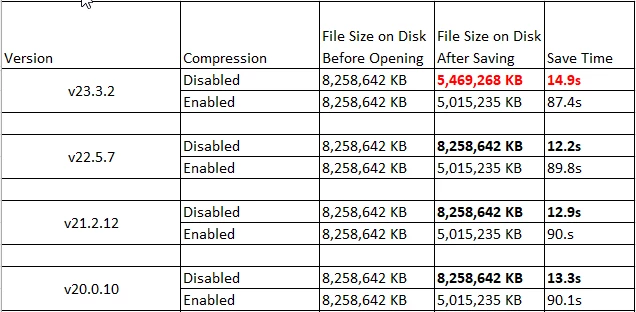
 

In all other versions, disabling file compression resulted in a larger file but a much faster save. The new version is not as slow as enabling compression, but clearly some undocumented partial compression has been introduced. There are many of us who invest in large high speed solid state drives for the fastest save and load times, and purposely disable compression in favour of speed. This change negates some of that speed gain.


Dave


Note : This bug report came out of a discussion on speed in this thread : https://community.adobe.com/t5/photoshop-ecosystem-discussions/slow-saving-16bit-images-m1-max/td-p/12975588  but as it has not yet been proven on Mac I've raised this bug report separately.

This topic has been closed for replies.

53 replies

davescm
Community Expert
davescmCommunity ExpertAuthor
Community Expert
June 6, 2022

@CShubert 

I'll upload the 8GB file to Cloud storage and send you a link via email. It might be a while though as the upload speed is not fast 😞


Dave


D Fosse
Community Expert
Community Expert
June 6, 2022

I'll get it over by tomorrow. I assume I can share through CC documents? (never done it, but I'll figure it out 😉 )


jane-e
Community Expert
Community Expert
June 6, 2022

@CShubert 

Dag and Dave are on Windows, so I tested on my Mac and get the same results. To create a large file, I added 23 raw files as embedded images, then created a Smart Object out of all 23. I duplicated the larger SO 22 times.


16 bits

Maximize PSD and PSB File Compatibility: Always


Jane

CShubert
Community Manager
Community Manager
June 6, 2022

Would either of you, or both, care to share your test files with the team so they can run the same settings on our machines to see what might be happening?  You can send them to me directly: shubert@adobe.com.

Thank you,

D Fosse
Community Expert
Community Expert
June 6, 2022

Ditto. Double checked that those preferences were the same.


I'd also like to emphasize that all instances, in both versions, started out with the very same file, which was stored elsewhere on a different disk. I didn't reopen and resave anything, all of them went back to the same original.


EDIT - and yes, the max comp setting is "always", not "ask".

davescm
Community Expert
davescmCommunity ExpertAuthor
Community Expert
June 6, 2022

I checked those file handling preference settings were also the same in all the versions tested, so the difference seen in v23 was not a settings issue.

davescm
Community Expert
davescmCommunity ExpertAuthor
Community Expert
June 6, 2022

16 bit for the tests. Maximise Compatibility on 'Always'

Dave

D Fosse
Community Expert
Community Expert
June 6, 2022

16 bit, max compatibility on in all instances.

CShubert
Community Manager
Community Manager
June 6, 2022

Hi all, couple questions from the team:


In addition to the state of the “Disable Compression of PSD and PSB Files” preference, please answer from the individual tests:
  1. Bit depth of the document’s image, specifically if it’s 16-bits or 32-bits.
  2. The state of the “Maximize PSD and PSB File Compatibility” preference.
These all affect the compression used for both PSD and PSB files.
 
Thank you,
davescm
Community Expert
davescmCommunity ExpertAuthor
Community Expert
June 6, 2022

Thanks @CShubert let me know if you need further info or testing carried out.


Dave