Jan 23, 2018 7:33 PM UTC
Released

P: Video Render Stalls at 50%

Problem is not solved with update 19.1

This topic is closed to new replies. Start a new post to keep the conversation going.

69 replies

PhotoManJohan
Participant
Nov 30, 2018 1:12 AM UTC
Hi Hannah. I stand corrected. My Photoshop updated to the latest version today and now I can export video. Brilliant!
Translate
Hannah Nicollet
Community Manager
Community Manager
Nov 30, 2018 12:22 AM UTC
Hi Everyone,

To check your Photoshop version and make sure you are up to date, please go to Help > System Info. In the top line you should see "20.0.1," which is the current version of Photoshop.

Thanks,
Hannah
Translate
Inspiring
Nov 28, 2018 3:46 AM UTC
Shane & Johan,

Please confirm that you have Photoshop 20.0.x and not 19.x. I ask because there was trouble for some users getting 20.0 to download (such as for Johan a month ago).

If you indeed have 20.0, we'd like to arrange a screen share session to see what is happening.

Thanks.
Translate
PhotoManJohan
Participant
Nov 27, 2018 11:22 AM UTC
Like Shane says, it's still the same. Only last week I tried exporting a video on a friend's CC (newest version) and it's exactly the same. Export stops about half way through and stays there until you cancel.
Translate
Inspiring
Nov 27, 2018 4:18 AM UTC
Latest version of Photoshop. Tried workaround.
Still not fixed. Come on now this is getting a bit embarrassing!
Translate
Legend
Nov 15, 2018 8:52 PM UTC
This issue should be fixed in Photoshop CC 2019 and later. Let us know if you're still having trouble.
Translate
Participant
Oct 31, 2018 11:21 AM UTC
Very weird site, with multiple popups asking me to have a callback or a chat. Not so nice.
Translate
Inspiring
Oct 31, 2018 10:45 AM UTC

It may be the permission issue or memory issue. You can read this blog to clear your doubt, How to Unblock Adobe Flash Player, they have given solutions for every issue related to Adobe. So, I am sure you'll get what you want.
Translate
PhotoManJohan
Participant
Oct 16, 2018 1:10 AM UTC
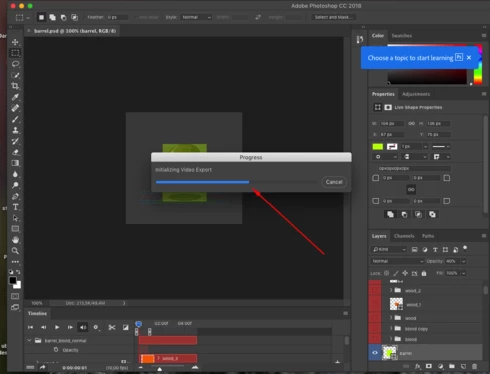
Just updated Photoshop CC through creative cloud. It's only version 19.1.6 and the video render problem persists. I've never made it past about 60%. Very frustrating, I'm doing stop motion and actually really need that function to work now.
Translate
go_ahead_straight
Participant
Oct 15, 2018 7:33 PM UTC
Hi Hannah
I have the multi-tutti-frutti-cc-account with all the apps but it does not show me a newer version than the 19.1.6. I already have.

Best,
Lorena
Translate
