

Jqqerry
Inspiring
February 7, 2020

P: Weird Brush size animation very slow using keyboard (Windows)

  • February 7, 2020
  • 24 replies
  • 17113 views

Hi. I'm posting a question again. There are many people who go through the same phenomenon as me.


I'll tell you exactly what the problem is first.

Like you and I know when we want change brush size, press keyboard shortcut [ + ].

No matter how long I press, the size of the brush should change. Because it's always been like that.

But if you look at the attached picture below, there are many differences.
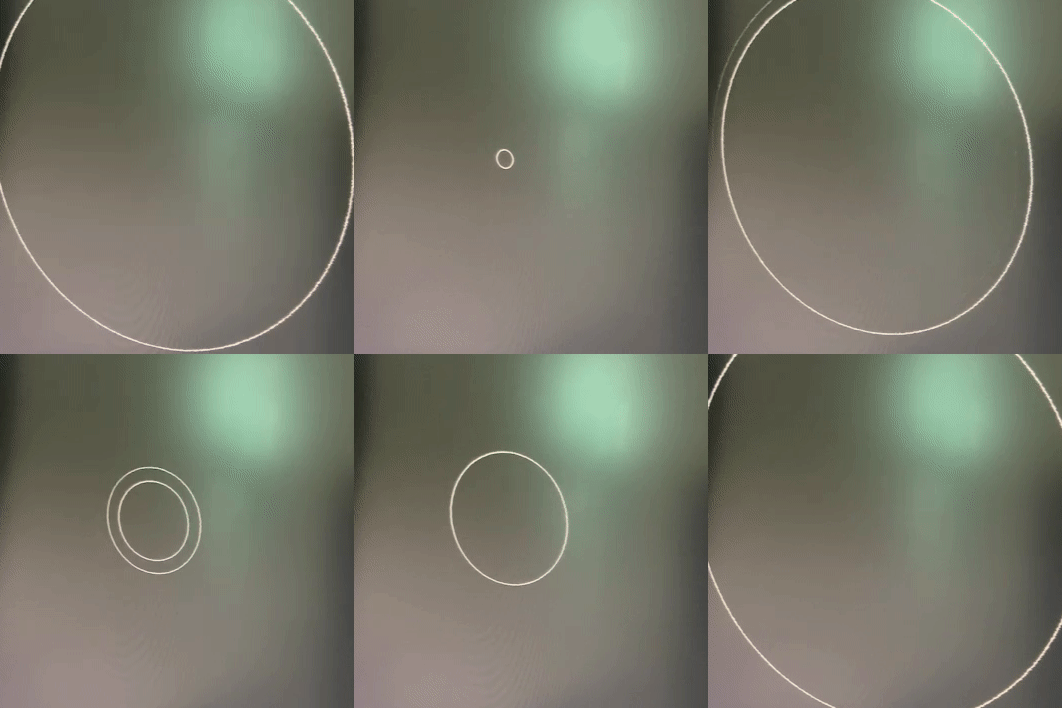
 

in photoshop2015.5 * very smooth, It changes and shows exactly how much I press.
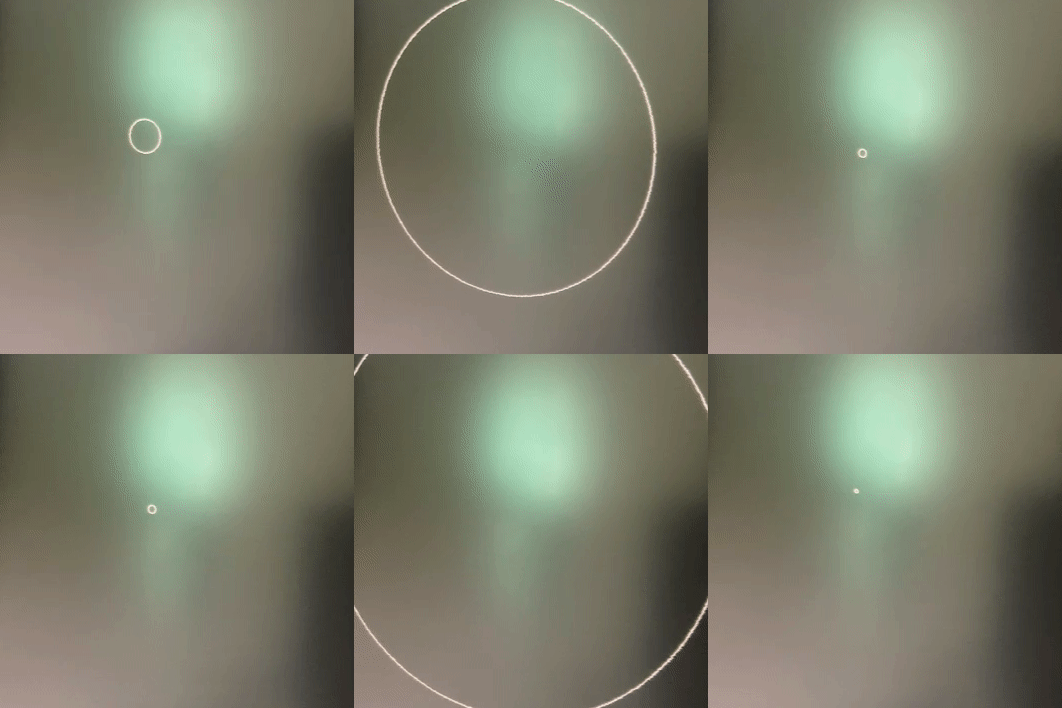


in photoshop2021 * something wrong. You can only see the first and last brush changes in size. In the middle, it appears to be slow (or broken) as if there is a delay.


Someone says. Why don't use a drag shortcut(Alt + Mouse Rightclick and drag)?

Yes. I know that. However, use keyboard is more comfortable to me. And as you can see from the attached photos of Photoshop2015.5, it's very soft as like drag shortcut.

brush panel is not important and turn off already.


i tried many things. Check this first..

1. Reinstall Photoshop2021, Reset Setting Pref.

2. Tried other version(2020, 2019,2018). But the same. *But funny thing is... My main workflow takes almost in photoshop2019. And A few months ago, I used to use it smoothly and well without this delay

3. Reinstall GPU nvidia Driver, and tried other every version. But same results.

4. So... I Reinstall Windows10(Clean install from microsoft, Not recovery) * I think I've formatted it about six times so far. 😃

My computer is no problem. It's new.

Ryzen5600x, Ram64GB, 2070Super GPU, Nvme SSD, Windows10

https://feedback.photoshop.com/conversations/photoshop/photoshop-2018-brush-size-animation-very-slow-using-keyboard-windows/5f5f46094b561a3d426fad2d

I saw this post, and he tried 2015.5, works well.


So... What should I do now?..

* Is there a solution I can try? (like turning off some settings, changing the registry...


Why do I have to feel this slow brush change speed with my good computer specification when I've become a version-up paying monthly subscription fee?


{Title edited by moderator - PS-72737}

This topic has been closed for replies.

24 replies

February 15, 2022

So the "next" update is here and I don't see any improvements whatsoever.

When using bracket keys ('[' and ']'), while the Brushes panel is visible, the size change is still slow, just as before.

And just as before, hiding/closing the Brushes panel, resolves it, and it works fine, when that panel is closed (I assume the Size slidebar is the culprit). But we kinda need the Brushes panel open, if you could imagine that.

Are you messing with us? Did you really do anything at all?


chad.rolfs
Community Manager
Community Manager
February 9, 2022

@Jqqerry It will be in the "next" update - it hasn't been released yet.  Apologies if that wasn't clear.  

Jqqerry
JqqerryAuthor
Inspiring
February 9, 2022

Current version is nothing change.
I tried already disable native canavas and turn on or off gpu acc.
Nothing change =(

chad.rolfs
Community Manager
Community Manager
February 8, 2022

This should be fixed in the next update.

Legend
January 24, 2022

Apologies. This was incorrectly marked as fixed for this update. It's slated for the next update. Will update the thread when the fix is available.

teryakiwok
Participating Frequently
January 21, 2022

I updated to 23.1.1 and it hasn't made any difference at all to this issue, in fact it's probably worse now than it was before. Increasing from the smallest brush size completely hangs and then re-appears when it's huge.

PECourtejoie
Community Expert
Community Expert
January 20, 2022

Hello,  update to Ps 23.1.1 as it has a fix for this very issue.

blented
Participant
December 12, 2021

Anyone ever find a solution for this?


Same issue, fast brush resizing in older versions, switch to the latest photoshop, brush lag is crazy.


The only fix I've found is to hit tab to hide the interface completely, then it's fast again, but if the brush pallete is visible it's glacial.

teryakiwok
Participating Frequently
November 18, 2021

Yeah I'm sick of this bug. I remember using CS6 on a budget PC many years ago and it was perfect. Today using CC on a high end machine it's infuriatingly laggy.

November 18, 2021

The new PS version (23.0.1) sees the resurfacing of an old bug, that plagued some older versions before.
If the brush panel is open, changing the brush size with hotkeys is very laggy and slow.
Before anyone asks, yes my workstation is sufficiently powerful (12 core cpu, 32GB ram, RTX4000, SSD on pcie 4.0). There are no problems on my end.
This is a software bug.
Fix it ASAP!
Demonstration:
https://youtu.be/i2MvHMtnEVk
Reverting back to version 22 until this is fixed.

Legend
November 18, 2021

@15922955 Are you actually hitting the bracket keys [ ] or using the Wacom touch ring?