

Jqqerry
Inspiring
February 7, 2020

P: Weird Brush size animation very slow using keyboard (Windows)

  • February 7, 2020
  • 24 replies
  • 17134 views

Hi. I'm posting a question again. There are many people who go through the same phenomenon as me.


I'll tell you exactly what the problem is first.

Like you and I know when we want change brush size, press keyboard shortcut [ + ].

No matter how long I press, the size of the brush should change. Because it's always been like that.

But if you look at the attached picture below, there are many differences.
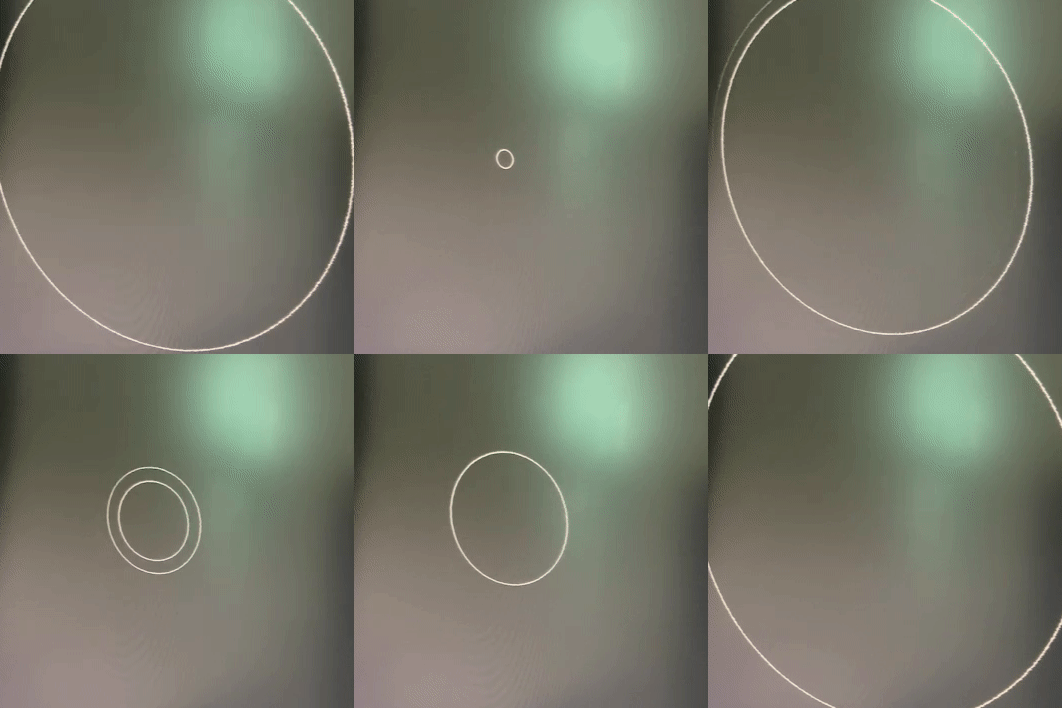
 

in photoshop2015.5 * very smooth, It changes and shows exactly how much I press.
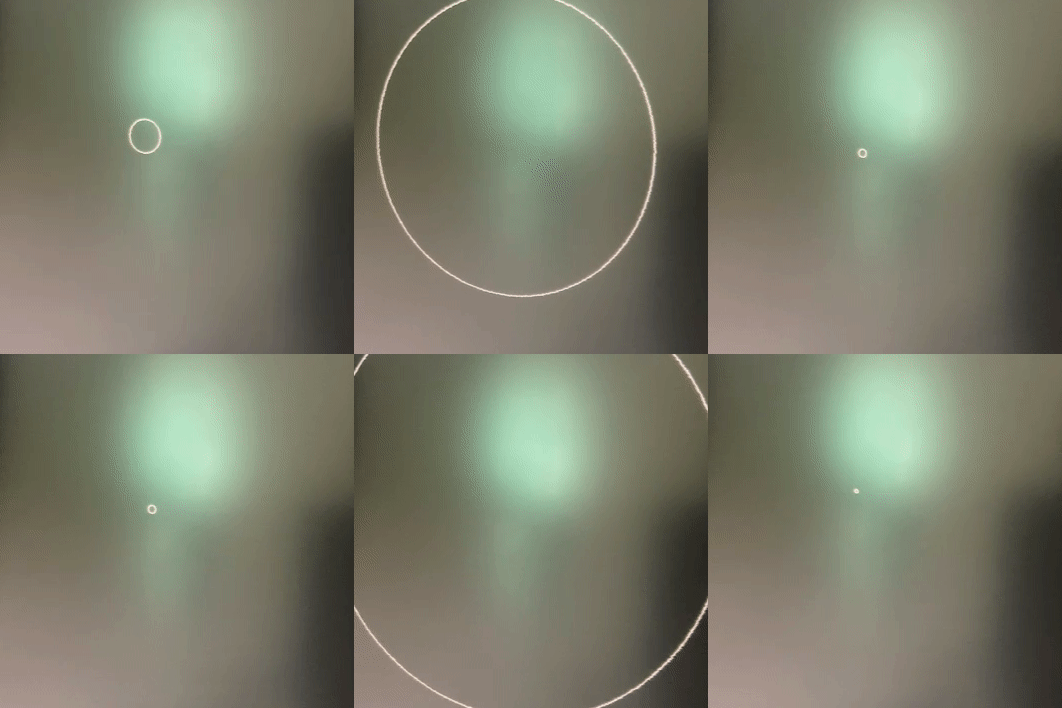


in photoshop2021 * something wrong. You can only see the first and last brush changes in size. In the middle, it appears to be slow (or broken) as if there is a delay.


Someone says. Why don't use a drag shortcut(Alt + Mouse Rightclick and drag)?

Yes. I know that. However, use keyboard is more comfortable to me. And as you can see from the attached photos of Photoshop2015.5, it's very soft as like drag shortcut.

brush panel is not important and turn off already.


i tried many things. Check this first..

1. Reinstall Photoshop2021, Reset Setting Pref.

2. Tried other version(2020, 2019,2018). But the same. *But funny thing is... My main workflow takes almost in photoshop2019. And A few months ago, I used to use it smoothly and well without this delay

3. Reinstall GPU nvidia Driver, and tried other every version. But same results.

4. So... I Reinstall Windows10(Clean install from microsoft, Not recovery) * I think I've formatted it about six times so far. 😃

My computer is no problem. It's new.

Ryzen5600x, Ram64GB, 2070Super GPU, Nvme SSD, Windows10

https://feedback.photoshop.com/conversations/photoshop/photoshop-2018-brush-size-animation-very-slow-using-keyboard-windows/5f5f46094b561a3d426fad2d

I saw this post, and he tried 2015.5, works well.


So... What should I do now?..

* Is there a solution I can try? (like turning off some settings, changing the registry...


Why do I have to feel this slow brush change speed with my good computer specification when I've become a version-up paying monthly subscription fee?


{Title edited by moderator - PS-72737}

This topic has been closed for replies.

24 replies

Legend
August 25, 2021

Thanks. We've asked engineering to take a look at this.

Jqqerry
JqqerryAuthor
Inspiring
August 26, 2021

I hope it's settled.
What I can tell you for sure is a mysterious delay that has occurred since 2015.5 version.

I tested all the versions.(2017,2018,2019,2020,2021...)

And Only version 2015.5 survived...


Now, I have no choice but to use 2019. (Because 2018 doesn't fully support HiDPI, 2019 is faster than 2021. Of course, it's much slower than 2015.5).... =(


Please let me know if there is any change. I've been waiting for years.
And if I can change any file in the Photoshop folder or modify the registry to fix this phenomenon, I would really appreciate it if you could tell me the answer.

Trevor.Dennis
Community Expert
Community Expert
August 24, 2021

Frame 10


Frame 11


I've turned on all 40 layers here, and set them to Lighten and you can see there are only four steps in size for the ellipse.


Did you make the layers?  Did you use Make frames from layers to make the frame animation?  We can (I) can tell you how to produce the layers and make the animation with smooth steps if you need advice.  


Actually I am going to say more than four steps because the lines are quite thick in some areas.  If we zoom in we can see probably seven steps.  There should be 20 steps, because the last 20 frames are the same as the first 20 frames in reverse, buit you knew that. 🙂

Trevor.Dennis
Community Expert
Community Expert
August 24, 2021

Ahhh,...   LOL I didn't read your post properly, and I can see you are actually concerned about brush change size.  I'll have a closer look

Jqqerry
JqqerryAuthor
Inspiring
August 24, 2021

😃 LOL

I understand.

I think there's something I don't know......

It's not the problem with my computer that's for sure. And I don't think it's even Windows10' problem.


Well, all I can think of is that there's been a difference in the version since Photoshop 2015.5.... What's that?


Jqqerry
JqqerryAuthor
Inspiring
July 25, 2021


I posted a question a while ago, but I'm writing again because I didn't get a satisfactory answer.

As you can see from the GIF file, you can only see the beginning and end of the brush by pressing down on the [,] keyboard shortcut and changing the size of the brush. I can't see the change in the middle, but it's cut off. (Lag..? Delay?)


Some people say. You can't keep up with the keyboard. That's what they say. That's exactly what it wasn't. The brush has always changed in size as smoothly as I'm pressing it.
And I know because I'm a professional change of size through right-click. But I prefer to use a keyboard.


The size adjustment of the brush is smooth in liquify. If you adjust it like this in Photoshop, it looks like that.

Does anyone know why and how to fix?


The list below is what I've tried.

1. Reset all setting

2. Re-installing 2019, 2021

3. Reinstall Window10,,,,

4. update gpu driver

5. change gpu

I'm writing it down in advance because I think someone will say that my computer specification is not good. And it was adjusted very smoothly on my computer until last week. Please don't conclude that it's the way it is.

windows10 21h1, ryzen5600x, rtx2070super, ram32g

photoshop2019,2021 Both are the same problem. Updating to the latest version is also not a solution.


Somebody help me.

Few years ago, I've seen someone like me on Reddit who goes through this all of a sudden. There must be a solution.


Kevin Stohlmeyer
Community Expert
Community Expert
July 26, 2021

When you say "Change GPU" - Photoshop does not do well with two active Graphics Cards.

See this page on configuring with two (or more) graphics cards:

Configuring computers with multiple graphics cards. 

Jqqerry
JqqerryAuthor
Inspiring
July 27, 2021

No. not two GPU.

i mean, 

I wasn't using two GPUs, I was using 1060 before. And I thought it might be a problem with the graphics card, so I updated the driver and changed the graphics card to 2070. Please read it properly.

Participant
February 7, 2020

Hey guys, 

I've been using Photoshop CC for sometime now. Since the newest update, when I try to increase or decrease my brush size using the keyboard shortcuts [ or ] there is a significant amount of lag.  Before It would seemlessly resize and visually go through each sizing stage. Now it skips about every 40 pixel sizes and adjusts (lags) to the new size. Strangely enough, my Wacom Intuos touch ring does not share this same problem with my keyboard.  It seemlessly transitions through each stage of resizing the brush. Thoughts?

My PC specs are beyond professional grade. It's for sure not a hardware issue.    

italosan
Community Expert
Community Expert
February 7, 2020

Hi, have you checked if there are driver updates available for your graphics card?