


jacksonl41895023
Participant
November 3, 2021

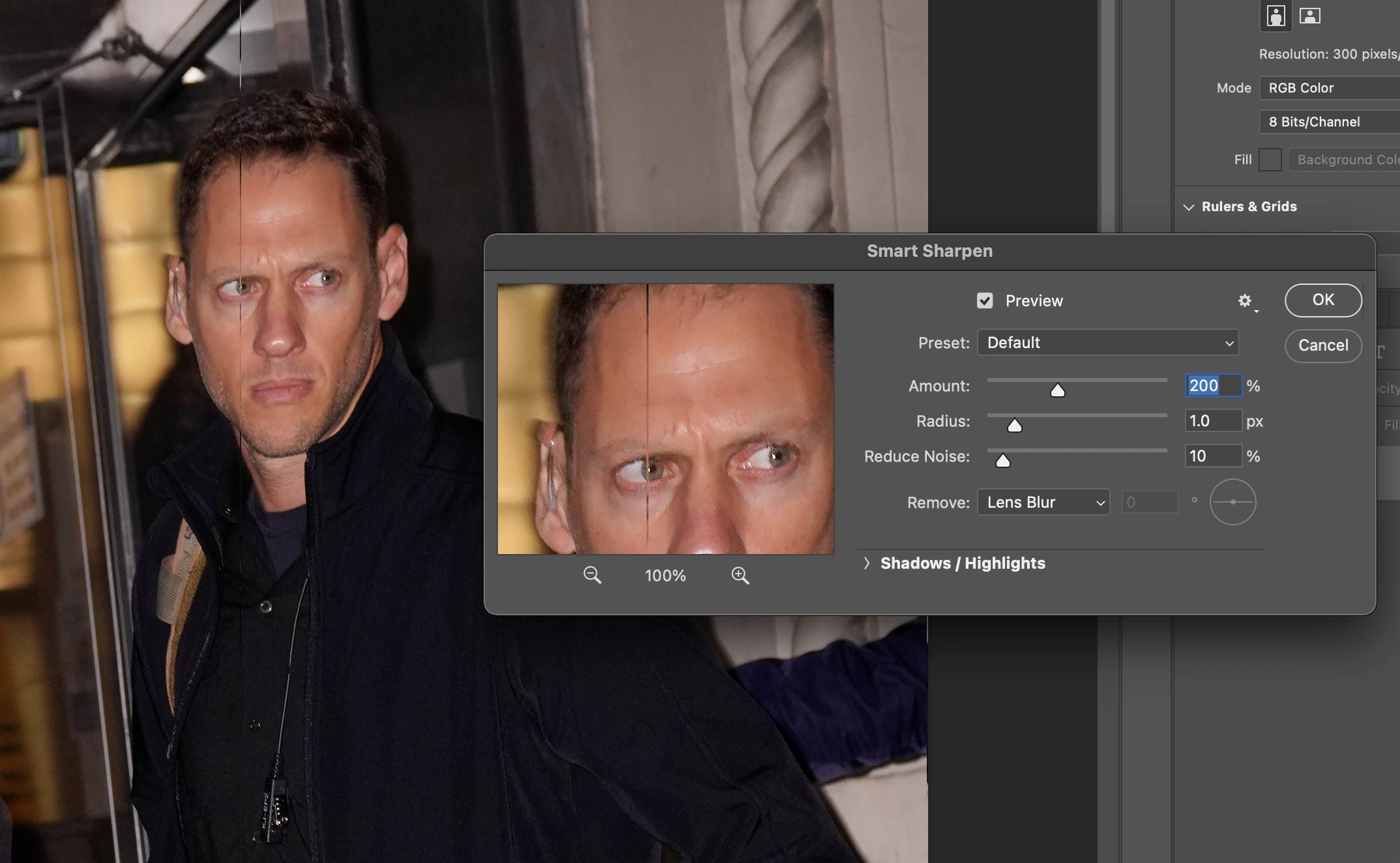
P: Weird Vertical Lines when using Smart Sharpen and "Use Graphic Processor" Turned on Monterey
  • November 3, 2021
  • 103 replies
  • 21642 views


Getting random weird vertical lines on Apple m1 pro with Photoshop 23.0 and 22.5.2


Goes away when "Use Graphic Processor" or "open CL" turned off, but operation becomes extremely slow.


Can anyone Please help?


103 replies

Participant
March 12, 2022

I installed Photoshop Beta version 23.3.0. 

I can confirm that Smart Sharpen with OpenCL checked does not produce the vertical lines anymore.

Is it possible to know approximately when this version will be officially in production?

Thanks for fixing this issue which was really affecting my workflow.

Michel Jarry

Participant
March 10, 2022

An alternative is to leave the "Use OpenCL" checked and on. In the Smart Sharpen filter use Remove: "Motion Blur" and the vertical anomilly lines disapear. 

Legend
March 9, 2022

@dianeedmonds You can install from the Creative Cloud desktop app. Instructions/FAQ here: https://helpx.adobe.com/x-productkb/global/creative-cloud-beta.html

Participant
March 9, 2022

 Photoshop 2022 - Professional app

Participant
March 9, 2022

3/8/22
Hello,
I believe this link is to request the Photoshop Beta update that hopefully resolves the ongoing issue of 1 pixel wide vertical lines appearing in photos after using the Sharpen tool. This has been a very frustrating issue for me when I use my MacBookPro running Monterey 12.2.1 with the latest Photoshop version 23.2.1. Luckily, I only use the MacBookPro to edit photos when I travel.

This issue has kept me from updating my home iMac to O/S Monterey since I edit photos all day and frequently use the Sharpen command. I have kept my iMac on Big Sur which has not caused the vertical lines, thankfully.

A post I made on the Adobe Support Community has received a LOT of comments from other Photoshop users who have been extremely upset over this glitch. I am happy to hear that you are getting closer to resolving the issue and I would be happy to use the Beta version to possibly help you get this update ready for general release.

Please provide instructions on how to download the Beta version.

Regards,

Diane Edmonds

kevin_todora
Known Participant
March 8, 2022

Thanks Jeffrey! 

-Kevin Todora
Legend
March 8, 2022

The most recent Photoshop Beta updatae contains a change that corrects this problem if you want to try the release and provide feedback:


The beta app is a separate application install.

Participant
March 7, 2022

same here. quiete a problem as smart sharpen is part of about every action we are using in our workflows ... if you dont want to change the GPU settings to a slower version - it helps for me to choose "old version" in the settings dialogue inside the smart sharpen window. not a solution either - but a workaround until abode fixes the main issue - hopefully soon. we need this.


Known Participant
March 2, 2022

People see it as failure if you put Hemi engine in new car design, and say the car is built with/for Hemi, but then it has mechanical problems here and there that makes your ride uncomfortable or makes you frequent visitor to car shops.

Participant
March 1, 2022

Maybe Adobe could just realease a M1 Version of Photoshop. How much longer do we have to wait?