


jacksonl41895023
Participant
November 3, 2021

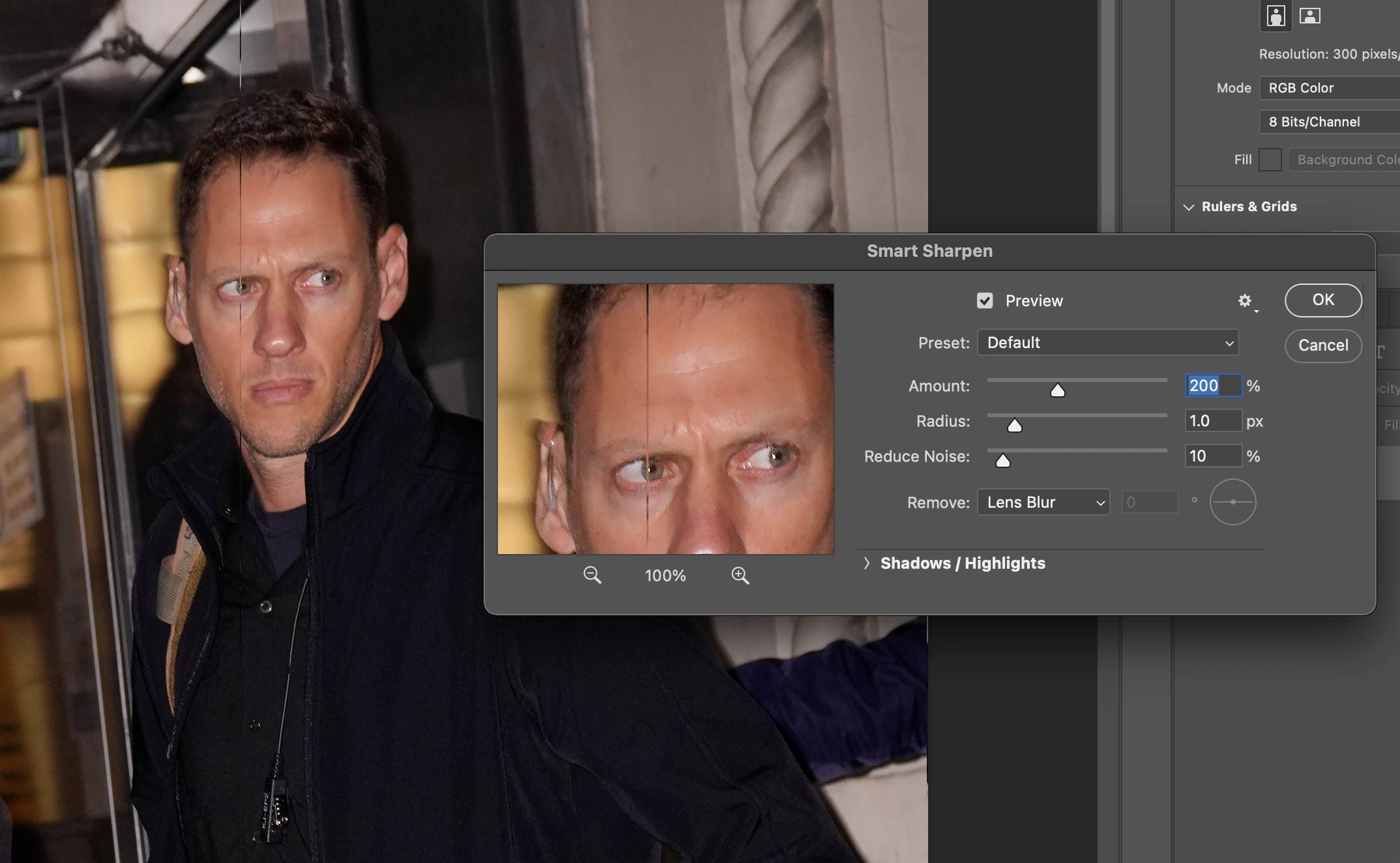
P: Weird Vertical Lines when using Smart Sharpen and "Use Graphic Processor" Turned on Monterey
  • November 3, 2021
  • 103 replies
  • 21642 views


Getting random weird vertical lines on Apple m1 pro with Photoshop 23.0 and 22.5.2


Goes away when "Use Graphic Processor" or "open CL" turned off, but operation becomes extremely slow.


Can anyone Please help?


103 replies

Inspiring
February 28, 2022

Yes I'm having the same uissue, this has been months now please fix it!

Earth Oliver
Legend
February 27, 2022

@TheColorist Yes, this should have been patched within a week, two at the most. It's becoming increasingly clear that Adobe no longer respects the userbase who depend on Ps for putting food on the table. We have jobs to do and families to feed and bugs taking months or years to patch isn't helping us do either of those.

Participating Frequently
February 27, 2022

No, this issue was present before 23.2.1, it's been an issue for months. Actually since M1-version of photoshop shipped. 

Unchecking OpenGl or opening the rosetta transcribed version of photoshop does "fix" the issue, but it's painfully slow. If you are working as a product photographer and need to deliver 100-200 images a day, it's not a viable solution at all. That workaround would maybe suffice for 2 weeks or so when this problem was discovered, but now months has passed.


Unsharp mask is one way to get sharpening but it's to unreliable if the customer expects to get similar images back, like we use to deliver. A week or two ago I talked to a friend who had a print made out of 4 images superimposed together like a panorama. It was 4 x 45Mpix images he shapened and then put into a panorama and sent to the printing house. Since this issue is making vertical lines a pixel wide or so he did not see the problem when saving the super big image, nor did he know of this app breaking bug so he went on and printed this image 3 meters wide for a customer. 3 meters! Every single image in this composition had multiple vertical lines coming out of the press. The result was unusable to say the least and he could not show this to his customer and had to make another huge print using an i9-computer. Stuck with paying for the first print out of his own pocket. 


Adobe: Could we please have an update at least so that we know that this is being worked on? The issue will just escalate when more and more people are upgrading their systems. Are you working on a new version of sharpening, are you doing anyting at all? 


While this might be the most pressing issue with apple silicon version of photoshop, it's certainly not the only one. We often get graphical bugs in the layer panel, rulers de-tached from the canvas floating freely over the app, chrashes (not that often though), some images seem to get somekind of graphic bug where parts of a layer repeats it self over the entire image which is impossible to remove and you need to go back to the raw image. Professionals use this app, we can't deal with you guys releasing crap before it's ready. It's embarassing sitting with a client when these bugs appear. I'm the one looking unprofessional when that happends. 

@J453: You said in the first half of November last year that you are investigating the issue, how is that investigation progressing?

Participating Frequently
February 27, 2022

unselecting "use openCL" did resolve the issue, however I'm assuming this selection is disabling the use of the processor which makes timeline convert very slowly and the lag time is now what it used to be before I upgraded my computer. Many will appreciate this workaround but it simply not sufficient enough for those who are trying to get work done quickly. Adobe needs a solid resolve to make their app compatible with M1 processors. It's absolutely insane that people are spending thousands of dollars for M1 processors for the soul reason of getting work in photoshop done quickly, and yet we can't even use these processors because photoshop's developing team can't keep up... if bugs this catastrophic cannot be fully resolved immediately, its users should not be recurringly charged for the full price of photoshop. 

Participant
February 27, 2022

Many of us have been requesting support from Adobe for this issue...

We received no other feedback than the unchecking of the "Use OpenGL".

Our full monthly subscription fee is still fully charged though...


Participant
February 25, 2022

Hello

Same issue for me.

I use PS on a macbook pro 16" M1 max.

When I use Smart Sharpen tool, (with Open CL option acivated), and a reduce noise amount , some vertcal straight lines appears one the picture.

With open CL option desactivated I don't have any issue but the processing tilme is very long...


Participating Frequently
February 25, 2022

Updat: After some restarts of photoshop and the machine itself - it now works on the M1 even with OpenCL - im using v23.21

Participating Frequently
February 25, 2022

I have the same problem on an M1 iMac with Monterey and an 10-core Intel iMac Pro with Radeon Pro Vega 56 GPU and Catalina. Switching off OpenCL and restart does not fix the issue on any of the machines

Participant
February 22, 2022

Yeah tried using "Legacy" setting. Its basically using the old "Sharpen" filter. Results not nearly as good as Smart Sharpen. Its a workaround but not a great one. I dont understand why this issue is taking Adobe over 4 months to fix!

Participant
February 22, 2022

Yeah tried that. Its basically using the old "Sharpen" filter. Results not nearly as good as Smart Sharpen. Its a workaround but not a great one. I dont understand why this issue is taking Adobe over 4 months to fix!