


jacksonl41895023
Participant
November 3, 2021

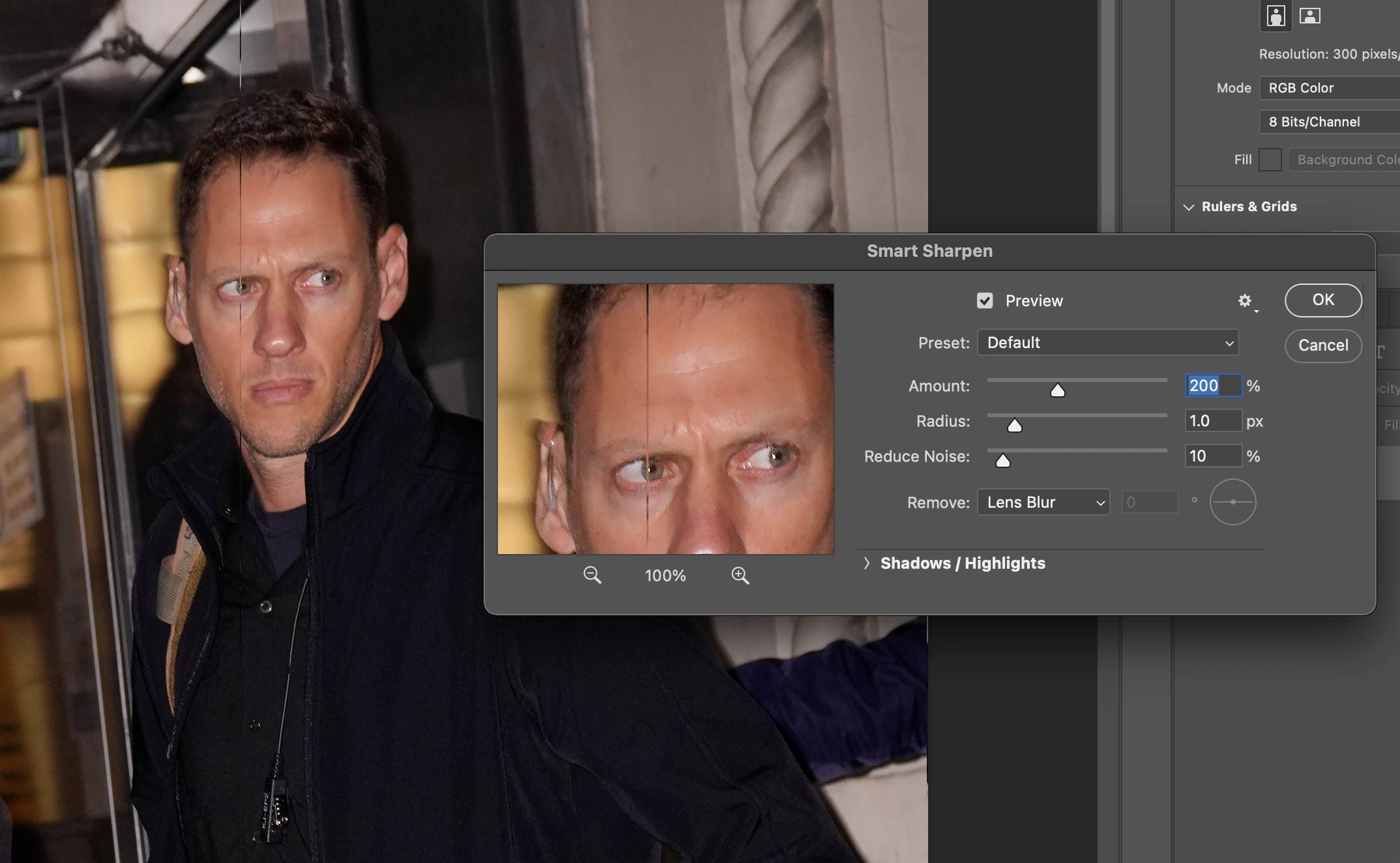
P: Weird Vertical Lines when using Smart Sharpen and "Use Graphic Processor" Turned on Monterey
  • November 3, 2021
  • 103 replies
  • 21644 views


Getting random weird vertical lines on Apple m1 pro with Photoshop 23.0 and 22.5.2


Goes away when "Use Graphic Processor" or "open CL" turned off, but operation becomes extremely slow.


Can anyone Please help?


103 replies

Participant
February 22, 2022

Nearly four months have passed (and several app updates), and this is still an issue. Any word on when this bug will be fixed? 

Participating Frequently
February 22, 2022

End of February and still no solution. Adobe needs to fix this as soon as possible. This drastically prolongs my workflow.

Inspiring
February 16, 2022

This doesn't fix it, the lines re-appear depending on the settings of the sliders.

ALG32420429
Participant
February 14, 2022

Little late to the party. But I managed to fix the issue by selection "Gaussian Blur" in the Remove dialog

Participant
February 9, 2022

Another (kind of) workaround: In the Smart Sharpen dialogue : Click on the gear icon at the top right and check: Use Legacy

Not ideal as it reverts to the old version of Smart Sharpen but at least does not produce the vertical lines.

Participant
February 3, 2022

Try in 32 bits and merge, next return to 16 bits

Participating Frequently
February 2, 2022

Maybe they think that ignoring it - or even making a statment- makes it go away. This issue will just escalate. Dosn't everybody... like EVERYBODY use Smart sharpen on every damn image? This is so disrespectful and they can't even bother to give us an answer. 

Participating Frequently
February 2, 2022

oh, that’s easy! only thing you have to do is just forget about it.
and also trying to ignore the fact you pay Adobe a lot of money for not finished applications full of bugs they sell!!!

this is really terrible! this is happening since october (last version of PS and MAC OS) and nobody from adobe (because it is their fault not Apple’s) gives a *hit... 

Earth Oliver
Legend
February 1, 2022

Why hasn't this been fixed yet? People have jobs to do and waiting months for an essential filter to be patched is way too long to wait. We depend on the software to operate without major issues and a bug like this can result in job loss. Imagine if you were running this filter in an action and the output wasn't properly QC'd and the images were published. In the real world, this could cost you your job.

Participating Frequently
January 20, 2022

New update to Photoshop. v23.1.1

- App still broken, no changes.