


jacksonl41895023
Participant
November 3, 2021

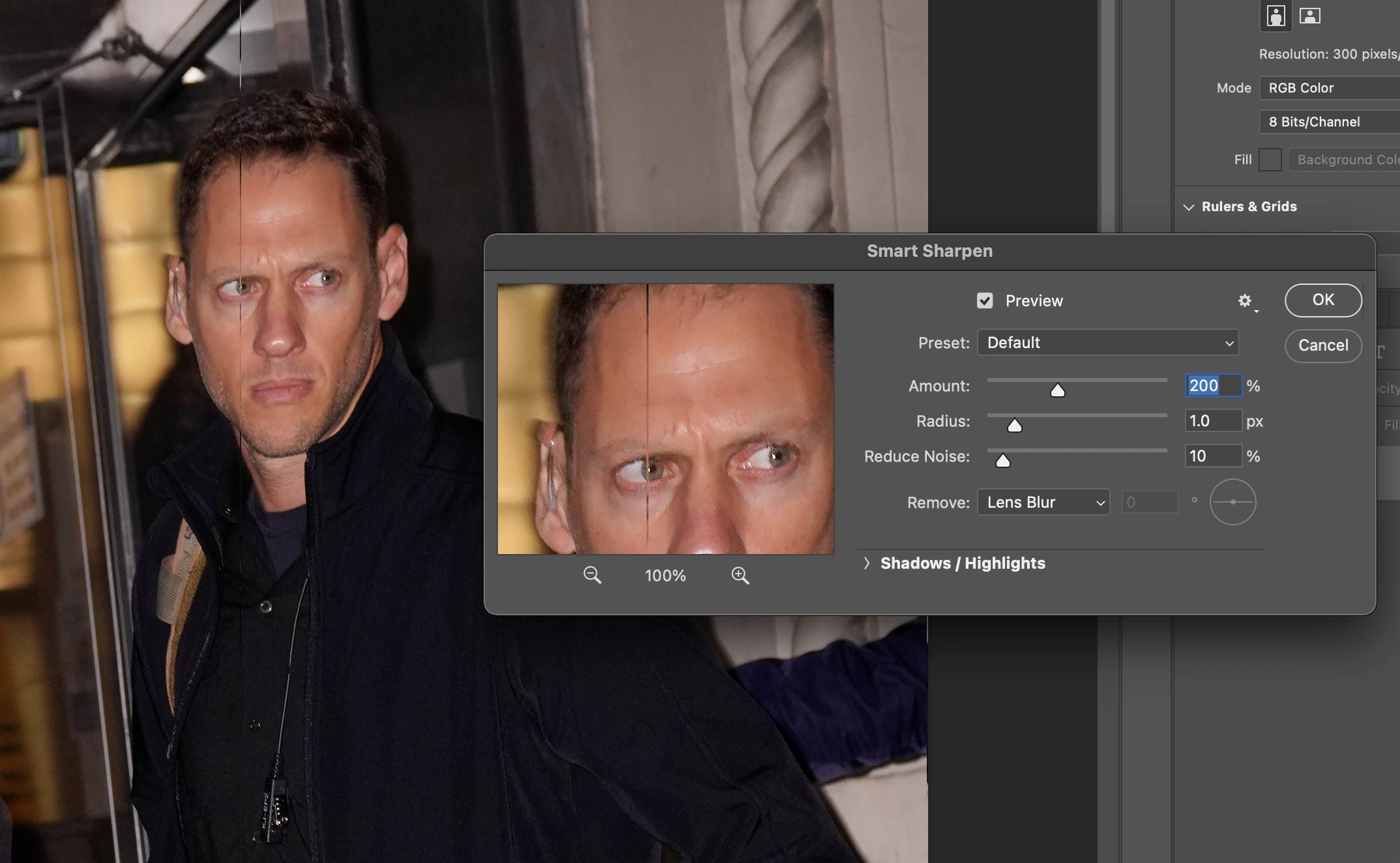
P: Weird Vertical Lines when using Smart Sharpen and "Use Graphic Processor" Turned on Monterey
  • November 3, 2021
  • 103 replies
  • 21644 views


Getting random weird vertical lines on Apple m1 pro with Photoshop 23.0 and 22.5.2


Goes away when "Use Graphic Processor" or "open CL" turned off, but operation becomes extremely slow.


Can anyone Please help?


103 replies

Participant
December 31, 2021

Same Issu 

Participating Frequently
December 16, 2021

This is a HUGE problem right now. The lines don't appear when "use legacy" isn't selected but legacy is needed for the work I'm doing. Not using the graphics processor is simply not an option. It's bad enough that editing in photoshop on a retina display is a struggle due to the improper scaling being an issue with clarity, but having to degrade the quality further for use of certain features is an absolute catastrophe that needs immediate resolve. Adobe, PLEASE fix this bug!

Participant
December 15, 2021

Is it my imagination or did this problem just disappear ?   I can't make the lines when Smart Sharpening....I could make them appear 20 minutes ago, but now they're gone ?

Participant
December 15, 2021

Same issue here, even with the recent PS update. (M1 Max Mac).

However, I also have a bit of a work-around. 

In the Smart Sharpen settings,  set reduce noise to 0% percent. and the lines don't appear.

Not ideal, but at least Smart Sharpen is still usuable until there's a proper fix (and better than turning of the Open CL settings in my opinion.

Good luck!

Participating Frequently
December 14, 2021

And I just did the latest Monterey update (12.1) half an hour ago, and lines are still there.  

Participating Frequently
December 14, 2021

Not fixed yet.  Maddening.  Am trying other sharpening filters, but Smart Sharpen was the best for that last pass before printing.

Known Participant
December 14, 2021

Still getting lines with Monterey 12.1 update from yesterday. My solution is to use Legacy sharpening to keep the speedier processing under OpenCL.

borisbadinoff_345
Participating Frequently
December 13, 2021

Still not fixed, at least for me.

Sascha Fronczek
Inspiring
December 12, 2021

I do not recommend you upgrade to Montery until the bug is fixed by Apple and Adobe.

Participant
December 12, 2021

After dealing with vertical lines appearing on my edited photos using Photoshop 2022 on my new MacBook Pro running O/S Monterey, now my iMac is saying it will update to Monterey tonight.  Is anyone aware whether Adobe has fixed the problems with Photoshop on Monterey?  I certainly don't want my iMac to have the same issues of adding thin vertical lines whenever I use the Sharpen tool.  Just contacted Apple and they don't seem to know anything about this issue.  I sure wish Adobe would give all of us a detailed update to at least let us know they are working on the issue, or better yet, advise us that it has been fixed.