


jacksonl41895023
Participant
November 3, 2021

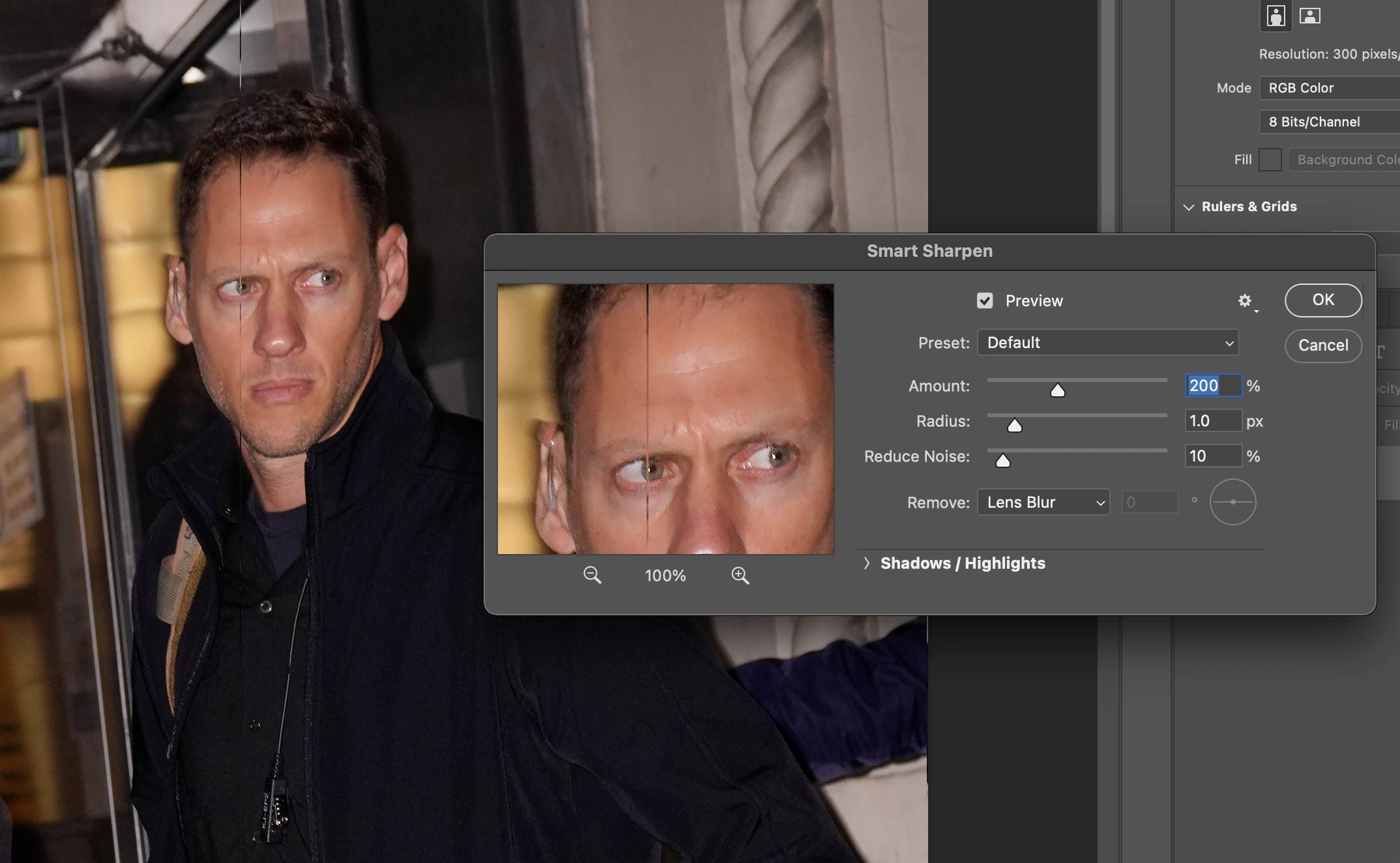
P: Weird Vertical Lines when using Smart Sharpen and "Use Graphic Processor" Turned on Monterey
  • November 3, 2021
  • 103 replies
  • 21644 views


Getting random weird vertical lines on Apple m1 pro with Photoshop 23.0 and 22.5.2


Goes away when "Use Graphic Processor" or "open CL" turned off, but operation becomes extremely slow.


Can anyone Please help?


103 replies

Participating Frequently
December 9, 2021

Same issue, running Monterey, Apple M1 Max.

Participating Frequently
December 8, 2021

We're running 800X,  5000x5000 a day. Good luck doing that with that solution. It's crazy slow. 

Known Participant
December 8, 2021

Another workaround is to click on the gear next to 'preview' and select 'Use Legacy' It's not the same sharpenening, it seems, but it does run fine with the GPU. 

Participating Frequently
December 8, 2021

When is this going to get fixed? We're having huge problems at a big scale. Could you please consider being more talkative?

Participant
December 8, 2021

Same issue here - tons of what look like gridlines in the image (you can see them best where the sky meets the horizon): 


Participating Frequently
December 7, 2021

Its an Adobe problem non the less 

Participant
December 7, 2021

Having "Use Open CL" checked takes less than one second to Smart Sharpen a 50mp image, but having it unchecked takes almost 37 seconds to sharpen, about 40 times longer....   I hope they can fix this soon !

Participating Frequently
December 6, 2021

Tried unchecking Use Open CL and restarting Photoshop, but then smart sharpen didn't work at all. This has been very frustrating to say the least.  Seems like you should have been able to fix this by now. I have MacBook Pro M1 chip and Monterey 12.0.1

Sascha Fronczek
Inspiring
December 2, 2021

Same Issue. MacBook Pro 16" M1 Max

PS 23.0.2

Cheeky Bull
Participant
December 1, 2021

It is an OS Monterey problem, not M1 problem