


jacksonl41895023
Participant
November 3, 2021

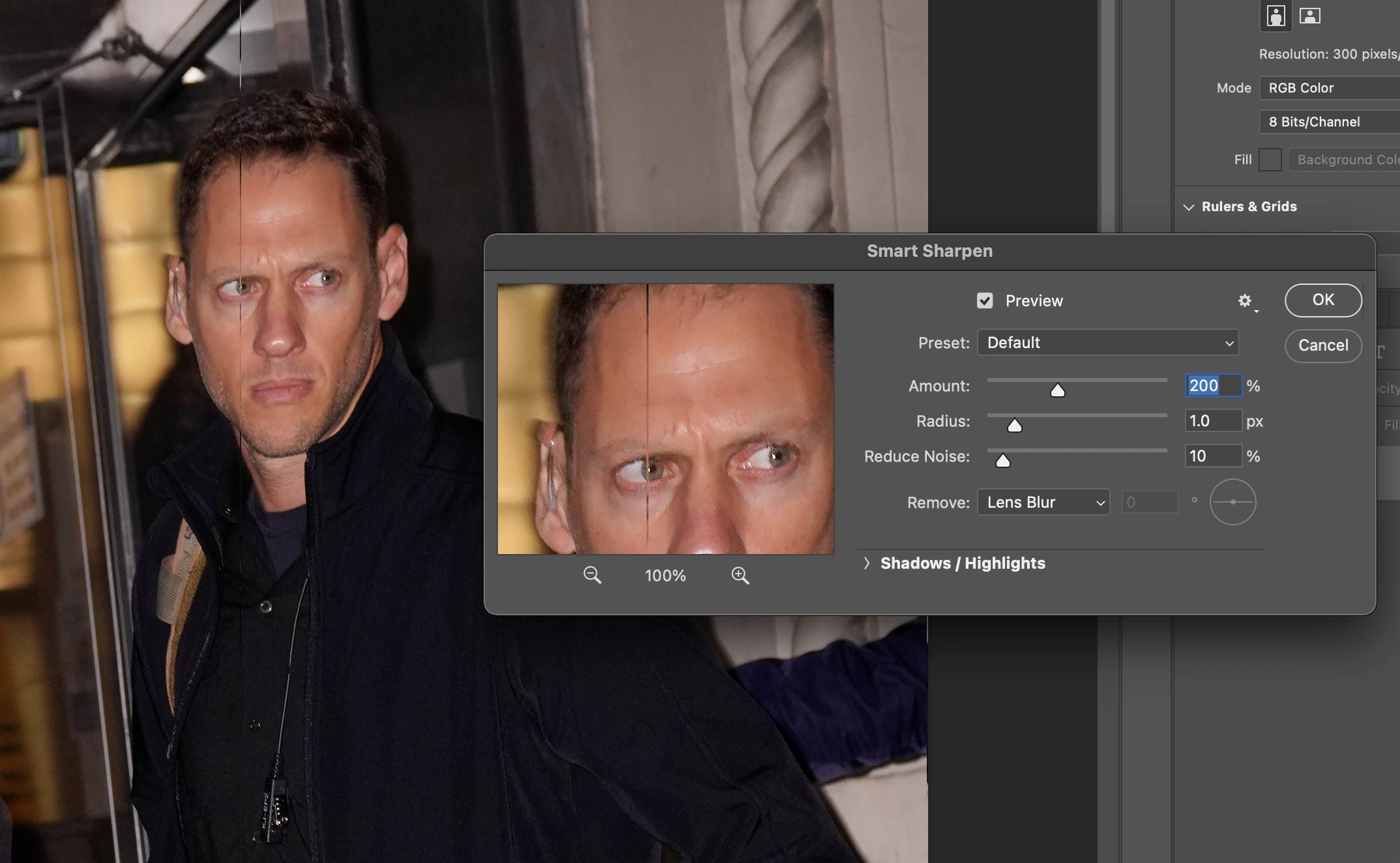
P: Weird Vertical Lines when using Smart Sharpen and "Use Graphic Processor" Turned on Monterey
  • November 3, 2021
  • 103 replies
  • 21645 views


Getting random weird vertical lines on Apple m1 pro with Photoshop 23.0 and 22.5.2


Goes away when "Use Graphic Processor" or "open CL" turned off, but operation becomes extremely slow.


Can anyone Please help?


103 replies

Cheeky Bull
Participant
December 1, 2021

Same here..........

Participating Frequently
November 29, 2021

Same. M1 macmini latest photoshop update and Monterey. Vertical lines still there. I wonder how many people this affects that misses to see the lines and delivers to clients...

Participating Frequently
November 29, 2021

I just ran smart sharpen on M1 macbook pro/Monterey and lines appeared.  When might this be fixed? I am on a tight deadline and this is maddening.

borisbadinoff_345
Participating Frequently
November 25, 2021

A quick update. I just ran Smart Sharpen on another photo and ended up with the vertical line again. I switched to Unsharp Mask. 

borisbadinoff_345
Participating Frequently
November 23, 2021

FWIW I just ran Smart Sharpen on an image in Monterey on an M1 MacBook Pro and no vertical line. But if this is still happening I am sure Adobe will fix it.

Participating Frequently
November 23, 2021

Yeah. Its so sad. Adobe is such a mess ever since Adobe cloud. Every new release introduces new bugs. I can't even tell how many hours my company lost in money. Some of the employees get graphical bugs when zooming in and out. This is just not a professional option anymore. Every release breaks something and now not even shapening works. So damn sad and we have to pay for it. When we used to pay 1k for the master collection at lest the software worked. 

Legend
November 15, 2021

Thanks for confirming. Photoshop is working on moving everything from OpenGL/OpenCL to native GPU (Metal and DX12). Smart Sharpen still uses OpenCL.

jacksonl41895023
Participant
November 15, 2021

As reported in my OG Post, turning this off fixes the lines, but performance is much much slower.. unacceptably slow

Participating Frequently
November 15, 2021

Yes it goes away but slows down processing.   Not a fix.

Legend
November 14, 2021

Can you please try this as a workaround: Go to Preferences > Performance... then choose "Advanced Settings" and uncheck "Use OpenCL" then restart Photoshop. Does the problem go away?