


jacksonl41895023
Participant
November 3, 2021

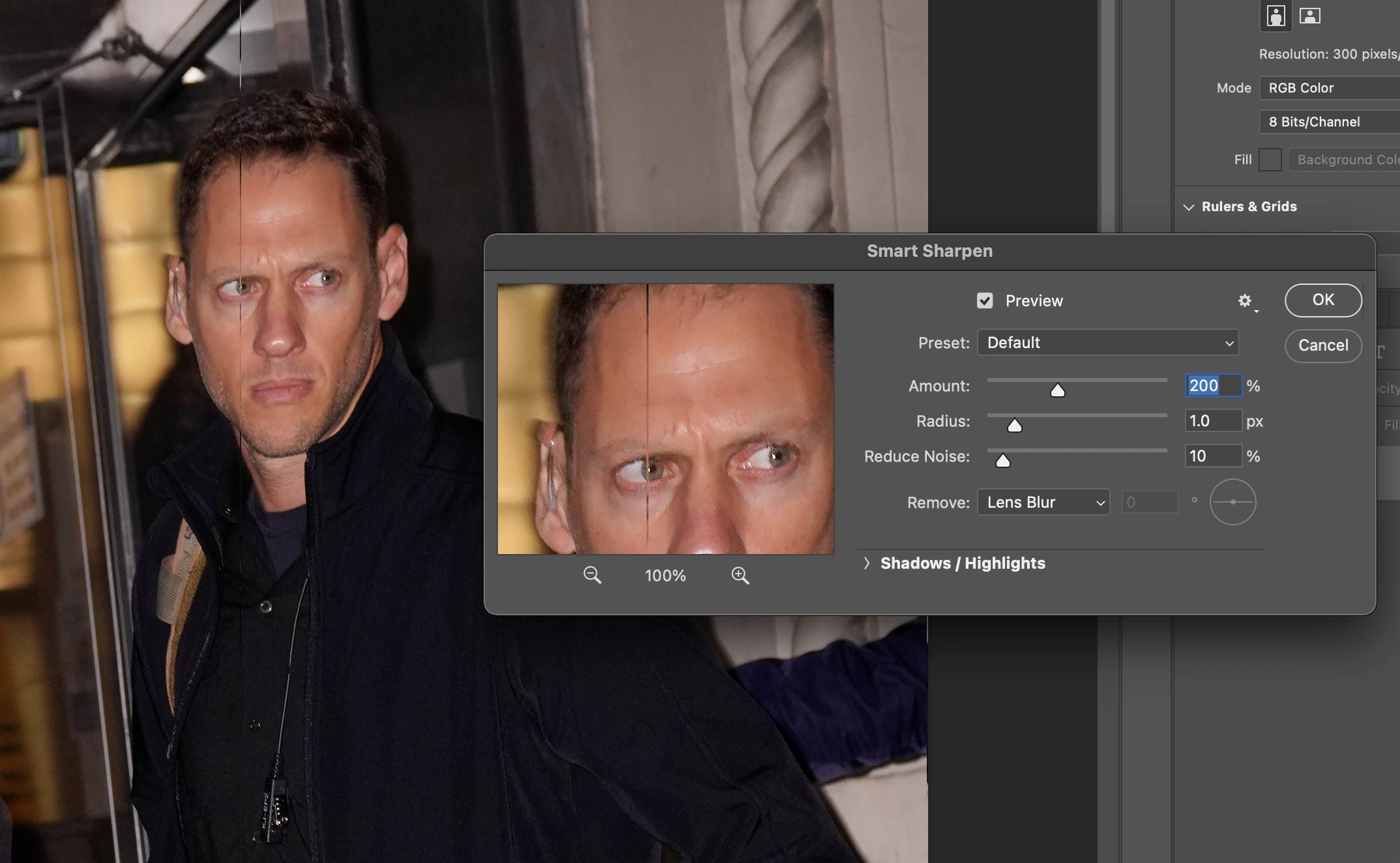
P: Weird Vertical Lines when using Smart Sharpen and "Use Graphic Processor" Turned on Monterey
  • November 3, 2021
  • 103 replies
  • 21645 views


Getting random weird vertical lines on Apple m1 pro with Photoshop 23.0 and 22.5.2


Goes away when "Use Graphic Processor" or "open CL" turned off, but operation becomes extremely slow.


Can anyone Please help?


103 replies

borisbadinoff_345
Participating Frequently
November 14, 2021

I have the same problem. I was puzzled until I found this.

Legend
November 11, 2021

We're investingating this issue. It's a Monterey specific GPU driver issue.


As a workaround, Go to Preferences > Performance... then choose "Advanced Settings" and uncheck "Use OpenCL" then restart Photoshop.

Timvanleeuwen
Participant
November 11, 2021

When I use smart sharpen on images imported from Canon DPP I am seeing two verticle lines appear on the part of the image that I am sharpening.

When I undo the smart sharpen the lines disappear.

Any ideas???

Tim 

lambiloon
Community Expert
Community Expert
November 11, 2021

Hi try to reset your photoshop preferences and check it or try on other picture it is working on my side...regards

Ali Sajjad / Graphic Design Trainer / Freelancer / Adobe Certified Professional
Participant
November 8, 2021

same here.  m1 13".   vertical lines on DNG and jpg

jacksonl41895023
Participant
November 8, 2021

My client had to tell me about it!!

jacksonl41895023
Participant
November 8, 2021

Exactly what happens to me

Participant
November 8, 2021

I am having the same issue with random vertical lines appearing after using Sharpen tool.  Mac O/S Monterey 12.0.1 with Photoshop 2022 ver. 23.0.0.  Very frustrating as lines are very subtle so I didn't notice them until I finished editing many photos.  Please help!

Participating Frequently
November 7, 2021

It's as if adobe is not paying any attention to the M1 chip.  Considering how many users have M1 chips you'd think adobe would test the software properly before releasing.    

Participating Frequently
November 7, 2021

Same issue. This is a catastrophic bug for me right now, breaking our production workflow. Photoshop for M1 has other issues as well, weird graphical problems, thumbnails in layer panel not updating. The app is simply not ready for M1 

hue way photo
Participant
November 7, 2021

Same problem here, but if you view your image in "Fit on Screen" you see 2 or 3 vertical lines; if you view it in 100%, you see many more lines, I counted as many as 9 in one of my images. All lines aprear to be 1 pixel in width in 100% view. Plus the whole image shifts one pixel from right to left in my case. Click on and off the Preview button, you can see this problem like an animation. Any setting changes on the Smart Sharpen window won't change the width and locations of the lines.


No problem if you "Smart Sharpen" on Lab color channel.


MacBook Pro M1 Pro MacOS Monterey 12.0.1

Photoshop 23.0.0