


Inspiring
January 24, 2018

P: Wia Support Failing Version 19.1

  • January 24, 2018
  • 18 replies
  • 212 views

I have just upgraded to Photoshop CC2018 19.1. This is on Windows 10 Enterprise.

On trying to import from a scanner I get the error after the scanner has run.
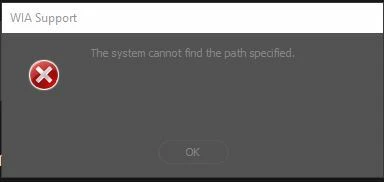
 

- I have tried uninstalling including all settings and then re-installation
- Using two different scanners, a Canon and an Epson

To get scanning to work again I have downgraded to version 19.0.1

Iain

This topic has been closed for replies.

18 replies

Participant
February 15, 2018
Hurray! It finally works again! There's nothing like comparing you to Microsoft, to make you all fix things super quickly! 
Thanks so much!
jimlos
Participant
February 14, 2018
Yes, works fine after updating! Thanks!
Inspiring
February 13, 2018
To confirm I have update and it seems to be working fine
Hannah Nicollet
Community Manager
Community Manager
February 13, 2018
Hi Everyone,

This should be resolved in the update to Photoshop that is now available. Please open your Creative Cloud, update Photoshop and let us know how it goes.

Thank you!
Hannah
Participant
February 9, 2018
I just got this error for the 1st time today! Come on Adobe, don't be just like Microsoft and put out crappy software!
Inspiring
February 3, 2018
And here - get it fixed Adobe! Serious questions being asked of your QA process.
Inspiring
February 1, 2018
Not enough regression testing. 😉
Inspiring
January 31, 2018
I have the same problem.
I am IT personal of the University of Haifa, Israel.
Do you have an estimate time for a solution?
will you please let me know if solution found:
ghorpi@univ.haifa.ac.il

Thank you
Inspiring
January 31, 2018
same error here; path not found. we are from University of Haifa
Inspiring
January 29, 2018
same error here; path not found